Packet Sniffing & Spoofing with Scapy (Lab Demonstration)
Packet Sniffing & Spoofing with Scapy
A Hands-On Networking Lab (Controlled Environment)
In this lab, I explored how network packets can be captured, inspected, and crafted using Scapy in a controlled SEED lab environment.
The goal of this exercise was to better understand:
- How packets travel across a network
- How protocol headers are structured
- How packet sniffing works at a low level
- How spoofed packets are constructed
- Why network monitoring tools like Wireshark are critical in security
⚠️ All experiments were performed in an isolated virtual lab environment for educational purposes only.
1️⃣ Packet Sniffing
Packet sniffing allows us to capture and analyze network traffic in real time.
Example 1: Capturing ICMP & UDP Traffic
1
2
3
4
5
6
7
8
9
10
11
12
#!/usr/bin/python3
from scapy.all import *

print("Listening to incoming traffic...")

pkt = sniff(
    iface="br-ab0cd5c5c153",
    filter="icmp or udp",
    count=10
)

pkt.summary()
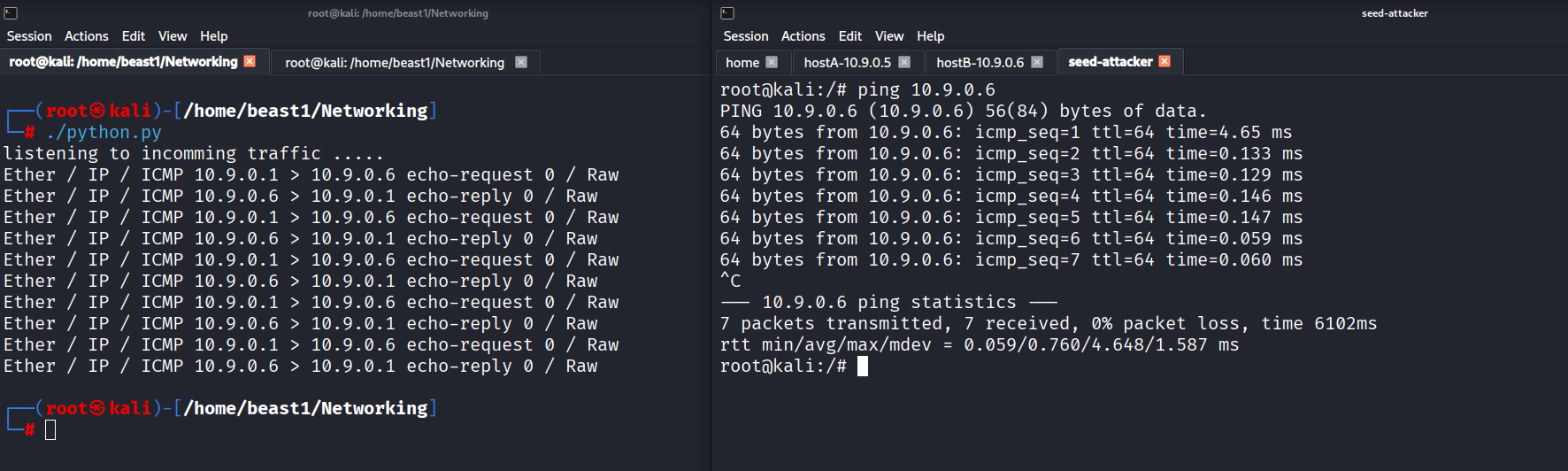
In this test:
- A ping was sent from another machine.
- The script captured both ICMP request and reply packets.
- The
summary()function displayed protocol-level information.
This demonstrates how easily traffic can be observed when monitoring an interface.
Example 2: Using a Callback Function
Instead of collecting packets in bulk, we can process them live.
1
2
3
4
5
6
7
8
9
10
11
12
13
14
#!/usr/bin/python3
from scapy.all import *

def process_packet(pkt):
    pkt.show()
    print("------------------------------------------------")

f = "udp and dst portrange 50-55 or icmp"

sniff(
    iface="br-ab0cd5c5c153",
    filter=f,
    prn=process_packet
)
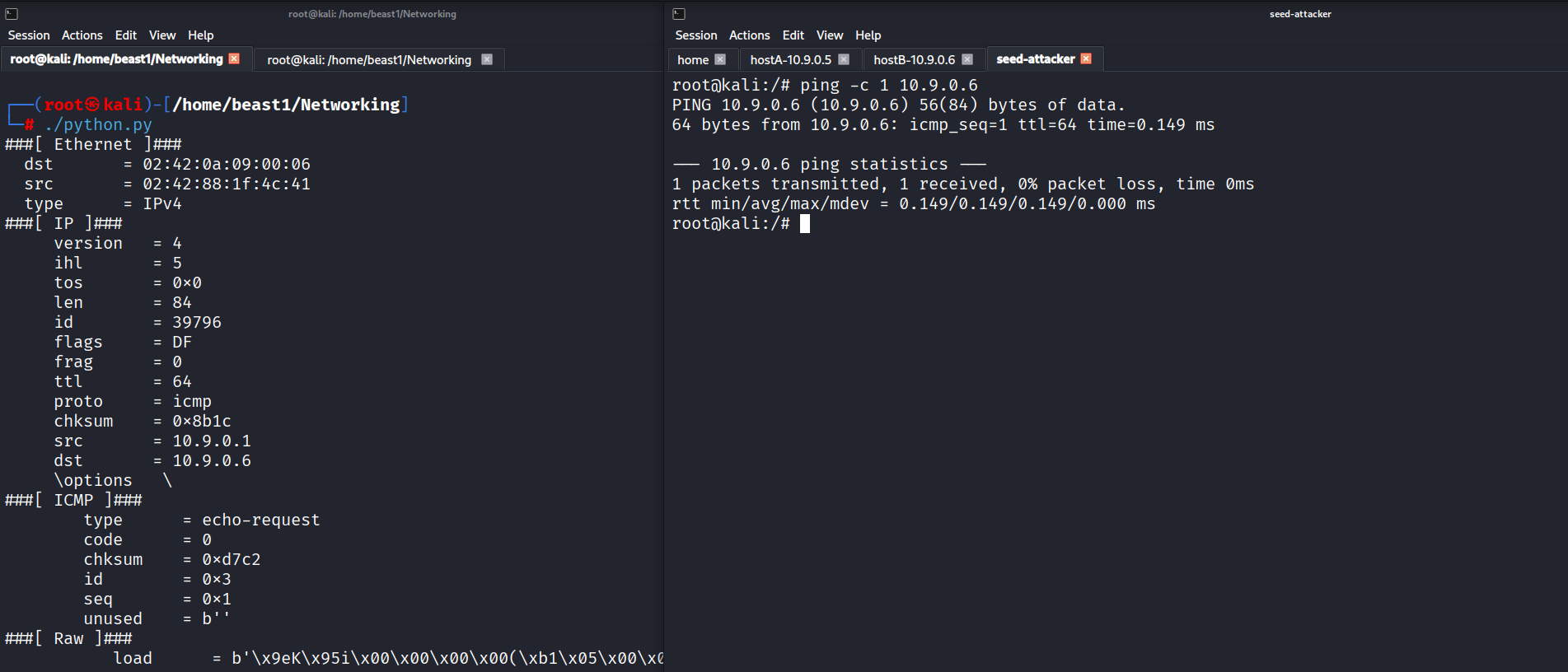
Key concept:
prn=process_packetexecutes a function for every captured packet.- This enables real-time inspection and analysis.
Example 3: Inspecting Packet Layers
Scapy allows us to access specific protocol layers and header fields.
1
2
3
4
5
6
7
8
9
10
11
12
13
14
15
16
17
18
19
20
21
22
23
#!/usr/bin/python3
from scapy.all import *

def process_packet(pkt):
    if pkt.haslayer(IP):
        ip = pkt[IP]
        print(f"IP: {ip.src} -> {ip.dst}")

    if pkt.haslayer(TCP):
        tcp = pkt[TCP]
        print(f"TCP ports: {tcp.sport} -> {tcp.dport}")

    elif pkt.haslayer(UDP):
        udp = pkt[UDP]
        print(f"UDP ports: {udp.sport} -> {udp.dport}")

    elif pkt.haslayer(ICMP):
        icmp = pkt[ICMP]
        print(f"ICMP type: {icmp.type}")

    print()

sniff(iface="br-ab0cd5c5c153", filter="ip", prn=process_packet, store=False)
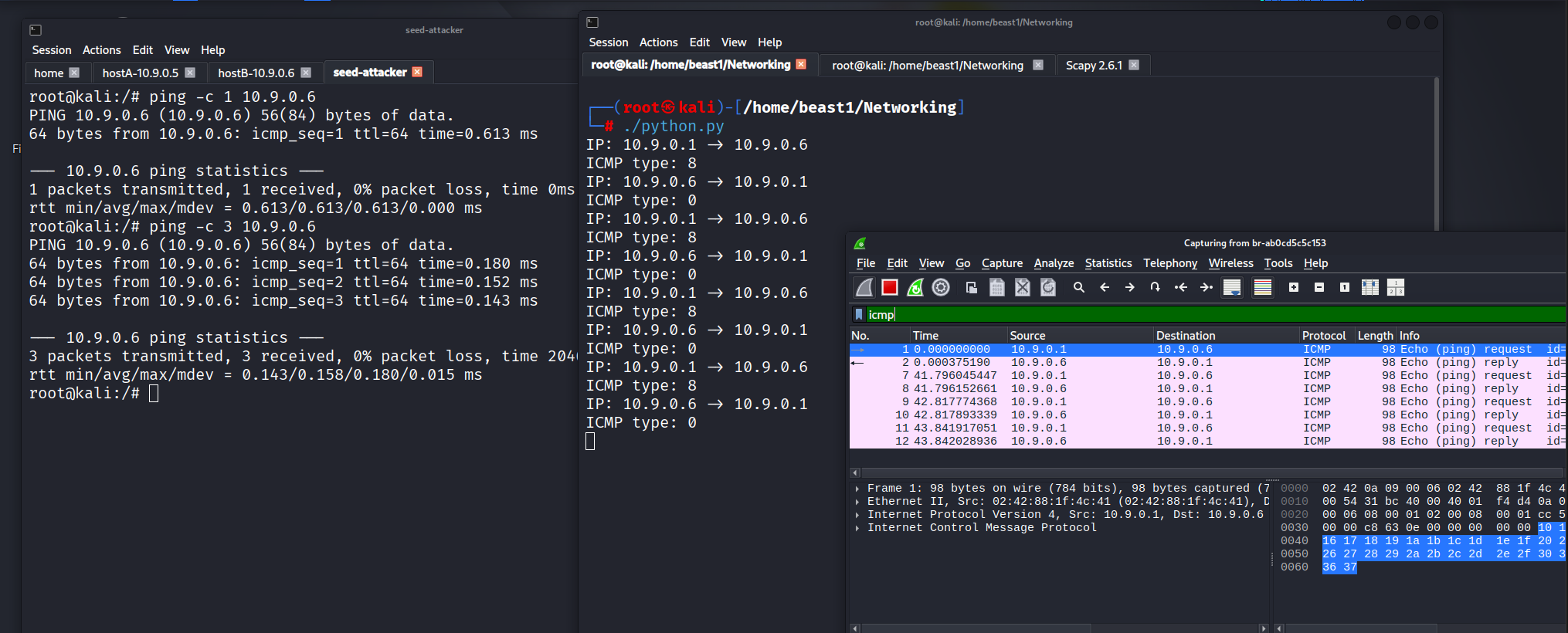
Here we extracted:
- Source and destination IP addresses
- Transport layer ports
- ICMP types
Wireshark confirmed the same packet details, validating the capture process.
Viewing IP Header Structure
Scapy allows inspection of protocol fields:
1
>>> ls(IP)
This displays attributes such as:
- TTL
- Header length (IHL)
- Protocol type
- Source and destination addresses
- Flags and fragmentation
Understanding these fields is essential when analyzing suspicious traffic.
2️⃣ Packet Spoofing
Packet spoofing involves manually constructing packets with modified header values.
This helps demonstrate:
- How IP headers can be forged
- Why network filtering and validation mechanisms are necessary
Constructing a Custom Packet
1
2
3
4
5
>>> a = IP(dst='10.9.0.6', src='1.2.3.4')
>>> b = UDP(sport=1234, dport=1020)
>>> c = "Hello World"
>>> pkt = a/b/c
>>> pkt.show()
Scapy uses operator overloading (/) to stack protocol layers:
1
pkt = IP()/UDP()/Raw()
This layered construction mirrors the OSI model structure.
3️⃣ ICMP Spoofing Demonstration
1
2
3
4
5
6
7
8
9
10
11
#!/usr/bin/python3
from scapy.all import *

print("Sending spoofed ICMP packet...")

ip = IP(src='1.2.3.4', dst='10.9.0.6')
icmp = ICMP()
pkt = ip/icmp

pkt.show()
send(pkt, verbose=0)
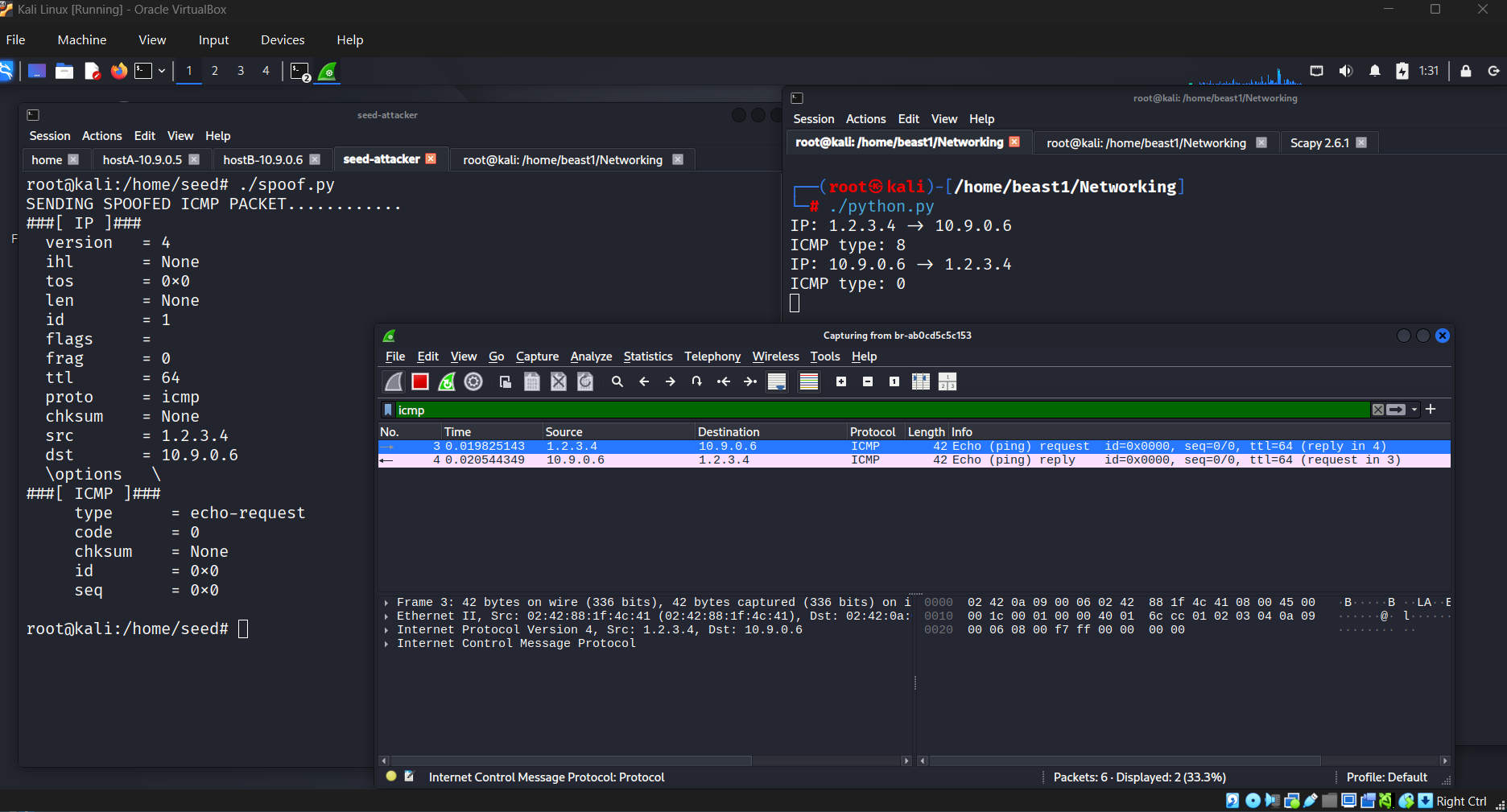
In this lab:
- The source IP was forged.
- The packet was transmitted successfully.
- Wireshark confirmed the spoofed packet.
This highlights why networks implement:
- Ingress/egress filtering
- Source validation
- Anti-spoofing controls
4️⃣ UDP Spoofing Demonstration
1
2
3
4
5
6
7
8
9
10
11
12
13
#!/usr/bin/python3
from scapy.all import *

print("Sending spoofed UDP packet...")

ip = IP(src='1.2.3.4', dst='10.9.0.6')
udp = UDP(sport=8888, dport=9090)
data = "Hello UDP!\n"

pkt = ip/udp/data
pkt.show()

send(pkt, verbose=0)
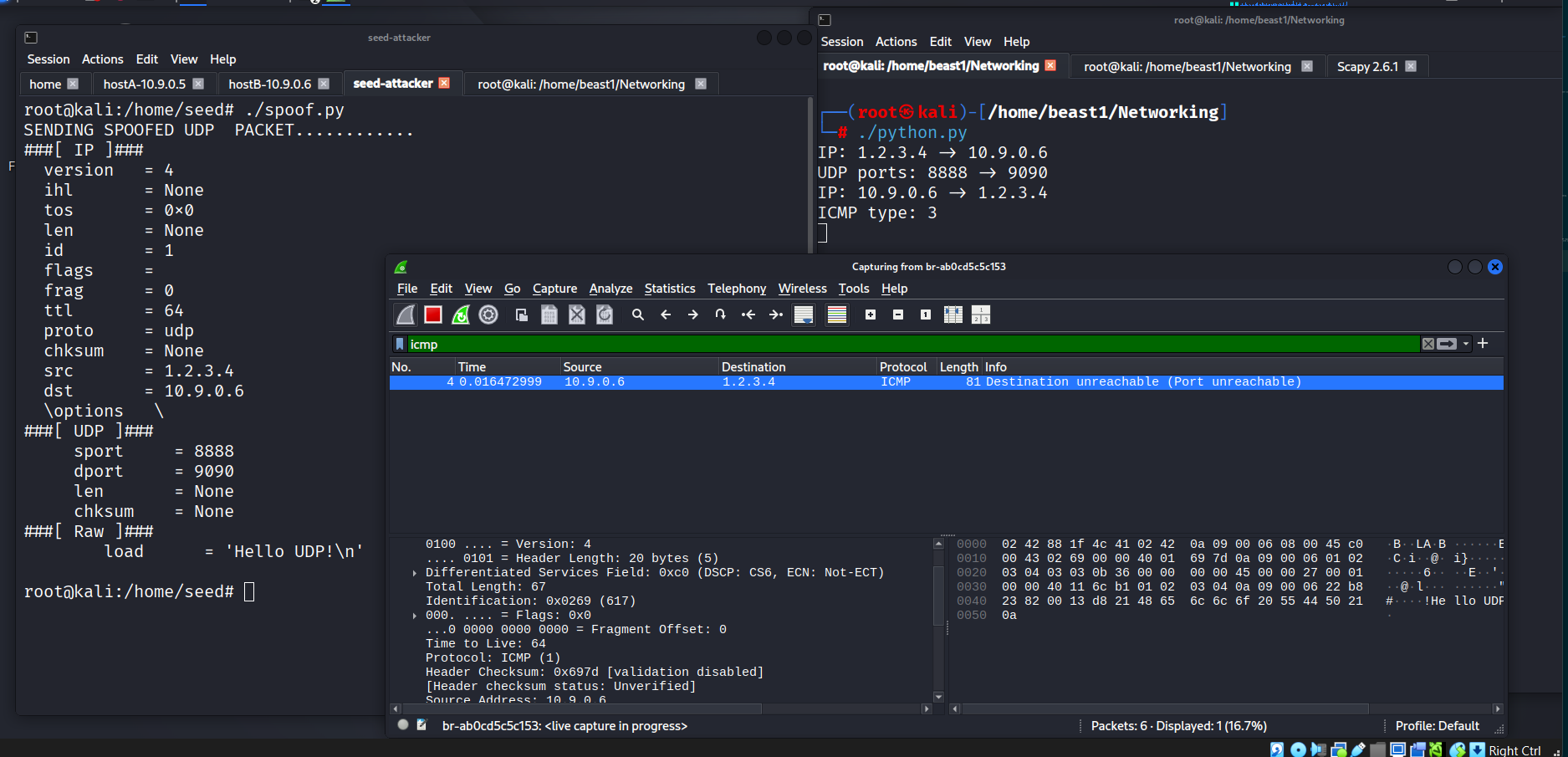
Although Wireshark showed “Destination Port Unreachable,” the spoofed packet was successfully crafted and transmitted.
5️⃣ Combining Sniffing & Spoofing
This script listens for ICMP Echo Requests and immediately sends a forged Echo Reply.
1
2
3
4
5
6
7
8
9
10
11
12
13
14
15
16
17
18
19
20
21
22
23
24
25
26
27
28
29
30
31
32
#!/usr/bin/python3
from scapy.all import *

def spoof_pkt(pkt):
    if ICMP in pkt and pkt[ICMP].type == 8:
        print("Original Packet")
        print("Source IP:", pkt[IP].src)
        print("Destination IP:", pkt[IP].dst)

        ip = IP(
            src=pkt[IP].dst,
            dst=pkt[IP].src,
            ihl=pkt[IP].ihl
        )
        ip.ttl = 99

        icmp = ICMP(
            type=0,
            id=pkt[ICMP].id,
            seq=pkt[ICMP].seq
        )

        if pkt.haslayer(Raw):
            data = pkt[Raw].load
            newpkt = ip/icmp/data
        else:
            newpkt = ip/icmp

        print("Spoofed Reply Sent")
        send(newpkt, verbose=0)

sniff(filter='icmp and src host 10.0.2.6', prn=spoof_pkt)
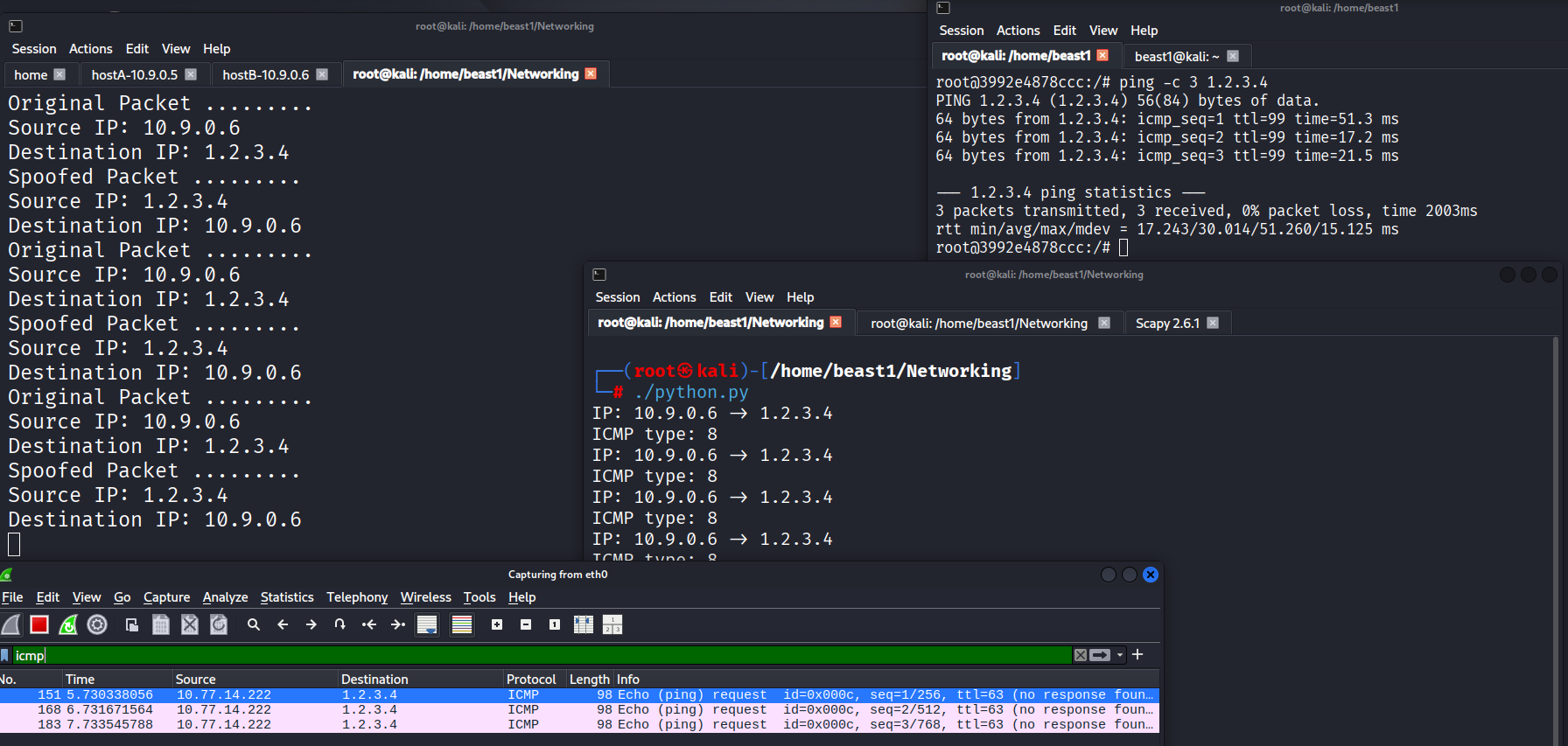
The result:
- A spoofed reply was generated automatically.
- The victim machine received a response from a forged IP address.
🔎 Key Takeaways
- Packet sniffing provides deep visibility into network traffic.
- Scapy allows full control over packet construction.
- IP spoofing demonstrates why network validation mechanisms are critical.
- Tools like Wireshark complement programmatic packet analysis.
- Understanding packet structure is foundational for SOC, penetration testing, and incident response roles.
📌 Skills Demonstrated
- Python scripting
- Scapy packet manipulation
- BPF filtering
- Network protocol analysis
- Wireshark validation
- Controlled lab experimentation
If you’re interested in networking security, packet-level analysis is one of the most powerful skills to build.
Feel free to connect or discuss networking security concepts.