MALWARE CHALLENGE I
The RAT.Unknown.exe
Instructions
Analyst
Excellent work with the last sample. Please take a look at the one in this directory. Our IR team said it might have command execution capabilities, but we’re not sure.
Please proceed directly with Basic Dynamic Analysis and determine:
- Network signatures
- Host-based signatures
- Command execution capabilities, if any
- Any other findings
RE Team
Overview
For this sample, I went straight into basic dynamic analysis to confirm what it actually does at runtime. From the beginning, the behavior looked more serious than a normal downloader. It reached out over HTTP, created a suspicious file in the Startup folder, opened a listening socket, and accepted remote commands from another system.
What stood out to me was how well the static clues matched the runtime behavior. The strings already hinted at HTTP communication, persistence, and command execution, and once I detonated it in a controlled lab, those suspicions were easy to confirm with Wireshark, Procmon, TCPView, and REMnux.
Basic static analysis
File hashes and signatures
1
2
3
C:\Users\sire\Desktop
λ md5sum.exe RAT.Unknown.exe.malz
689ff2c6f94e31abba1ddebf68be810e *RAT.Unknown.exe.malz
MD5: 689ff2c6f94e31abba1ddebf68be810e SHA256: 248D491F89A10EC3289EC4CA448B19384464329C442BAC395F680C4F3A345C8C
From VirusTotal, the sample was flagged by multiple vendors as malicious.
virus total results ↗
FLOSS
After running FLOSS, I found some interesting strings:
1
2
3
4
5
6
7
8
9
10
11
12
13
14
15
16
17
18
19
20
InternetOpenW
InternetOpenUrlW
@wininet
@wininet
MultiByteToWideChar
@kernel32
@kernel32
MessageBoxW
@user32
@user32
@[+] what command can I run for you
@[+] online
@NO SOUP FOR YOU
@\mscordll.exe
@Nim httpclient/1.0.6
@/msdcorelib.exe
@AppData\Roaming\Microsoft\Windows\Start Menu\Programs\Startup
@intrt explr
@http://serv1.ec2-102-95-13-2-ubuntu.local
Unknown error
Findings
- Windows API calls related to networking
- HTTP communication through WinINet
- Suspicious user-agent strings
- A possible executable download
- A Startup folder path that suggests persistence
- A string that clearly points to remote command execution
- Signs that the malware may have been written in Nim
PEStudio
Running the malware in PEStudio:
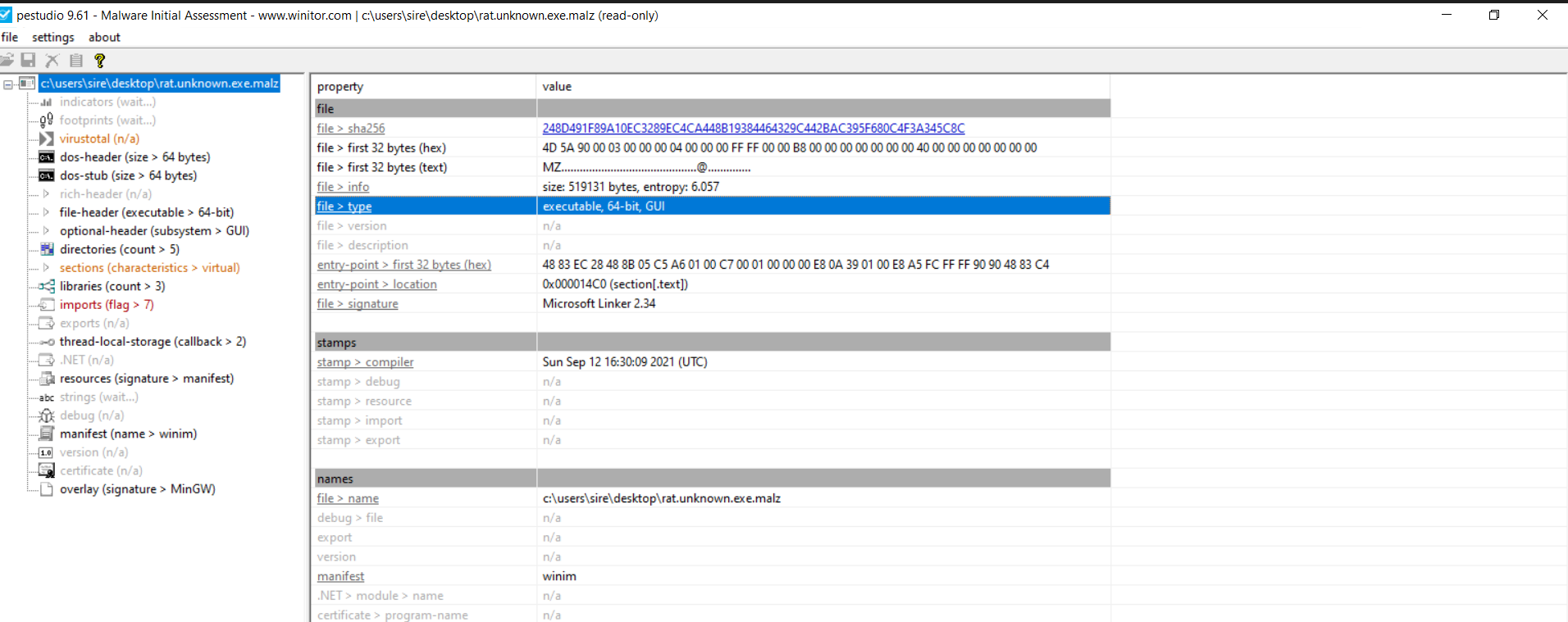
We can see the malware is a 64-bit portable executable.
Basic dynamic Analysis
Wireshark
When running the malware, the first thing I got was a dialog box with the message NO SOUP FOR YOU. This happened when the DNS setup was not working correctly.
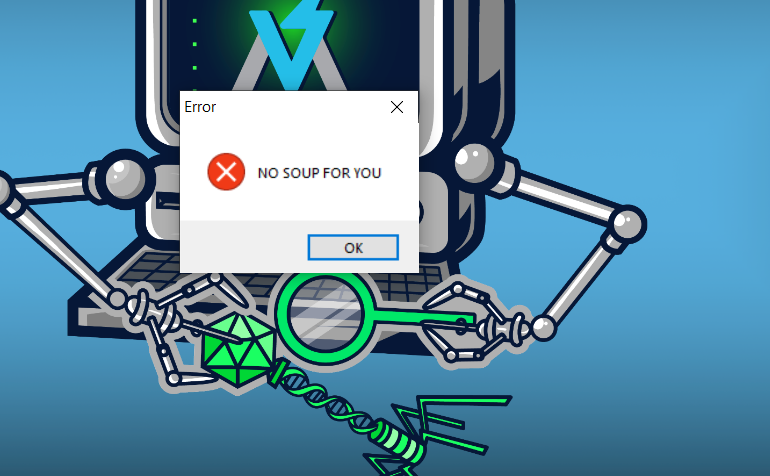
That message was actually useful during triage because it showed the malware expected something from the network side before continuing properly.
When I ran the malware again with INetSim running, I observed an HTTP request in Wireshark.
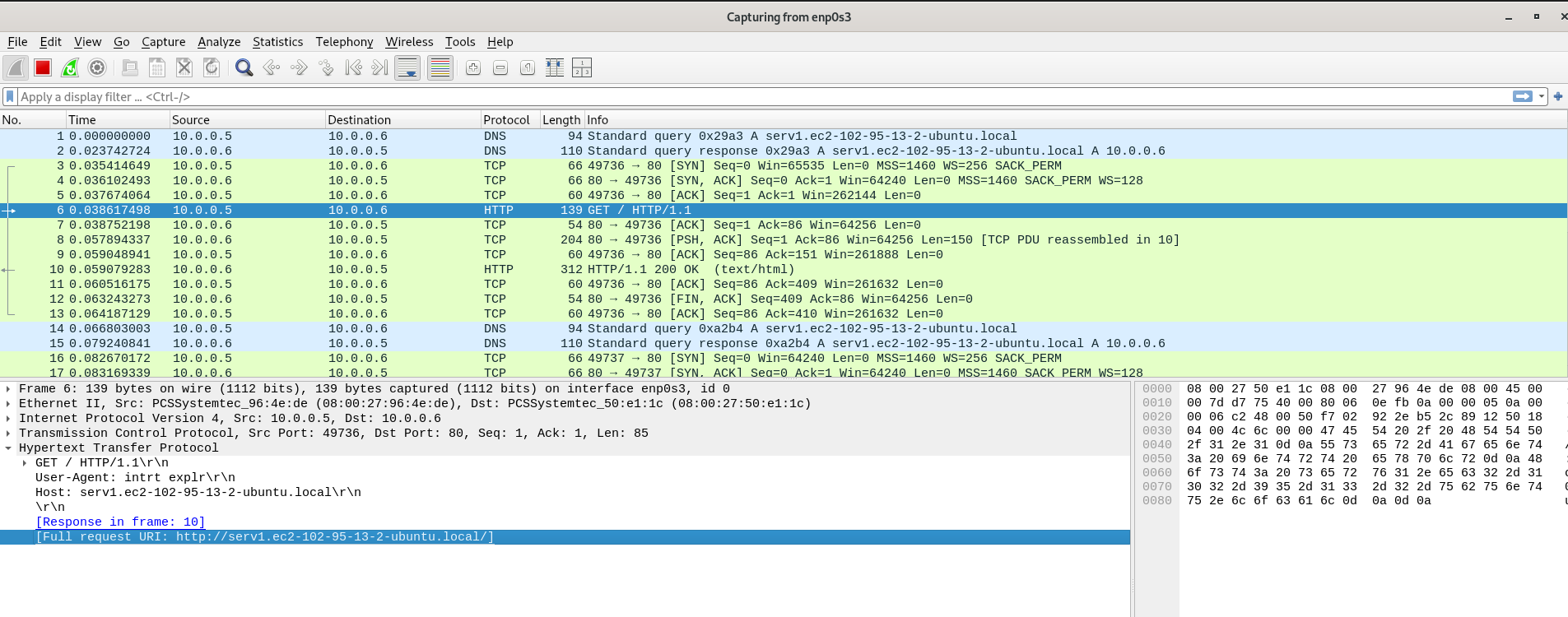
The packet above contains the same URL I saw during static analysis, which shows that the malware really does try to communicate outward. It also includes an unusual HTTP header and a suspicious user-agent that does not look normal.
I then found another packet that looked even more interesting and appeared to be tied to a second-stage payload.

When I followed the TCP stream for /msdcorelib.exe, I could see what looked like a successful file transfer over HTTP.
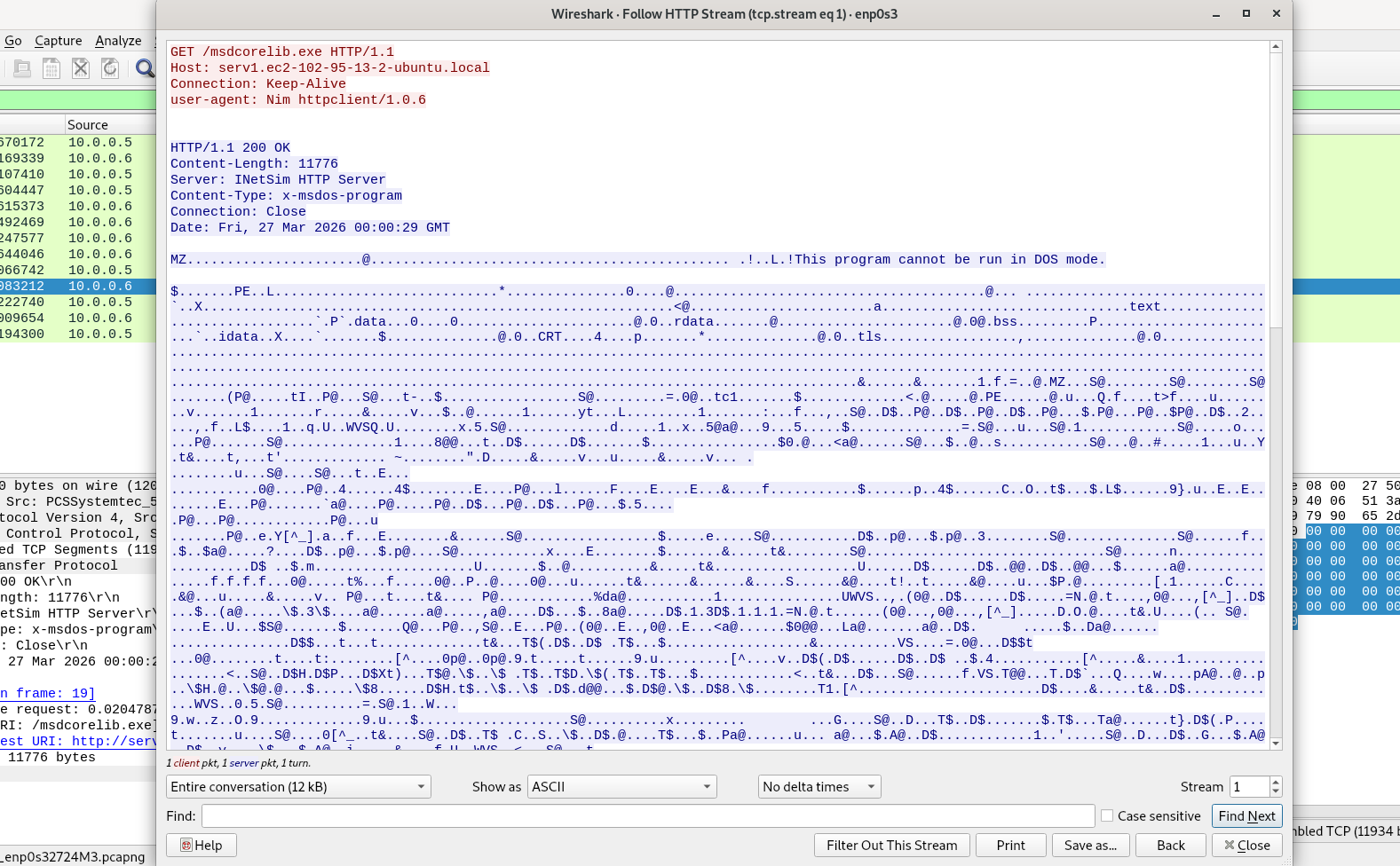
At this point, Wireshark already told me a lot. The malware made an outbound connection, reached the configured host successfully, and attempted to download another executable. That strongly suggests staged behavior.
Network signatures
From the packet captures, the main network indicators are:
serv1.ec2-102-95-13-2-ubuntu.localGET /GET /msdcorelib.exeUser-Agent: intrt explrUser-Agent: Nim httpclient/1.0.6- HTTP over port 80
Host based indicators
From the strings extracted during static analysis, one path immediately stood out:
1
@AppData\Roaming\Microsoft\Windows\Start Menu\Programs\Startup
That path was worth hunting because it usually points to persistence.
Procmon
After filtering Procmon for the malware process and file-related activity, I saw several operations such as create file, close file, and query security file. To narrow it down further, I filtered around the Startup path found during static analysis.
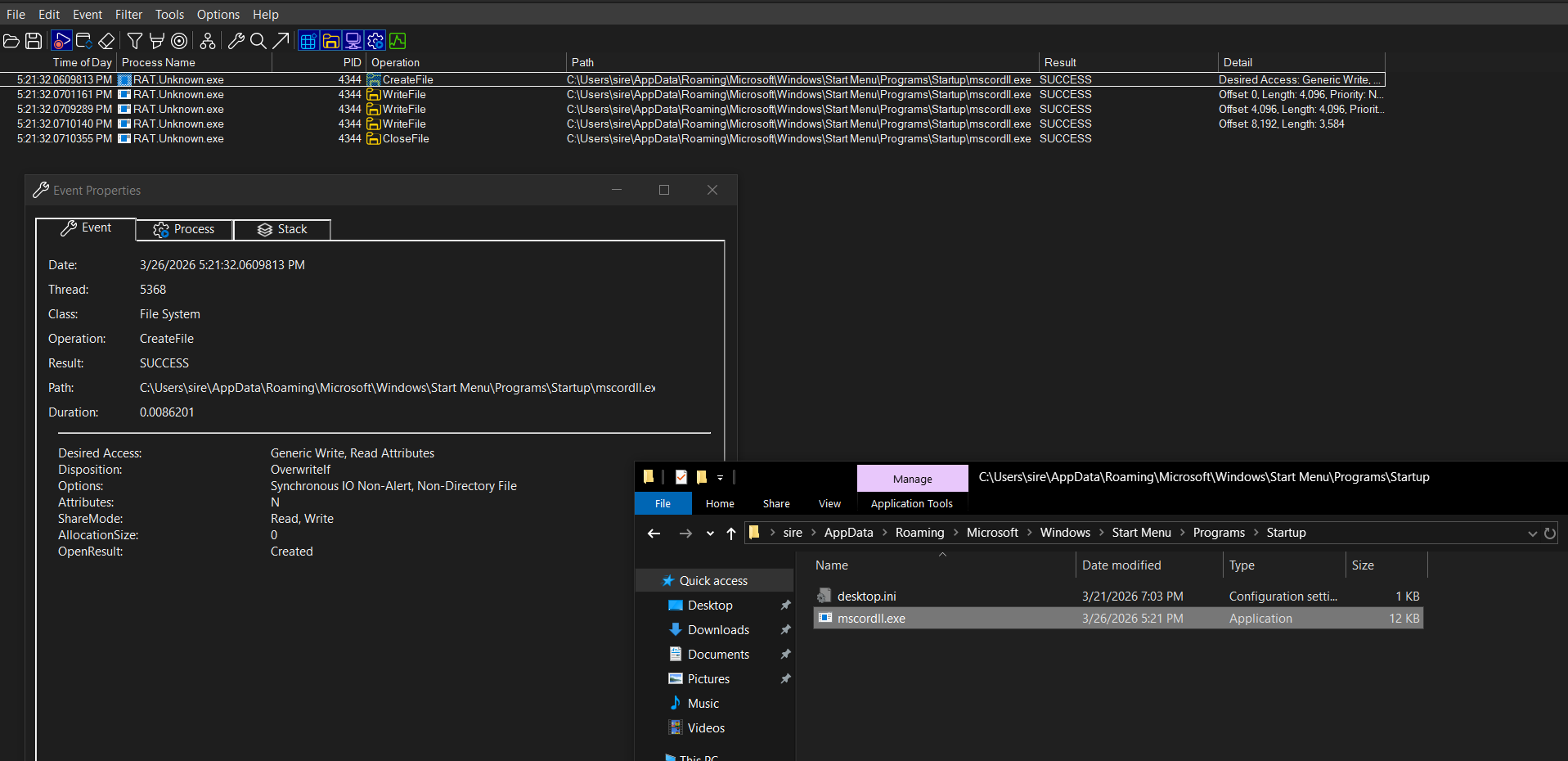
Here I found the exact action performed by the malware. It created the following file:
1
C:\Users\sire\AppData\Roaming\Microsoft\Windows\Start Menu\Programs\Startup\mscordll.exe
That is a very strong host-based indicator. The malware dynamically used the user profile path and wrote an executable into the Startup folder, which is a common persistence mechanism.
The name mscordll.exe also looks intentionally deceptive. It resembles a Microsoft-related file name, which could help it avoid attention if someone casually checks the folder.
Host-based signatures
C:\Users\sire\AppData\Roaming\Microsoft\Windows\Start Menu\Programs\Startup\mscordll.exe- File creation in the Startup folder
- Persistence through user logon execution
- Suspicious executable name meant to blend in
Host based indicators network based - Open sockets and TCP connections
TCPView
After running the malware, TCPView showed the process listening on 0.0.0.0, meaning all local interfaces, on local port 5555.
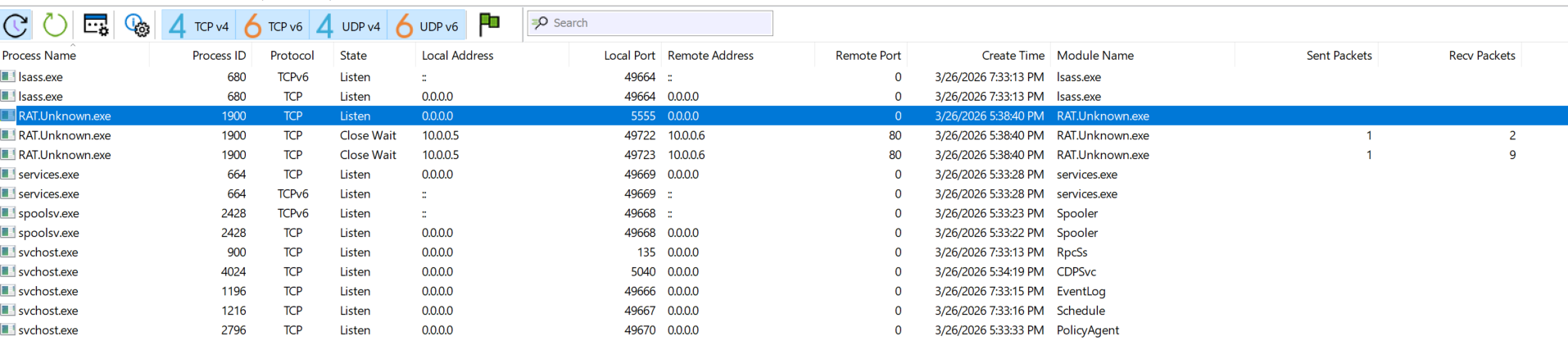
That was a very important finding because it showed the malware was not only making outbound traffic. It was also opening a listener on the victim system.
Using REMnux and nc, I connected to that port and received a Base64-encoded string:
1
WytdIHdoYXQgY29tbWFuZCBjYW4gSSBydW4gZm9yIHlvdQ==
After decoding it, the message was:
1
[+] what command can I run for you
That matched the string I had already found during static analysis, which confirmed the malware supported remote command interaction.

I then tested a command such as ipconfig, and the malware returned a Base64-encoded response. After decoding the output, I could see that the command had actually been executed on the infected host.
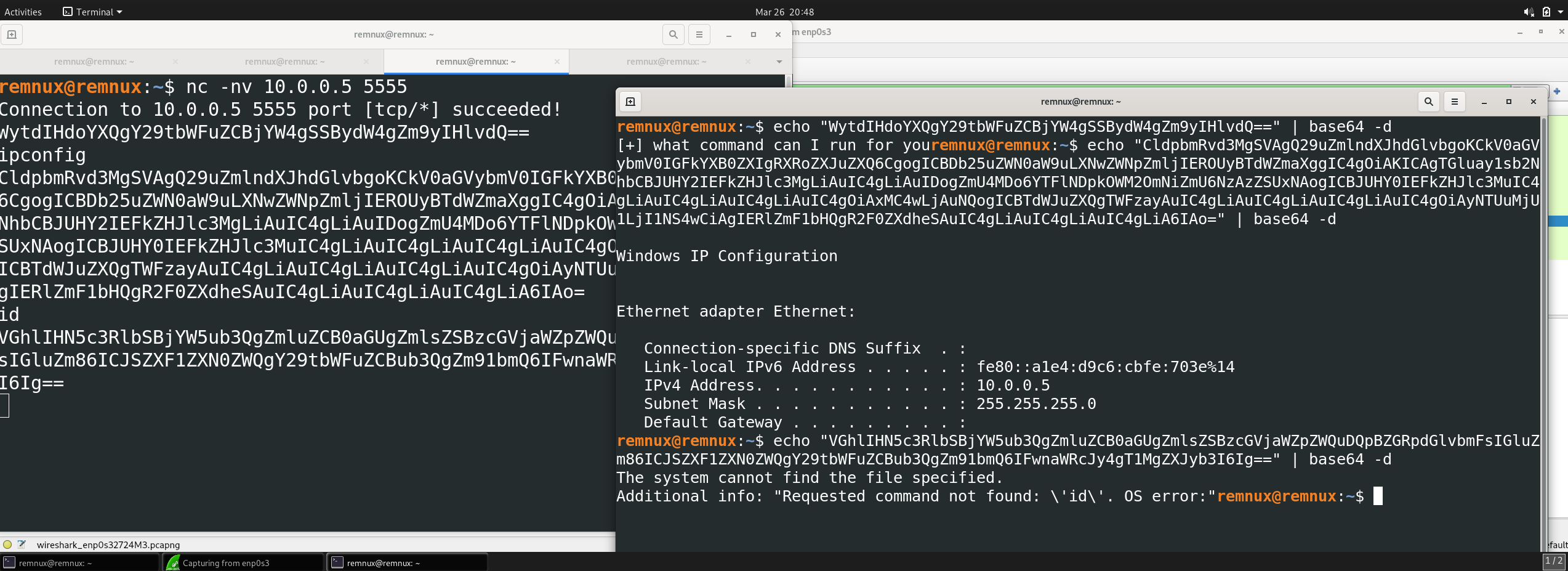
At this point, I could confidently say the malware had command execution capability. It behaves like a small RAT with a bind shell.
Procmon
From Procmon, I also filtered for successful TCP activity after sending remote commands.

When I killed the process, the TCP connection dropped. After running the malware again, the connection was established again.
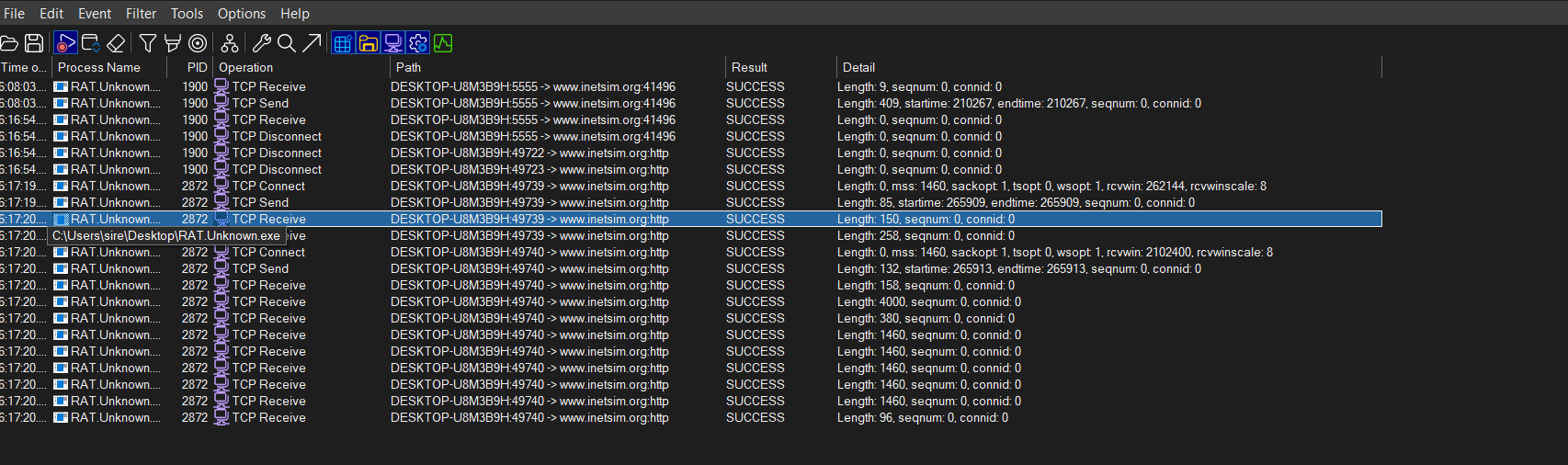
I also tested the whoami command remotely, and Procmon showed the malware looking for the whoami binary, executing it, reading the output, and returning the result to the connected client.
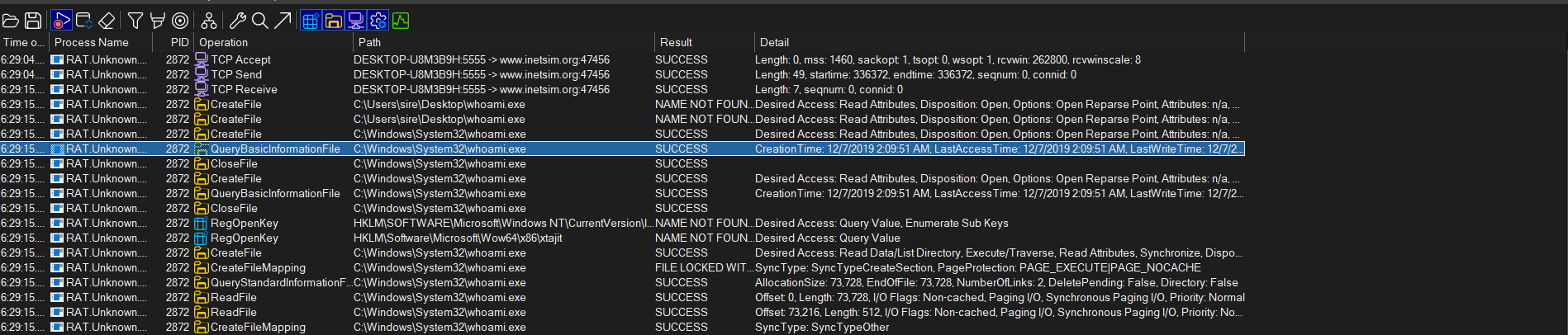
That was useful because it gave host-level confirmation of the remote command execution I already observed over the network.
Command execution capability
The malware clearly supports command execution.
What confirms it:
- It opens a listening socket on TCP
5555 - It sends a prompt asking what command to run
- It accepts remote input from a connected client
- It executes commands like
ipconfigandwhoami - It returns the results back to the remote side
This is consistent with bind shell behavior.
MITRE ATT&CK mapping
Below is the ATT&CK mapping that best matches what I observed during this analysis.
| Tactic | Technique | ID | Why it fits |
|---|---|---|---|
| Persistence | Registry Run Keys / Startup Folder | T1547.001 | The malware writes mscordll.exe into the Startup folder so it can run again at logon. |
| Command and Control | Application Layer Protocol: Web Protocols | T1071.001 | The sample uses HTTP communication to reach the remote host. |
| Command and Control | Ingress Tool Transfer | T1105 | It attempts to download msdcorelib.exe from the remote server. |
| Command and Control | Non-Application Layer Protocol | T1095 | The bind shell uses raw TCP over port 5555. |
| Execution | Command and Scripting Interpreter: Windows Command Shell | T1059.003 | Remote commands are executed on the victim host. |
| Discovery | System Owner/User Discovery | T1033 | The whoami command reveals the current user. |
| Discovery | System Network Configuration Discovery | T1016 | The ipconfig command reveals network details. |
Indicators of compromise
File and path IOCs
1
2
3
4
RAT.Unknown.exe.malz
mscordll.exe
msdcorelib.exe
C:\Users\sire\AppData\Roaming\Microsoft\Windows\Start Menu\Programs\Startup\mscordll.exe
Network IOCs
1
2
3
4
5
6
7
serv1.ec2-102-95-13-2-ubuntu.local
http://serv1.ec2-102-95-13-2-ubuntu.local/
http://serv1.ec2-102-95-13-2-ubuntu.local/msdcorelib.exe
TCP/5555
HTTP/80
User-Agent: intrt explr
User-Agent: Nim httpclient/1.0.6
Wrapping up
This sample looks like a remote access trojan with command execution capability.
It opened a listening socket on the infected host, accepted remote commands, and returned the output back to the operator. On top of that, it reached out over HTTP, attempted to download another executable, and created persistence through the Startup folder.
The strongest part of this analysis for me was seeing how the evidence lined up across different tools. Wireshark showed the outbound traffic, TCPView showed the listener, Procmon showed the file and process activity, and REMnux confirmed that the malware could actually execute commands remotely.
In short, this malware behaves like a RAT with bind shell functionality.