Basic Static Analysis
Basic Static Analysis
In this lab, I explored out a basic static malware analysis on a suspicious Windows executable without running it. The goal was to collect useful indicators early, understand what the sample might be capable of, and build a solid starting point for deeper analysis later.
At this stage, the focus is not to make final conclusions too fast. The point is to gather clues from hashes, strings, imports, PE structure, and rule-based tools like CAPA. From this first pass, the sample already shows signs of HTTP communication, file download behavior, process creation, and self-deletion.
Malware Repositories and VirusTotal
First step: getting the malware hashes
The first thing I did was generate the malware hashes, specifically the SHA256 and MD5 values. Hashes matter because they uniquely identify the file and make it easier to search for the same sample in malware repositories like VirusTotal.
1
2
3
4
5
6
7
8
9
10
C:\Users\sire\Desktop
λ sha256sum.exe Malware.Unknown.exe.malz
92730427321a1c4ccfc0d0580834daef98121efa9bb8963da332bfd6cf1fda8a *Malware.Unknown.exe.malz

C:\Users\sire\Desktop
λ md5sum.exe Malware.Unknown.exe.malz
1d8562c0adcaee734d63f7baaca02f7c *Malware.Unknown.exe.malz

C:\Users\sire\Desktop
λ
After checking the file hashes in VirusTotal, it was clear that many security vendors already flagged the sample as malicious.
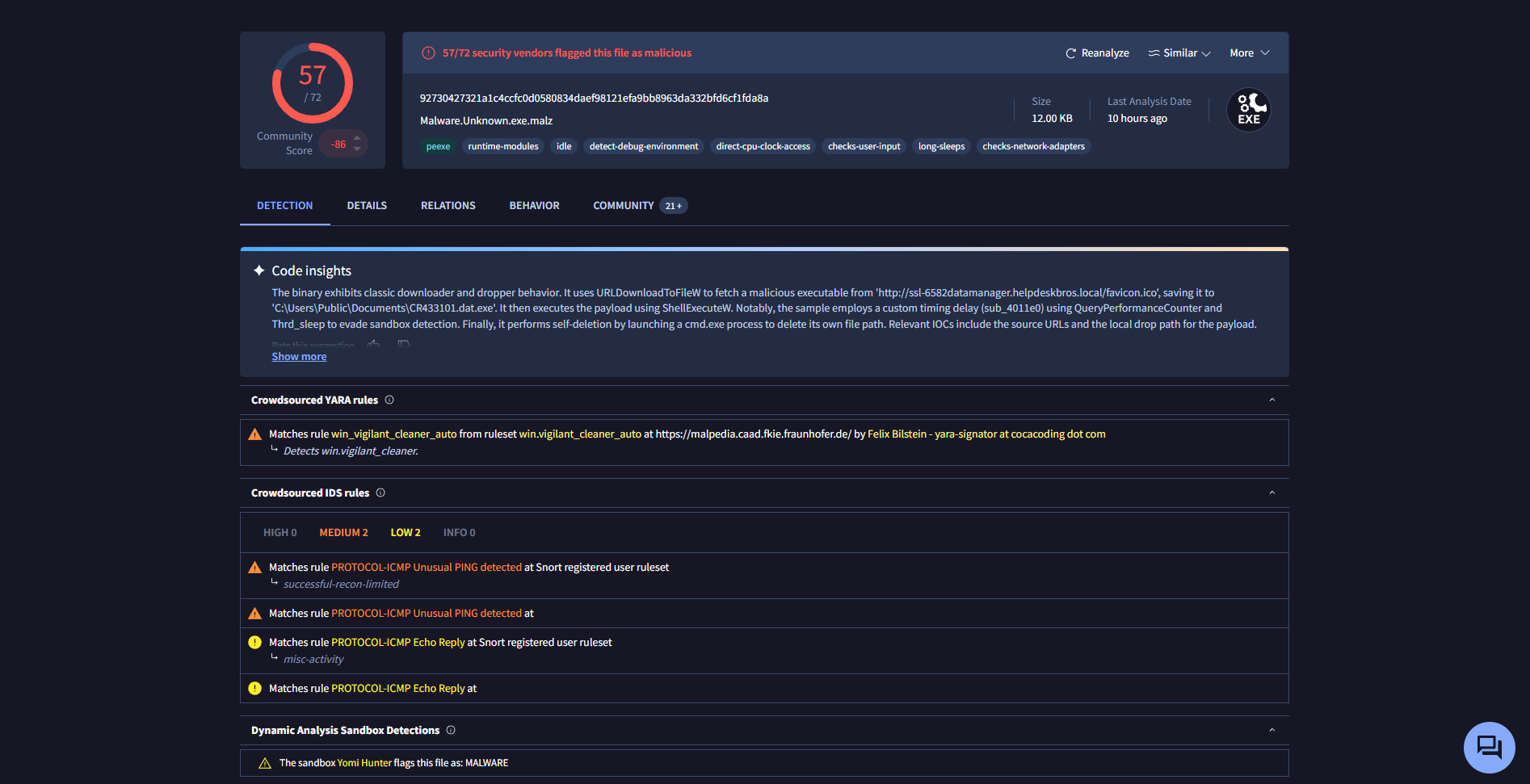
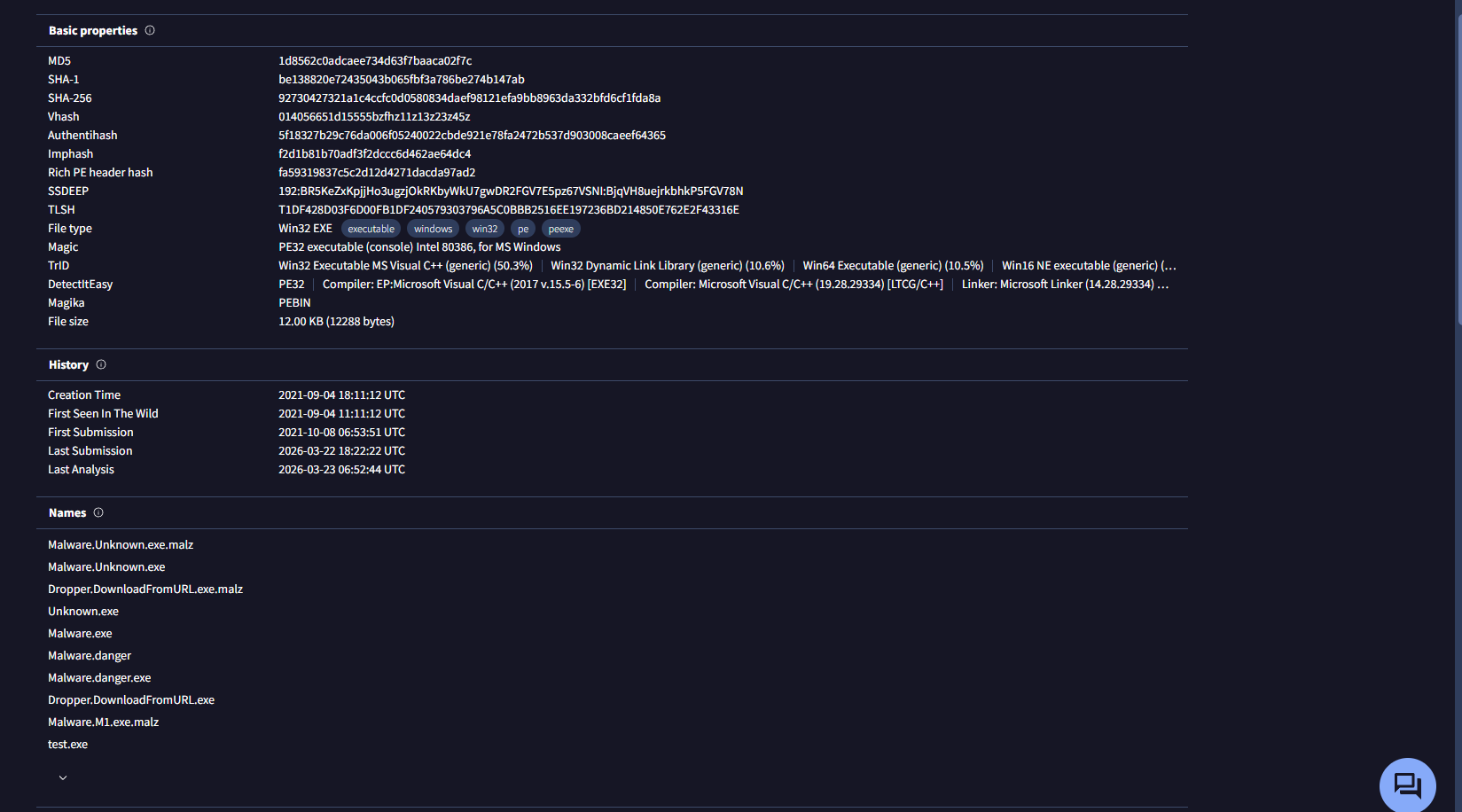
In this case, 57 out of 72 vendors detected the file as malicious. VirusTotal also showed other names and signatures associated with the sample, which is useful because one malware sample can be labeled differently depending on the vendor.
VirusTotal also mapped some of the observed behavior to the MITRE ATT&CK framework. One thing that stood out was behavior related to indicator removal, specifically file deletion through force-delete commands.
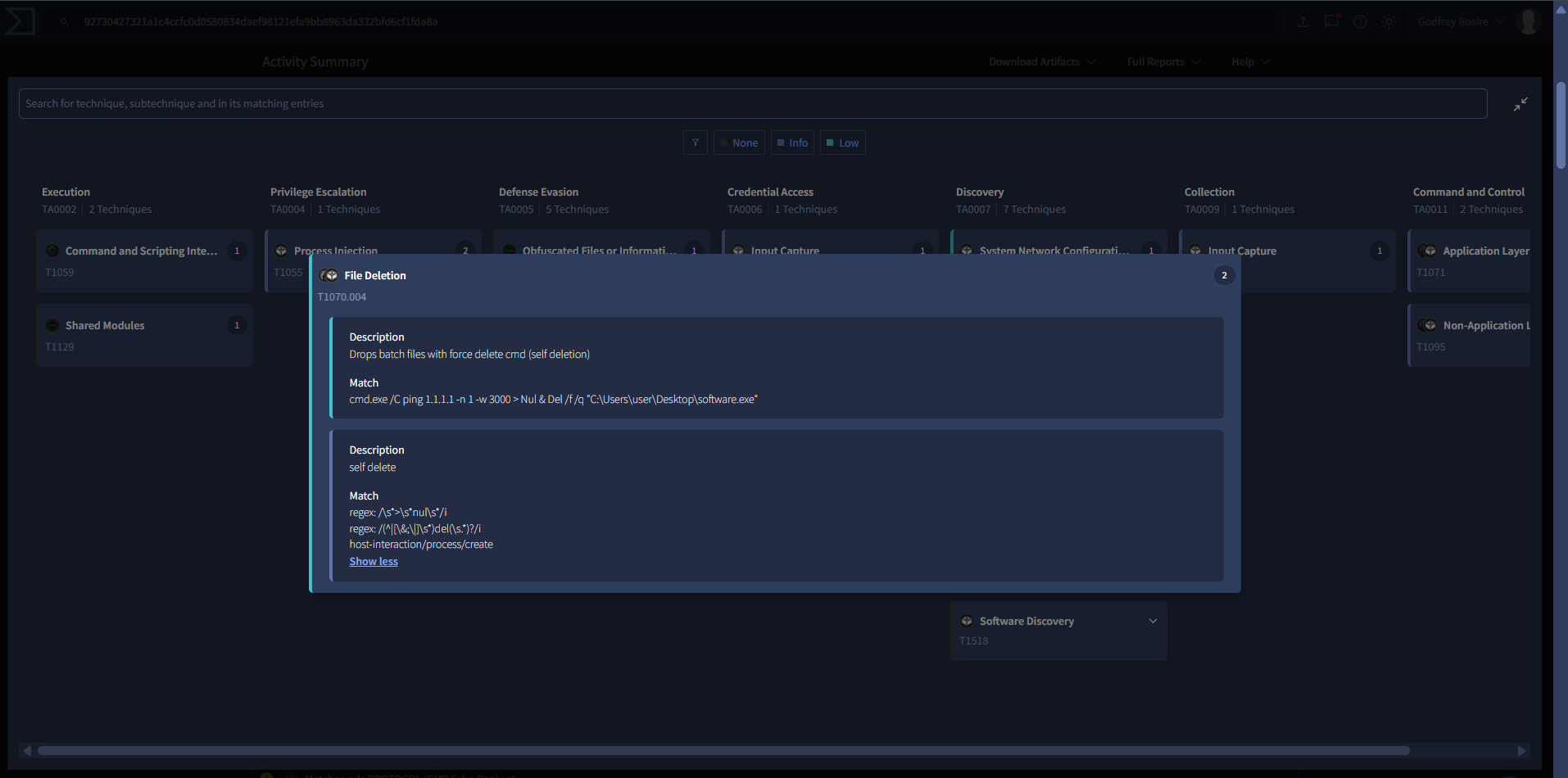
That is an early clue that the malware may try to remove traces of itself after execution.
Strings and FLOSS
What is a string?
A string is just a sequence of characters, like "hello world". In programming, strings usually end with a null byte. In malware analysis, strings are useful because they can reveal file paths, commands, DLLs, URLs, and other clues without having to execute the file.
Using FLOSS, I was able to extract readable strings from the binary. At this point, strings help build a first triage picture, but they do not prove everything the malware does. They simply point us in directions worth investigating further.
1
2
3
4
5
6
7
8
9
10
11
12
13
14
15
16
17
18
19
20
21
22
23
24
25
26
27
28
29
30
31
32
33
34
35
36
37
38
39
40
41
42
43
44
45
46
47
48
49
50
51
52
53
54
55
56
57
58
59
60
61
62
63
64
65
66
67
68
69
70
71
72
73
74
75
76
77
78
79
80
81
FLARE FLOSS RESULTS (version v3.1.1-0-g3cd3ee6)

+------------------------+-------------------------------------------------------------------------------+
| file path              | Malware.Unknown.exe.malz                                                      |
| identified language    | unknown                                                                       |
| extracted strings      |                                                                               |
|  static strings        | 177 (2521 characters)                                                         |
|   language strings     |   0 (   0 characters)                                                         |
|  stack strings         | 1                                                                             |
|  tight strings         | 0                                                                             |
|  decoded strings       | 0                                                                             |
+------------------------+-------------------------------------------------------------------------------+

 ────────────────────────────
  FLOSS STATIC STRINGS (177)
 ────────────────────────────

+-----------------------------------+
| FLOSS STATIC STRINGS: ASCII (169) |
+-----------------------------------+

!This program cannot be run in DOS mode.

C:\Users\Matt\source\repos\HuskyHacks\PMAT-maldev\src\DownloadFromURL\Release\DownloadFromURL.pdb

.rsrc$01
.rsrc$02
GetModuleFileNameW
CloseHandle
CreateProcessW
KERNEL32.dll
ShellExecuteW
SHELL32.dll
MSVCP140.dll
URLDownloadToFileW
urlmon.dll
InternetOpenUrlW
InternetOpenW
WININET.dll
.......

SetUnhandledExceptionFilter
GetCurrentProcess
TerminateProcess
IsProcessorFeaturePresent
QueryPerformanceCounter
GetCurrentProcessId
GetCurrentThreadId
GetSystemTimeAsFileTime
InitializeSListHead
IsDebuggerPresent
GetModuleHandleW
.......

<?xml version='1.0' encoding='UTF-8' standalone='yes'?>
<assembly xmlns='urn:schemas-microsoft-com:asm.v1' manifestVersion='1.0'>
  <trustInfo xmlns="urn:schemas-microsoft-com:asm.v3">
    <security>
      <requestedPrivileges>
        <requestedExecutionLevel level='asInvoker' uiAccess='false' />
      </requestedPrivileges>
    </security>
  </trustInfo>
</assembly>

.........

+------------------------------------+
| FLOSS STATIC STRINGS: UTF-16LE (8) |
+------------------------------------+

jjjj
cmd.exe /C ping 1.1.1.1 -n 1 -w 3000 > Nul & Del /f /q "%s"
http://ssl-6582datamanager.helpdeskbros.local/favicon.ico
C:\Users\Public\Documents\CR433101.dat.exe
Mozilla/5.0
http://huskyhacks.dev
ping 1.1.1.1 -n 1 -w 3000 > Nul & C:\Users\Public\Documents\CR433101.dat.exe
open

........
A few strings stand out immediately:
URLDownloadToFileWInternetOpenUrlWInternetOpenWCreateProcessWShellExecuteWcmd.exe /C ping 1.1.1.1 -n 1 -w 3000 > Nul & Del /f /q "%s"http://huskyhacks.devMozilla/5.0C:\Users\Public\Documents\CR433101.dat.exe
From these strings, the sample appears to be capable of:
- connecting to a URL
- downloading a file
- using HTTP-related functions
- creating or launching another process
- deleting itself or another file through the command line
- writing an executable into a public documents path
That already gives a strong first impression of downloader-like behavior.
Analyzing the Import Address Table
Using PEview, I inspected the executable more closely. On the left side, PEview shows structures such as the Import Address Table, while the middle section shows the raw executable bytes in hexadecimal form. The first column contains the offset, which tells us where the bytes are located relative to the beginning of the file.
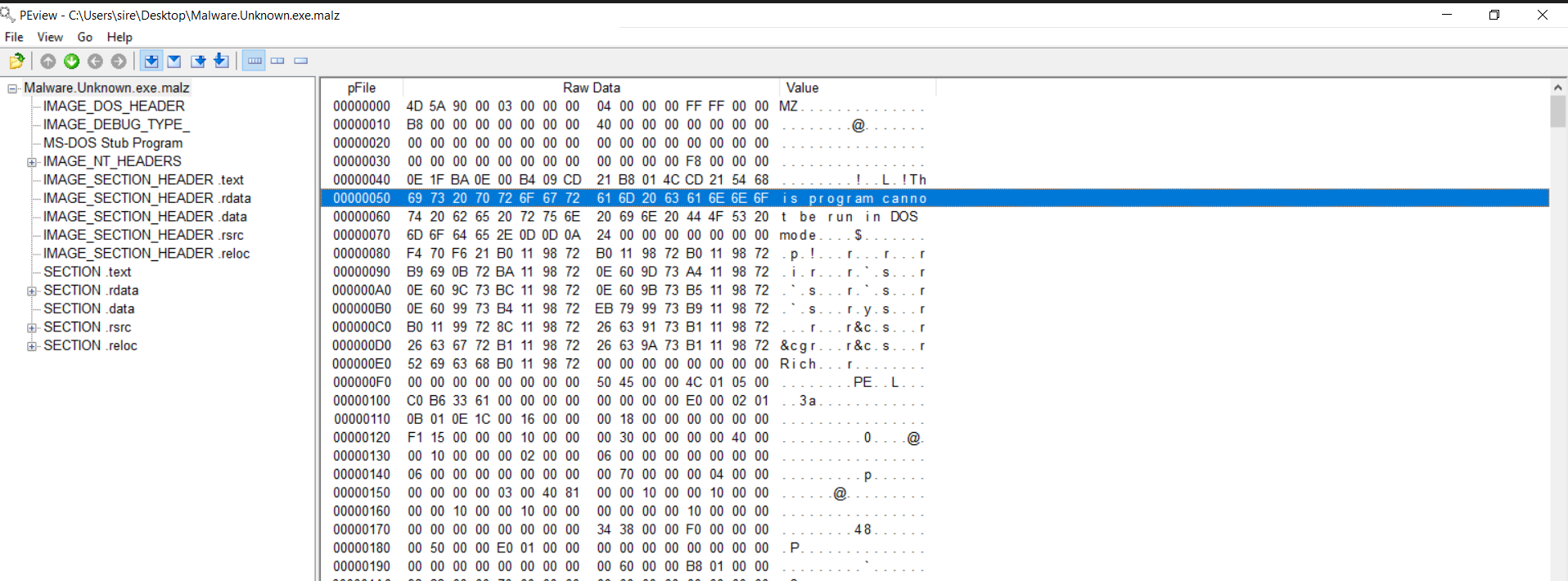
A Portable Executable usually follows a standard structure. One of the first things to notice is the MZ signature, which tells us this is a Windows PE file.
In the IMAGE_NT_HEADERS and IMAGE_FILE_HEADER, we can also see the timestamp that appears to show when the malware was compiled or built.
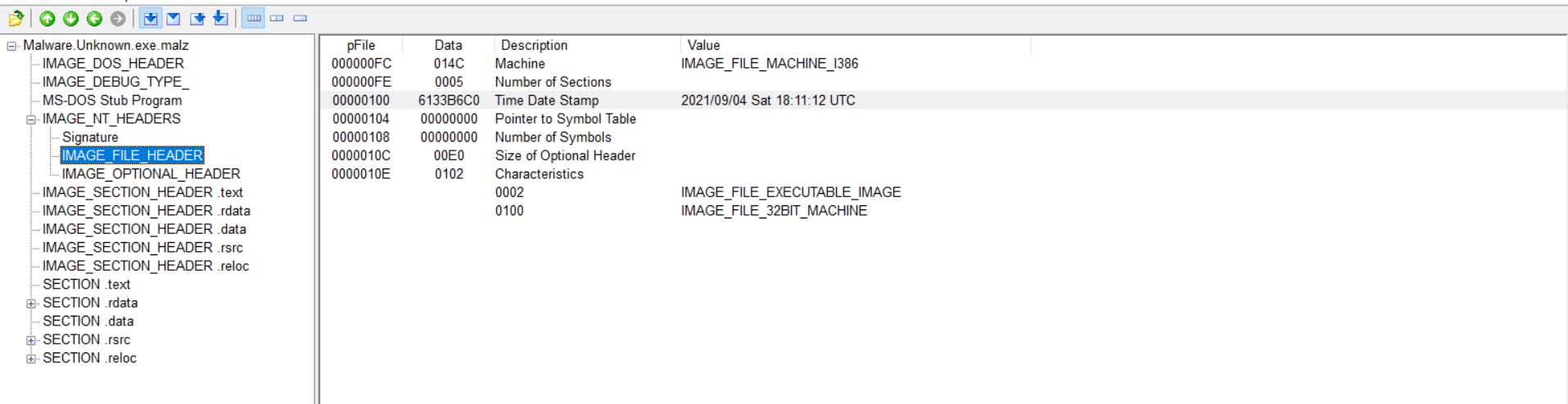
That said, timestamps should be treated carefully. A timestamp does not always prove the real compile date. Some compilers are known to reuse old values, so this field can be misleading.
IMAGE_SECTION_HEADER .text
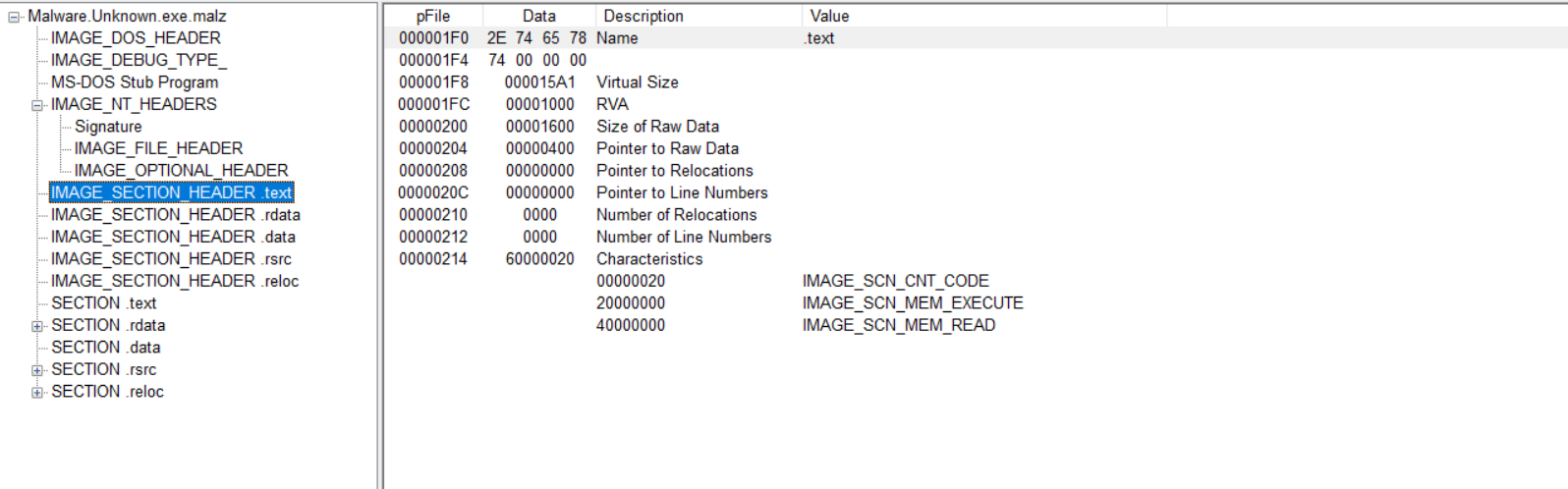
One important thing to compare here is the Virtual Size and the Size of Raw Data.
- Virtual Size =
15A1=5537in decimal - Size of Raw Data =
1600=5632in decimal
These values are close to each other, which suggests that the size of the section on disk is roughly the same as the size of the section when loaded into memory.
If the raw size is much smaller than the virtual size, that can suggest there is more inside the binary than what we first see on disk, which is often a sign of packing.
For this particular section, the numbers are close enough that it does not immediately suggest packing based on this part alone.
Section .rdata / Import Address Table
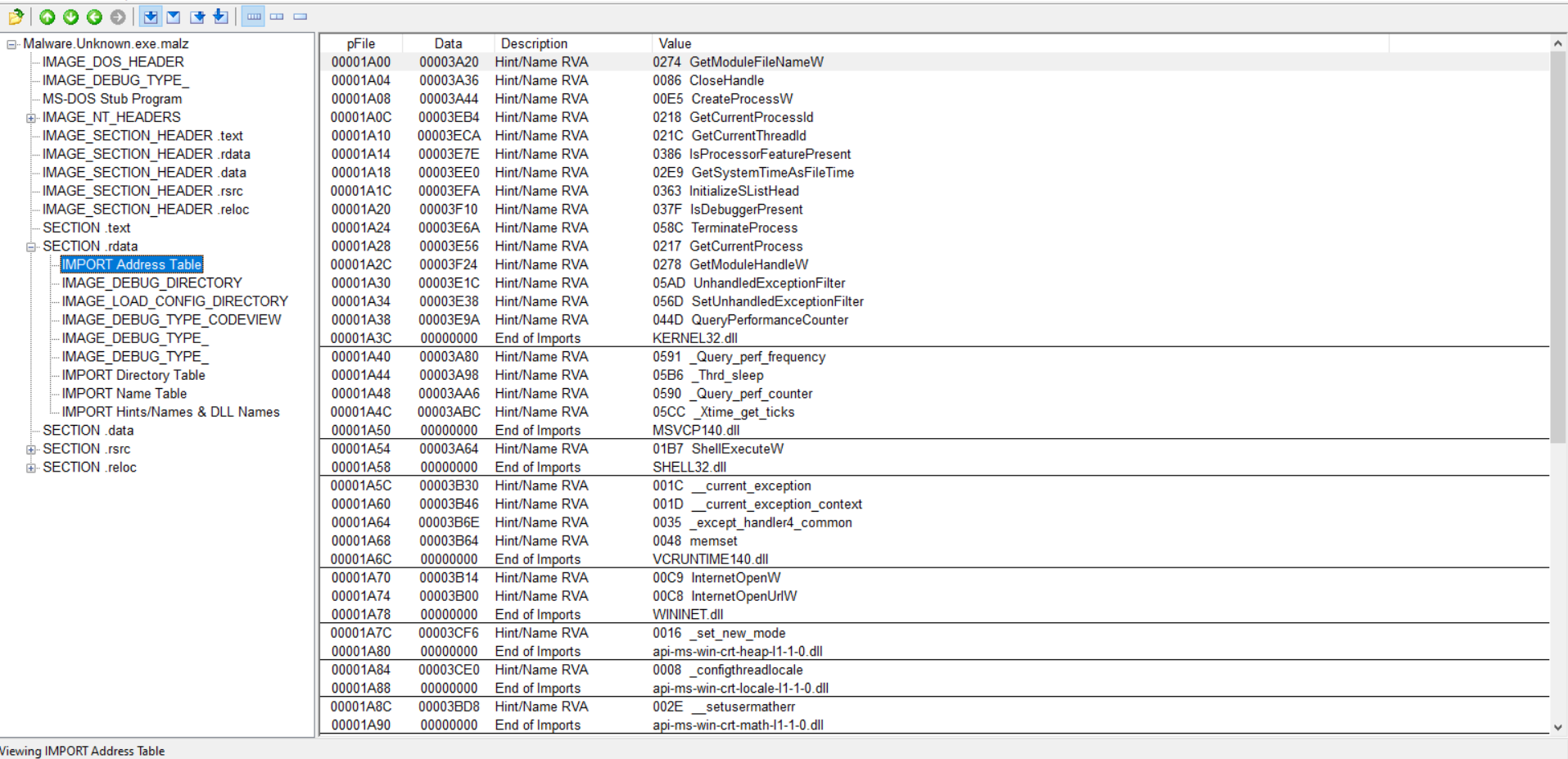
The Import Address Table helps show what Windows API functions the malware depends on. Looking at those imports gives a better idea of what the executable was designed to do.
Introduction to the Windows API
API stands for Application Programming Interface.
In malware analysis, Windows APIs matter because malware uses them to interact with the operating system. That can include creating files, opening network connections, downloading content, launching processes, or deleting files.
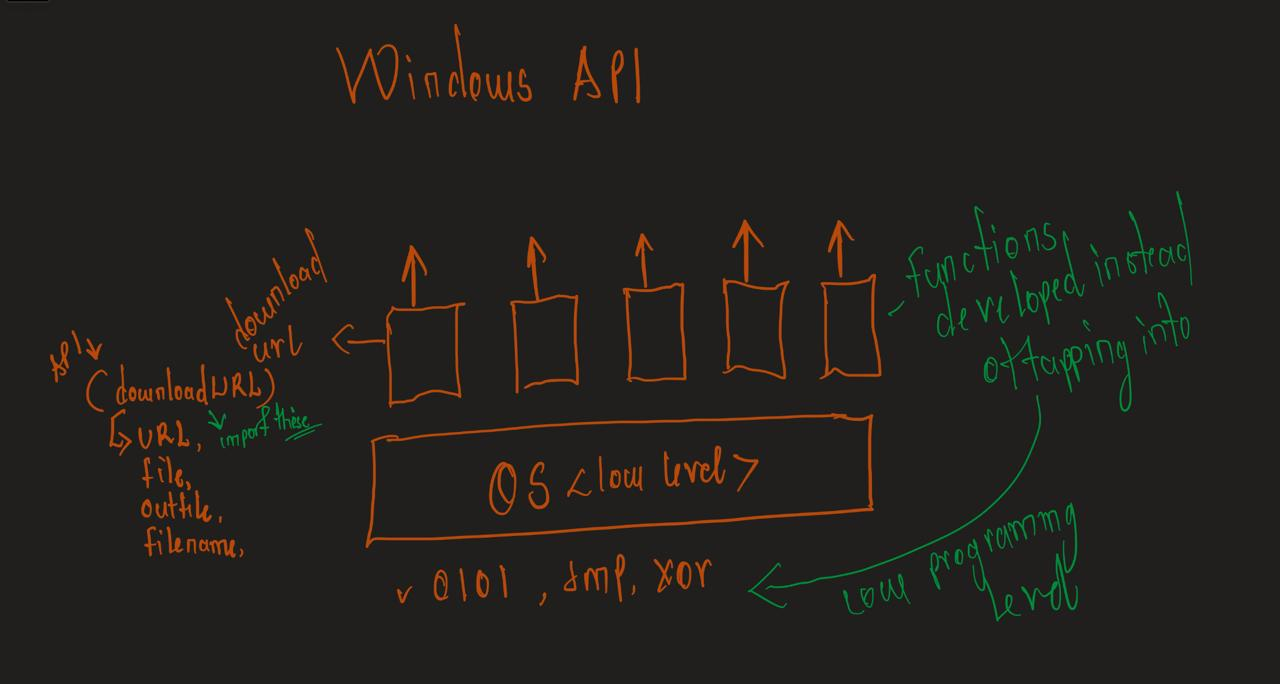
How the Windows API works

Checking the URLDownloadToFile API
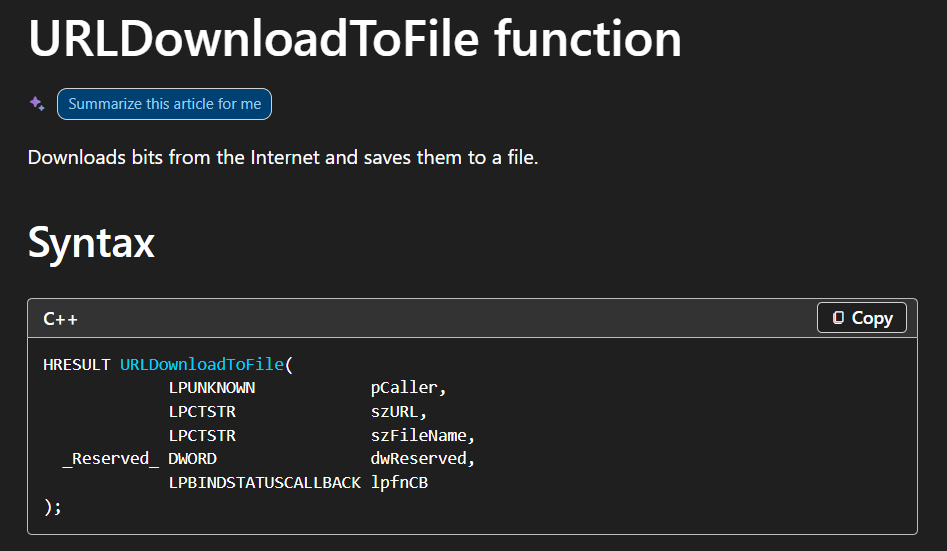
The presence of URLDownloadToFile is important because it strongly suggests that this sample can download a file from the internet onto the system. That may point to a second-stage payload being dropped or retrieved later.
This supports what was already seen in FLOSS and strengthens the idea that the malware may not be acting alone.
MalAPI.io
MalAPI is a useful reference for Windows APIs that are commonly associated with malicious behavior. It brings together malware analysis context and Windows API information in one place.
A helpful part of the site is that it explains why an API may matter during malware analysis, and in some cases it also gives examples of malware families that use that API.
That makes it useful when trying to understand why APIs like URLDownloadToFile, CreateProcess, or ShellExecute stand out during triage.
To Pack or Not to Pack: Packed Malware Analysis
Packing is a compression or obfuscation method used to make malware look different from its original form. In simple terms, a packed malware sample hides or compresses its real content so that analysis becomes harder.
A common clue is seeing UPX, which is a well-known packer.
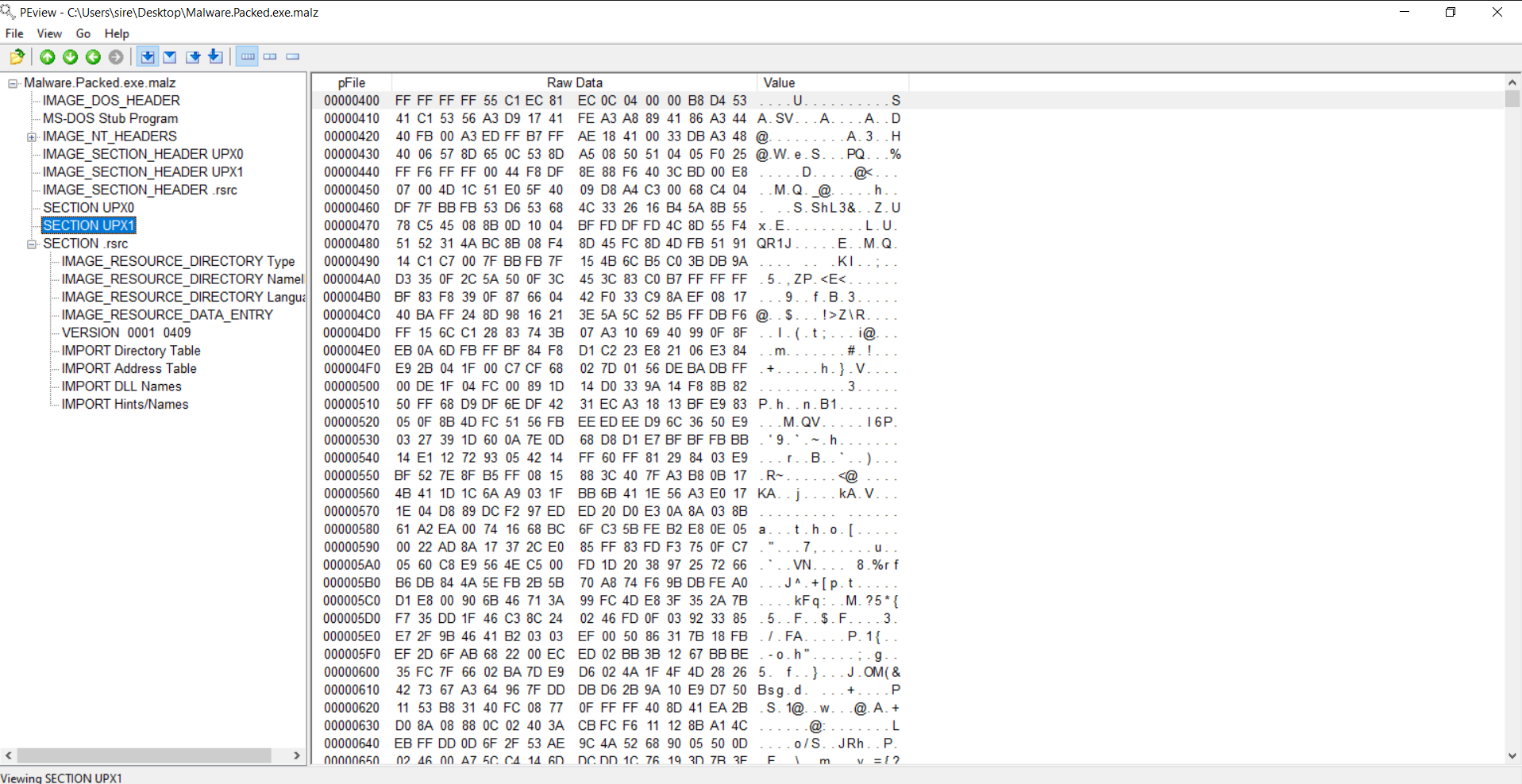
Packed malware often has a much smaller Import Address Table compared to an unpacked sample, because many APIs are resolved later after the malware unpacks itself in memory.
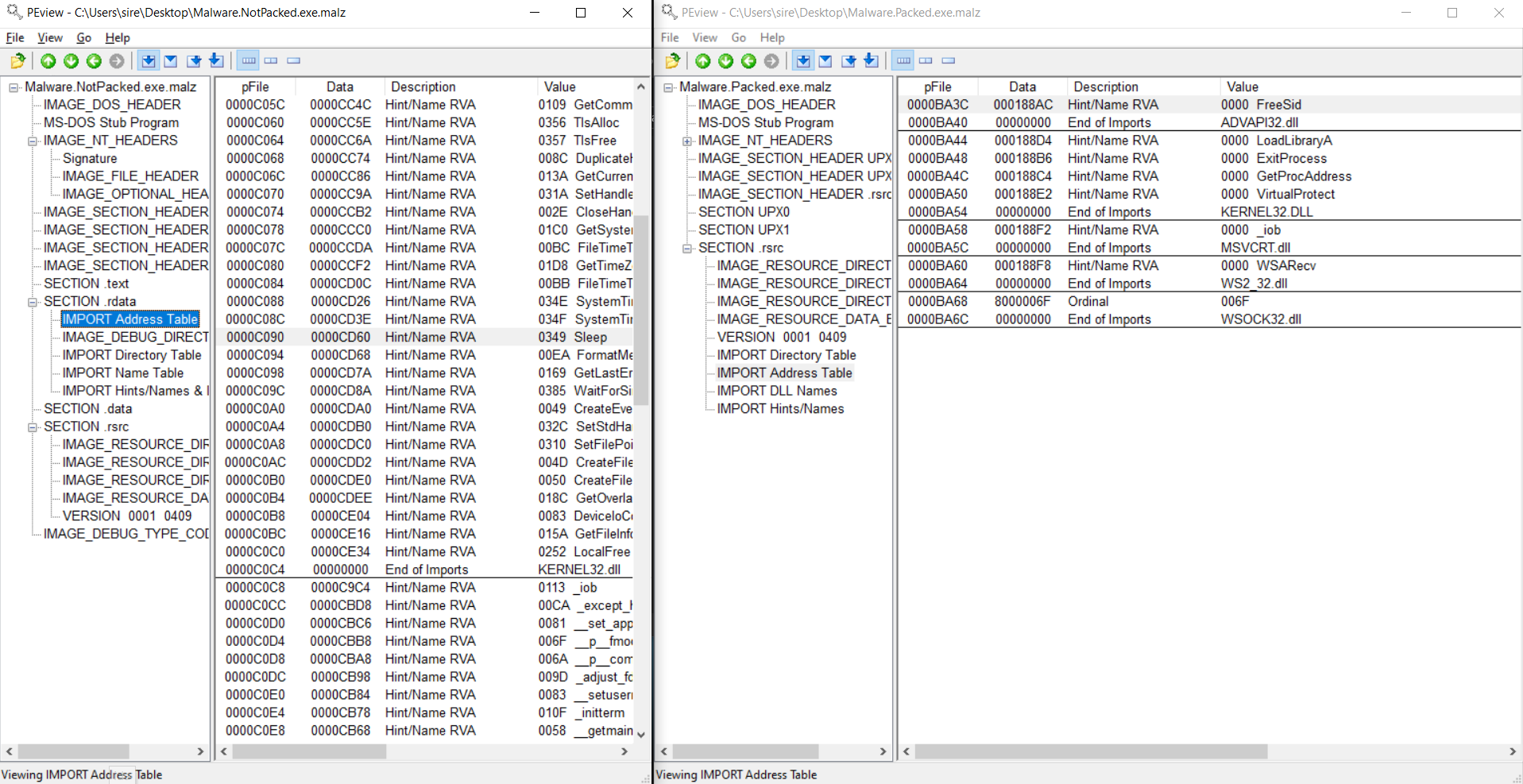
That is why APIs such as GetProcAddress and LoadLibraryA become important in packed malware. They help the program locate and load other APIs dynamically.
Another clue comes from comparing Size of Raw Data with Virtual Size.
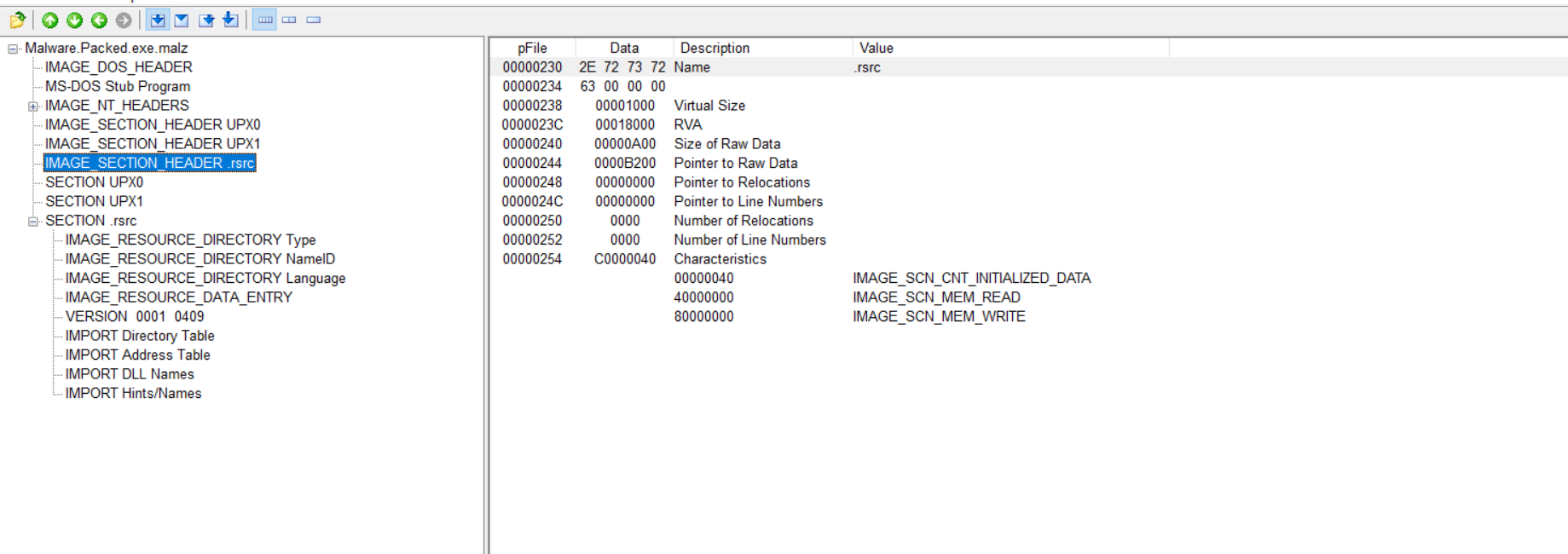
If the raw size is extremely small compared to the virtual size, or even zero in a suspicious way, that can be a strong sign that the file is packed.
So with packed malware, the file you first inspect may not reveal the full program immediately. You may need unpacking or dynamic analysis to expose the real behavior.
Combining Analysis Methods: PEStudio
PEStudio is useful because it combines several analysis methods into one place. It quickly shows hashes, PE structure, libraries, suspicious strings, and indicators without executing the malware.
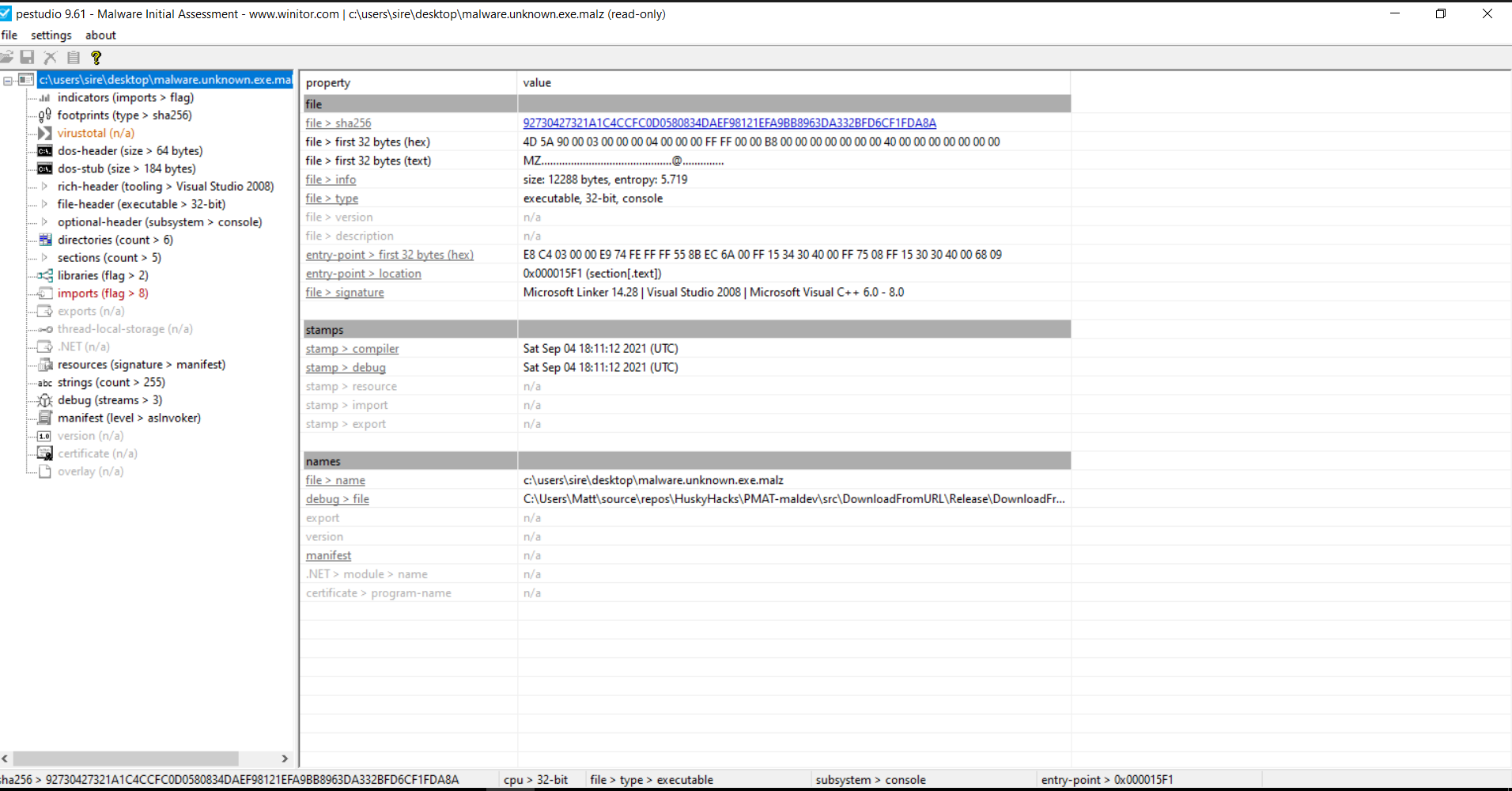
When I loaded the sample into PEStudio, I could again see the file hashes, the MZ header, and the CPU architecture, which in this case is 32-bit.
Suspicious libraries and DLLs
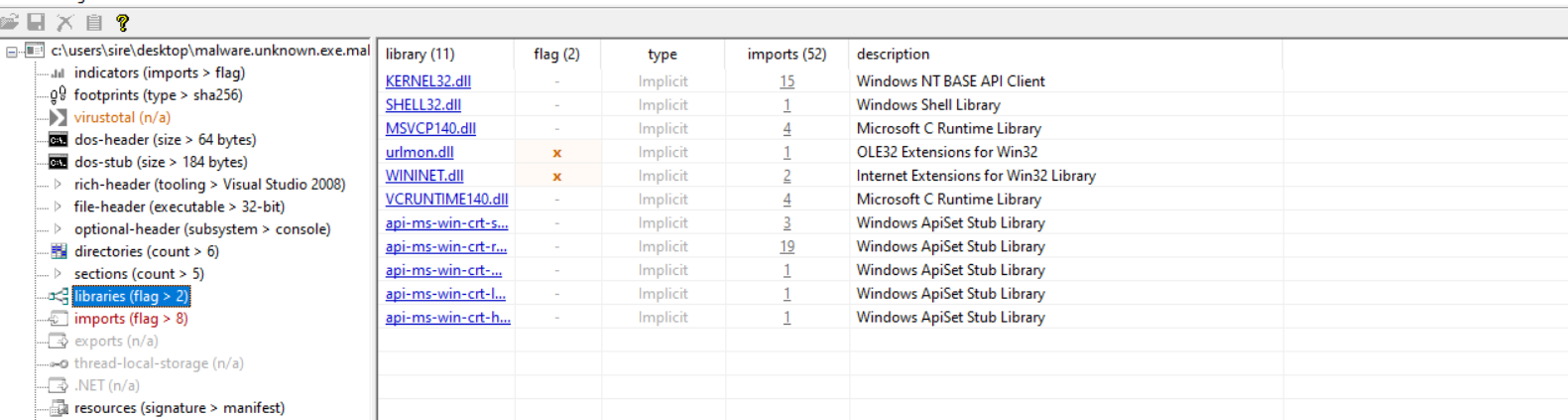
PEStudio also highlights suspicious libraries and APIs. That helps draw attention to functions that are often abused by malware.
Strings and suspicious commands
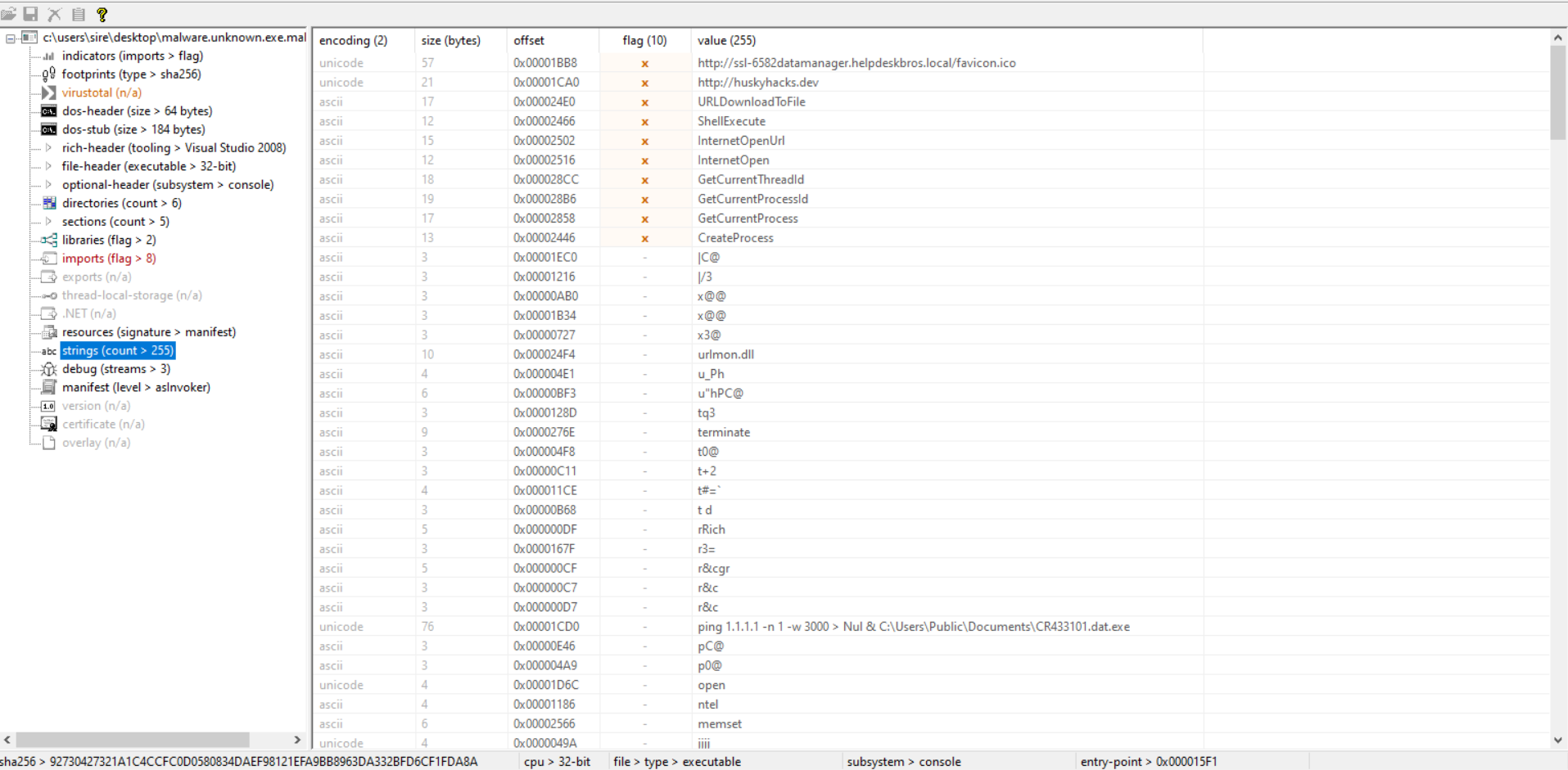
We can also see some of the same strings already found in FLOSS, including suspicious command-line patterns and API-related clues.
At this point, several tools are telling the same story:
- the file uses HTTP-related APIs
- it can download content from a URL
- it can create processes
- it includes commands related to deletion behavior
That consistency makes the early triage stronger.
CAPA
CAPA is a tool that detects malicious capabilities in suspicious programs by using a set of rules. Instead of only showing low-level technical details, CAPA tries to translate what it sees into more human-readable capabilities.
For example, CAPA can inspect a binary, identify an API call or string of interest, and match it to a rule such as receive data or connect to a URL.
Running CAPA
1
2
3
4
5
6
7
8
9
10
11
12
13
14
15
16
17
18
19
20
21
22
23
24
25
26
27
28
29
30
31
32
33
34
35
36
37
38
39
40
41
λ capa Malware.Unknown.exe.malz
┌─────────────┬────────────────────────────────────────────────────────────────────────────────────┐
│ md5         │ 1d8562c0adcaee734d63f7baaca02f7c                                                   │
│ sha1        │ be138820e72435043b065fbf3a786be274b147ab                                           │
│ sha256      │ 92730427321a1c4ccfc0d0580834daef98121efa9bb8963da332bfd6cf1fda8a                   │
│ analysis    │ static                                                                             │
│ os          │ windows                                                                            │
│ format      │ pe                                                                                 │
│ arch        │ i386                                                                               │
│ path        │ C:/Users/sire/Desktop/Malware.Unknown.exe.malz                                     │
└─────────────┴────────────────────────────────────────────────────────────────────────────────────┘
┌────────────────────────────────┬─────────────────────────────────────────────────────────────────┐
│ ATT&CK Tactic                  │ ATT&CK Technique                                                │
├────────────────────────────────┼─────────────────────────────────────────────────────────────────┤
│ DEFENSE EVASION                │ Indicator Removal::File Deletion [T1070.004]                    │
└────────────────────────────────┴─────────────────────────────────────────────────────────────────┘
┌────────────────────────────┬─────────────────────────────────────────────────────────────────────┐
│ MBC Objective              │ MBC Behavior                                                        │
├────────────────────────────┼─────────────────────────────────────────────────────────────────────┤
│ COMMAND AND CONTROL        │ C2 Communication::Receive Data [B0030.002]                          │
│ COMMUNICATION              │ HTTP Communication [C0002]                                          │
│                            │ HTTP Communication::Create Request [C0002.012]                      │
│                            │ HTTP Communication::Download URL [C0002.006]                        │
│                            │ HTTP Communication::Open URL [C0002.004]                            │
│ DEFENSE EVASION            │ Self Deletion::COMSPEC Environment Variable [F0007.001]             │
│ PROCESS                    │ Create Process [C0017]                                              │
└────────────────────────────┴─────────────────────────────────────────────────────────────────────┘
┌───────────────────────────────────────────────┬──────────────────────────────────────────────────┐
│ Capability                                    │ Namespace                                        │
├───────────────────────────────────────────────┼──────────────────────────────────────────────────┤
│ self delete                                   │ anti-analysis/anti-forensic/self-deletion        │
│ receive data                                  │ communication                                    │
│ reference HTTP User-Agent string              │ communication/http                               │
│ connect to URL                                │ communication/http/client                        │
│ create HTTP request                           │ communication/http/client                        │
│ contains PDB path                             │ executable/pe/pdb                                │
│ create process on Windows (2 matches)         │ host-interaction/process/create                  │
└───────────────────────────────────────────────┴──────────────────────────────────────────────────┘

C:\Users\sire\Desktop
λ
Right away, CAPA gives useful high-level findings. Besides the file hashes and architecture, it highlights behaviors that matter most during triage.
One important section is the ATT&CK mapping:
1
2
3
4
5
┌────────────────────────────────┬─────────────────────────────────────────────────────────────────┐
│ ATT&CK Tactic                  │ ATT&CK Technique                                                │
├────────────────────────────────┼─────────────────────────────────────────────────────────────────┤
│ DEFENSE EVASION                │ Indicator Removal::File Deletion [T1070.004]                    │
└────────────────────────────────┴─────────────────────────────────────────────────────────────────┘
This tells us CAPA identified behavior linked to file deletion, which matches the command strings already seen earlier.
Malware Behavioral Catalog (MBC)
The next output is the Malware Behavioral Catalog (MBC). MBC is similar to MITRE ATT&CK, but it is more focused on malware-specific behavior.
The output here is very useful:
1
2
3
4
5
6
7
8
9
10
11
┌────────────────────────────┬─────────────────────────────────────────────────────────────────────┐
│ MBC Objective              │ MBC Behavior                                                        │
├────────────────────────────┼─────────────────────────────────────────────────────────────────────┤
│ COMMAND AND CONTROL        │ C2 Communication::Receive Data [B0030.002]                          │
│ COMMUNICATION              │ HTTP Communication [C0002]                                          │
│                            │ HTTP Communication::Create Request [C0002.012]                      │
│                            │ HTTP Communication::Download URL [C0002.006]                        │
│                            │ HTTP Communication::Open URL [C0002.004]                            │
│ DEFENSE EVASION            │ Self Deletion::COMSPEC Environment Variable [F0007.001]             │
│ PROCESS                    │ Create Process [C0017]                                              │
└────────────────────────────┴─────────────────────────────────────────────────────────────────────┘
From this, CAPA suggests that the sample can:
- send and receive data
- communicate over HTTP
- open a URL
- download content from a URL
- create processes
- perform self-deletion behavior
This lines up well with what was already seen in FLOSS, PEview, PEStudio, and VirusTotal.
Running CAPA with Verbose Output
capa -v
1
2
3
4
5
6
7
8
9
10
11
12
13
14
15
16
17
18
19
20
21
22
23
24
25
26
27
28
29
30
31
32
33
34
35
36
37
38
39
40
41
42
43
44
45
46
47
48
49
50
51
52
53
54
55
56
57
58
59
C:\Users\sire\Desktop
λ capa Malware.Unknown.exe.malz -v
md5                     1d8562c0adcaee734d63f7baaca02f7c
sha1                    be138820e72435043b065fbf3a786be274b147ab
sha256                  92730427321a1c4ccfc0d0580834daef98121efa9bb8963da332bfd6cf1fda8a
path                    C:/Users/sire/Desktop/Malware.Unknown.exe.malz
timestamp               2026-03-23 12:37:08.872591
capa version            9.3.1
os                      windows
format                  pe
arch                    i386
analysis                static
extractor               VivisectFeatureExtractor
base address            0x400000
rules                   C:/Users/sire/AppData/Local/Temp/_MEI36682/rules
function count          43
library function count  26
total feature count     1087

self delete
namespace  anti-analysis/anti-forensic/self-deletion
scope      function
matches    0x401080

receive data
namespace    communication
description  all known techniques for receiving data from a potential C2 server
scope        function
matches      0x401080

reference HTTP User-Agent string
namespace  communication/http
scope      function
matches    0x401080

connect to URL
namespace  communication/http/client
scope      instruction
matches    0x4010F6

create HTTP request
namespace  communication/http/client
scope      function
matches    0x401080

download URL
namespace  communication/http/client
scope      function
matches    0x401080

contains PDB path
namespace  executable/pe/pdb
scope      file

create process on Windows (2 matches)
namespace  host-interaction/process/create
scope      basic block
matches    0x4010E3
           0x401142
This output gives more detail. CAPA not only shows the capability, but also the type of rule and the location in the binary where that rule matched.
That helps connect the high-level finding to the lower-level structure of the executable.
Running CAPA with Double Verbose Output
capa -vv
1
2
3
4
5
6
7
8
9
10
11
12
13
14
15
16
17
18
19
20
21
22
23
24
25
26
27
28
29
30
31
32
33
34
35
36
37
38
39
40
41
42
43
44
45
46
47
48
49
50
51
52
53
54
55
56
57
58
59
60
61
62
63
64
65
66
67
68
69
70
71
72
73
74
75
76
77
78
79
80
81
82
83
84
85
86
87
88
89
90
91
92
93
94
95
96
97
98
99
100
101
102
103
104
105
106
107
108
109
110
111
112
113
114
115
116
117
C:\Users\sire\Desktop
λ capa Malware.Unknown.exe.malz -vv
md5                     1d8562c0adcaee734d63f7baaca02f7c
sha1                    be138820e72435043b065fbf3a786be274b147ab
sha256                  92730427321a1c4ccfc0d0580834daef98121efa9bb8963da332bfd6cf1fda8a
path                    C:/Users/sire/Desktop/Malware.Unknown.exe.malz
timestamp               2026-03-23 12:37:34.543600
capa version            9.3.1
os                      windows
format                  pe
arch                    i386
analysis                static
extractor               VivisectFeatureExtractor
base address            0x400000
rules                   C:/Users/sire/AppData/Local/Temp/_MEI16002/rules
function count          43
library function count  26
total feature count     1087

contain loop (2 matches, only showing first match of library rule)
author  moritz.raabe@mandiant.com
scope   function
function @ 0x4011E0
  or:
    characteristic: loop @ 0x4011E0

self delete
namespace  anti-analysis/anti-forensic/self-deletion
author     michael.hunhoff@mandiant.com, @mr-tz
scope      function
att&ck     Defense Evasion::Indicator Removal::File Deletion [T1070.004]
mbc        Defense Evasion::Self Deletion::COMSPEC Environment Variable [F0007.001]
function @ 0x401080
  and:
    optional:
      regex: /\s*>\s*nul\s*/i
        - "cmd.exe /C ping 1.1.1.1 -n 1 -w 3000 > Nul & Del /f /q \"%s\"" @ 0x401171
        - "ping 1.1.1.1 -n 1 -w 3000 > Nul & C:\\Users\\Public\\Documents\\CR433101.dat.exe" @ 0x40111C
    or:
      match: host-interaction/process/create @ 0x4010E3, 0x401142
        or:
          api: CreateProcess @ 0x4011AD
        or:
          api: ShellExecute @ 0x401128
    or:
      regex: /(^|[\&;\|]\s*)del(\s.*)?/i
        - "cmd.exe /C ping 1.1.1.1 -n 1 -w 3000 > Nul & Del /f /q \"%s\"" @ 0x401171

receive data
namespace    communication
author       william.ballenthin@mandiant.com
scope        function
mbc          Command and Control::C2 Communication::Receive Data [B0030.002]
description  all known techniques for receiving data from a potential C2 server
function @ 0x401080
  or:
    match: download URL @ 0x401080
      or:
        api: URLDownloadToFile @ 0x4010D9

reference HTTP User-Agent string
namespace   communication/http
author      @mr-tz, mehunhoff@google.com
scope       function
mbc         Communication::HTTP Communication [C0002]
references  https://www.useragents.me/, https://www.whatismybrowser.com/guides/the-latest-user-agent/
function @ 0x401080
  or:
    substring: Mozilla/5.0
      - "Mozilla/5.0" @ 0x4010A2

connect to URL
namespace  communication/http/client
author     michael.hunhoff@mandiant.com
scope      instruction
mbc        Communication::HTTP Communication::Open URL [C0002.004]
instruction @ 0x4010F6
  and:
    api: InternetOpenUrl @ 0x4010F6

create HTTP request
namespace  communication/http/client
author     michael.hunhoff@mandiant.com, anushka.virgaonkar@mandiant.com
scope      function
mbc        Communication::HTTP Communication::Create Request [C0002.012]
function @ 0x401080
  and:
    or:
      api: InternetOpen @ 0x4010A7

download URL
namespace  communication/http/client
author     matthew.williams@mandiant.com, michael.hunhoff@mandiant.com, anushka.virgaonkar@mandiant.com
scope      function
mbc        Communication::HTTP Communication::Download URL [C0002.006]
function @ 0x401080
  or:
    api: URLDownloadToFile @ 0x4010D9

contains PDB path
namespace  executable/pe/pdb
author     moritz.raabe@mandiant.com
scope      file
regex: /:\\.*\.pdb/
  - "C:\\Users\\Matt\\source\\repos\\HuskyHacks\\PMAT-maldev\\src\\DownloadFromURL\\Release\\DownloadFromURL.pdb" @ file+0x1F1C

create process on Windows (2 matches)
namespace  host-interaction/process/create
author     moritz.raabe@mandiant.com
scope      basic block
mbc        Process::Create Process [C0017]
basic block @ 0x4010E3 in function 0x401080
  or:
    api: ShellExecute @ 0x401128
basic block @ 0x401142 in function 0x401080
  or:
    api: CreateProcess @ 0x4011AD
This output makes CAPA much easier to understand because it shows why the rules triggered.
For example, the download URL capability is tied directly to the URLDownloadToFile API:
1
2
3
4
5
6
7
8
download URL
namespace  communication/http/client
author     matthew.williams@mandiant.com, michael.hunhoff@mandiant.com, anushka.virgaonkar@mandiant.com
scope      function
mbc        Communication::HTTP Communication::Download URL [C0002.006]
function @ 0x401080
  or:
    api: URLDownloadToFile @ 0x4010D9
That means CAPA did not guess. It found the exact API call in the binary and matched it to a known behavioral rule.
The same happens with process creation:
1
2
3
4
5
6
7
8
9
10
11
create process on Windows (2 matches)
namespace  host-interaction/process/create
author     moritz.raabe@mandiant.com
scope      basic block
mbc        Process::Create Process [C0017]
basic block @ 0x4010E3 in function 0x401080
  or:
    api: ShellExecute @ 0x401128
basic block @ 0x401142 in function 0x401080
  or:
    api: CreateProcess @ 0x4011AD
This shows the malware has at least two possible ways to create processes:
ShellExecuteCreateProcess
CAPA also explains the self-delete behavior by tying it to the deletion command string and the process creation APIs used to launch that command.
That is one of the strongest parts of the analysis because several clues all support each other:
- the command string from FLOSS
- the ATT&CK result in CAPA
- the process creation APIs
- the deletion syntax in the command itself
Main Findings
From this static analysis, the main findings are:
- The sample is widely detected as malicious in VirusTotal.
- It is a valid 32-bit Windows PE executable.
- It contains strings that suggest HTTP communication.
- It can likely download a file from a URL.
- It shows signs of process creation using Windows APIs.
- It contains commands related to self-deletion.
- It includes a PDB path, which may give hints about the original development environment.
- The findings from FLOSS, PEview, PEStudio, and CAPA all support each other.
Conclusion
This lab was a good example of how much can be learned from a malware sample without running it.
By using hashing, VirusTotal, FLOSS, PEview, PEStudio, and CAPA, I was able to build an early picture of what the sample may do. The malware appears to use HTTP-related APIs, download content from a URL, create processes, and delete files as part of its behavior.
At this stage, I am still careful not to overclaim what the malware does in full, because static analysis only gives part of the story. But it does give a strong enough foundation to move into the next phase of analysis with better direction.
Based on these findings, this sample looks like a malware specimen with downloader behavior, process execution capability, and signs of defense evasion through file deletion. That makes it a strong candidate for deeper dynamic analysis in a controlled lab environment.